
KidsGuard App Samriya
Lifestyle
Keep kids safe online: app blocking, screen time limits, and web filtering
- Downloads
- 8+
- on Google Play
- Price
- Free
- No in-app purchases
- Updated
- Jul 24
- 2026 · v0.1.1
Screenshots
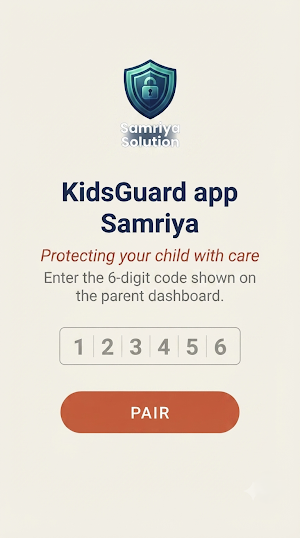
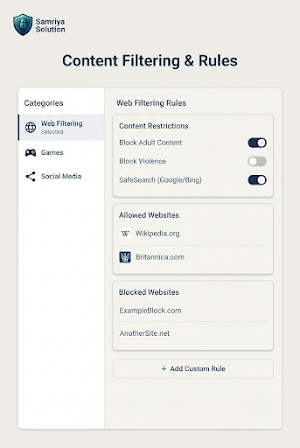
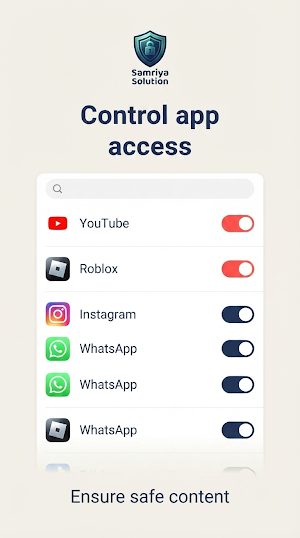
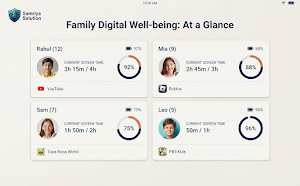
About KidsGuard App Samriya
KidsGuard App Samriya is a parental-control app that runs on your child's device and applies
the rules you set from the Kidscon dashboard or the Guardian Access App: app blocking, daily
screen-time limits, web filtering, and pausing internet access.
Proprietary app developed by Samaria Solutions.
WHAT THIS APP DOES
• App blocking & scheduling — block specific apps, or allow them only during hours you set.
• Screen-time limits — set a daily limit on total device usage.
• Web filtering — block categories like adult content or gambling sites, or add your own list.
• Pause internet — instantly cut off internet access from the dashboard or Guardian Access App.
• Uninstall protection — prevents the app from being removed without your authorization.
HOW THIS APP WORKS (Accessibility Service)
This app uses Android's AccessibilityService API to detect which app is currently open on the
device, in real time, so the app-blocking and scheduling rules you configure can be enforced
the moment a blocked app is opened. This is the only reliable, non-root way to do this on
Android, and is the same approach used by other parental-control apps such as Google Family Link and Qustodio.
Data accessed via the Accessibility Service, and why:
• Name — the child-profile name you (the parent) assigned to this device.
• Device or other identifiers — a pairing ID generated when you pair this device, used only to
sync your rules from your account. Not used for advertising.
• Page views and taps in this app — which app is in the foreground, checked on-device, so a
blocking overlay can be shown if that app is on your blocked list.
• Installed apps — the list of apps on the device, so you can choose which ones to block.
This app does NOT use the Accessibility Service to read message content, call logs, photos,
contacts, or browsing history, and does not change device settings on its own.
HOW THIS APP WORKS (VpnService)
This app uses Android's VpnService API to create a local, on-device VPN — no traffic is routed
through a remote server operated by us. This local VPN is used only to:
• filter web requests against the categories/domains you configured (web filtering), and
• pause internet access entirely when you enable "Pause Internet."
DNS lookups made through this local VPN are sent using encrypted DNS-over-HTTPS, not plaintext.
This app is a parental-control app, which is one of the categories Google Play's VpnService
policy explicitly permits for this kind of on-device use.
TRANSPARENCY
This app is always visible on the device — its icon, name, and any active-monitoring
notifications are never hidden or disguised. It is intended solely for use by a parent or
legal guardian on a device belonging to their own minor child, with the device user's family
aware of its presence. It is not designed for, and must not be used for, covert monitoring of
another adult without their knowledge and consent.
PRIVACY
Read our full Privacy Policy: https://kidscon.samriyasolution.com/privacy
Read our Terms & Conditions: https://kidscon.samriyasolution.com/terms
Developed by Samriya Solution Private Limited.
the rules you set from the Kidscon dashboard or the Guardian Access App: app blocking, daily
screen-time limits, web filtering, and pausing internet access.
Proprietary app developed by Samaria Solutions.
WHAT THIS APP DOES
• App blocking & scheduling — block specific apps, or allow them only during hours you set.
• Screen-time limits — set a daily limit on total device usage.
• Web filtering — block categories like adult content or gambling sites, or add your own list.
• Pause internet — instantly cut off internet access from the dashboard or Guardian Access App.
• Uninstall protection — prevents the app from being removed without your authorization.
HOW THIS APP WORKS (Accessibility Service)
This app uses Android's AccessibilityService API to detect which app is currently open on the
device, in real time, so the app-blocking and scheduling rules you configure can be enforced
the moment a blocked app is opened. This is the only reliable, non-root way to do this on
Android, and is the same approach used by other parental-control apps such as Google Family Link and Qustodio.
Data accessed via the Accessibility Service, and why:
• Name — the child-profile name you (the parent) assigned to this device.
• Device or other identifiers — a pairing ID generated when you pair this device, used only to
sync your rules from your account. Not used for advertising.
• Page views and taps in this app — which app is in the foreground, checked on-device, so a
blocking overlay can be shown if that app is on your blocked list.
• Installed apps — the list of apps on the device, so you can choose which ones to block.
This app does NOT use the Accessibility Service to read message content, call logs, photos,
contacts, or browsing history, and does not change device settings on its own.
HOW THIS APP WORKS (VpnService)
This app uses Android's VpnService API to create a local, on-device VPN — no traffic is routed
through a remote server operated by us. This local VPN is used only to:
• filter web requests against the categories/domains you configured (web filtering), and
• pause internet access entirely when you enable "Pause Internet."
DNS lookups made through this local VPN are sent using encrypted DNS-over-HTTPS, not plaintext.
This app is a parental-control app, which is one of the categories Google Play's VpnService
policy explicitly permits for this kind of on-device use.
TRANSPARENCY
This app is always visible on the device — its icon, name, and any active-monitoring
notifications are never hidden or disguised. It is intended solely for use by a parent or
legal guardian on a device belonging to their own minor child, with the device user's family
aware of its presence. It is not designed for, and must not be used for, covert monitoring of
another adult without their knowledge and consent.
PRIVACY
Read our full Privacy Policy: https://kidscon.samriyasolution.com/privacy
Read our Terms & Conditions: https://kidscon.samriyasolution.com/terms
Developed by Samriya Solution Private Limited.
What’s new
Version 0.1.1 · Updated July 24, 2026
Update policy requirements
Alternatives to KidsGuard App Samriya
Looking for apps like KidsGuard App Samriya? Here are 6 similar Android apps on Google Play. The highest rated is YourHour : Screen Time Control (4.2/5), and all 6 are free to download.
-
Mobile Hotel PMS by Hotel Sync
-
Webex Canary
-
Tawasal SuperApp 3.9
-
Workable 3.7
-
YourHour : Screen Time Control 4.2
-
Should I Answer? 4.0
| App | Rating | Price | Installs | Last updated | Compare |
|---|---|---|---|---|---|
| KidsGuard App Samriya | – | Free | 5+ | Jul 24, 2026 | |
| Mobile Hotel PMS by Hotel Sync | – | Free | 10,000+ | Oct 5, 2026 | Compare |
| Webex Canary | – | Free | 5,000+ | – | Compare |
| Tawasal SuperApp | 3.9 / 5 | Free | 1,000,000+ | Jun 25, 2026 | Compare |
| Workable | 3.7 / 5 | Free | 50,000+ | Oct 8, 2026 | Compare |
| YourHour : Screen Time Control | 4.2 / 5 | Free | 1,000,000+ | Oct 23, 2026 | Compare |
| Should I Answer? | 4.0 / 5 | Free | 1,000,000+ | Jul 30, 2026 | Compare |
Similar apps on Google Play
- Mobile Hotel PMS by Hotel Sync
- Webex Canary
- Tawasal SuperApp
- Workable
- YourHour : Screen Time Control
- Should I Answer?
- Private Screenshots
- Co-parenting: Shared Parenting
- Be Soul: Legacy Planner
- Be Closer: GPS Family Location
- ScreenStream
- Dzees Home
- Mutsapper - Chat App Transfer
- Zenze- Block Apps,Stay Focused
- Find my Phone - Family Locator
- TAP Kiln Control Mobile
- Parental Control - Kroha
- App Usage - Manage/Track Usage
- Balance: salud hormonal
- Groundwire: VoIP SIP Softphone
- Lookout - Assisted vision
- Baby Leap: Baby Tracker, Diary
- LockMyPix Safe Photo Vault
- HomeLight For Agents
- Family Nest: Private Locator
- TalkingParents: Co-Parent App
- IronVest - Security & Privacy
- AirDroid: File & Remote Access
- Parental Control - Kidslox
- OurFamilyWizard Co-Parent App
- Illumine - Childcare App
- GPS Tracker: Location Tracking
- Family Link parental controls
- Findmykids: Parental Control
- AppBlock - Block Apps & Sites
- CrookCatcher: Who Touched?
- Kids360: Parental Control App
- Microsoft Family Safety
- Alli360 by Kids360
- TeamViewer Remote Control
- Parental Control App- FamiSafe
- Google Family Link
- Crowdsource
- Parental Control App Blocker
- Smart Transfer: File Sharing
- Duo Mobile
- FlashGet Kids:parental control
- SPYPOINT
- AirDroid Parental Control
- Qustodio Parental Control App
- Home + Control
- Pushbullet: SMS on PC and more
- iSharing: GPS Location Tracker
- Home V
- RingCentral
- F-Secure Mobile Security
- Parent: Child Care App
- Glympse - Share GPS location
- Google Fi Wireless
- BabySparks - Development Activ
- FamilyWall: Family Organizer
- Blue Sky Vitamin
- Yubii Home
- Onoff Numbers
- Famly
- Sesame Search & Shortcuts