
WristBridge: Wear OS Data
Tools In-app purchases
Turn Tasker, JSON API and custom values into native Wear OS complications.
- Downloads
- 33+
- on Google Play
- Price
- Free
- In-app purchases
- Updated
- Oct 11
- 2026 · v0.1.16
Screenshots


About WristBridge: Wear OS Data
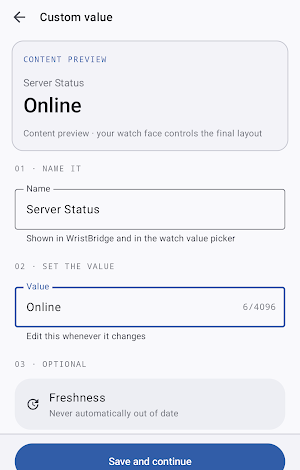
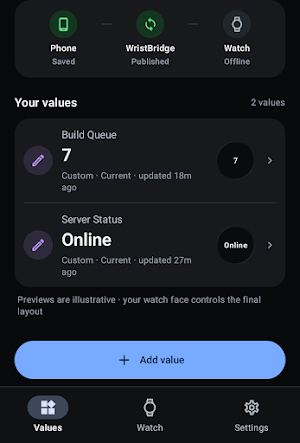
Create a source on your Android phone, sync it to your watch, and surface it through WristBridge without building a custom watch face or opening a dashboard just to check one value.
MAKE YOUR DATA GLANCEABLE
Use WristBridge for values such as:
* Custom text or numbers
* Values pushed from Tasker
* Phone battery percentage or charging state
* Scalar values from supported HTTPS REST/JSON endpoints
* Home Assistant entity state through a configured REST source
* Server, service, or homelab status
* GitHub Actions workflow status
* Uptime Kuma published status data
WristBridge focuses on showing state. It is not a watch-face editor, automation engine, or remote-control platform.
NATIVE WEAR OS COMPLICATIONS
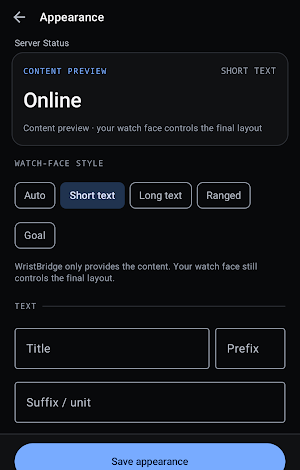
Bind WristBridge to supported complication slots on compatible Wear OS watch faces. Depending on the watch face and source, WristBridge can provide short text, long text, ranged values, and goal/progress presentations.
Customize supported values with titles, prefixes, suffixes, number formatting, labels, icons, conditional icon rules, and freshness behavior. Final appearance depends on the watch face and complication type.
WEAR OS TILE
Choose a WristBridge source for the Wear OS Tile to keep one important value a swipe away. The Tile uses synchronized watch-local data rather than making remote API requests from the watch.
TASKER TO YOUR WATCH
Create a Tasker-backed source and send supported values into WristBridge. This gives Tasker users a focused way to put a value on a Wear OS watch face without requiring a broader automation system.
REST AND JSON DATA
WristBridge Pro can read supported scalar values from HTTPS JSON endpoints. Configure an endpoint on your phone, select the value you want from the response, and let WristBridge format and sync it for Wear OS.
Starting templates cover generic JSON, Home Assistant entity state, GitHub Actions workflow status, Uptime Kuma published status pages, and server or service health. Templates create editable REST sources, so you control the endpoint and displayed value.
PHONE-FIRST SETUP, WATCH-LOCAL DISPLAY
Source setup and remote data acquisition happen on the Android phone. WristBridge synchronizes display data to the paired Wear OS app using the Wear Data Layer.
The watch keeps the last successfully synchronized value locally. If the phone or network is temporarily unavailable, WristBridge can continue showing that cached last-known value instead of replacing it with invented data. Freshness handling helps make older values clear.
NO WRISTBRIDGE ACCOUNT REQUIRED
Core use does not require a WristBridge account or WristBridge-operated cloud backend for your source values.
REST credentials stay on the phone, and REST requests go to endpoints you configure. Phone battery and charging values are stored locally and synchronized to the paired Wear OS app for display.
FREE AND PRO
The free experience supports the core phone-to-watch workflow with a limited number of sources.
WristBridge Pro is an optional one-time lifetime unlock for REST/JSON sources, unlimited sources, and advanced presentation features.
IMPORTANT
* Requires the Android companion app and a compatible Wear OS watch.
* WristBridge is not a standalone watch app.
* Complication availability and appearance depend on the watch face.
* Tasker is a separate app and is only required for Tasker-based sources.
* REST and synchronization timing are best-effort and depend on Android and Wear OS scheduling, connectivity, and the configured endpoint.
* WristBridge does not promise real-time or exact refresh intervals.
Your data. Your watch face.
What’s new
Version 0.1.16 · Updated October 11, 2026
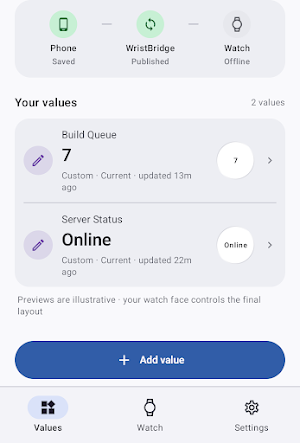
- Refreshed phone interface with clearer values, watch status, and settings. - Added source-type filters, improved sorting, and easier navigation. - Quickly update custom values without opening the full editor. - Create new custom values from existing saved readings. - Easier copying of values and source IDs. - Improved phone-to-watch synchronization safeguards and recovery handling. - Reduced unnecessary Wear OS Tile updates. - Accessibility, performance, and stability improvements.
Alternatives to WristBridge: Wear OS Data
Looking for apps like WristBridge: Wear OS Data? Here are 6 similar Android apps on Google Play. All of them are free to download.
-
PressDeck: Button Remapper
-
WristCapture: Phone Screenshot
-
SoundLatch: Keep Speaker Awake
-
SquadTap: Team Picker
-
MotionGuard: Motion Alarm
-
WristExposure
| App | Rating | Price | Installs | Last updated | Compare |
|---|---|---|---|---|---|
| WristBridge: Wear OS Data | – | Free | 10+ | Oct 11, 2026 | |
| PressDeck: Button Remapper | – | Free | 50+ | Oct 13, 2026 | Compare |
| WristCapture: Phone Screenshot | – | Free | 10+ | Oct 9, 2026 | Compare |
| SoundLatch: Keep Speaker Awake | – | Free | 100+ | Oct 21, 2026 | Compare |
| SquadTap: Team Picker | – | Free | 10+ | Oct 11, 2026 | Compare |
| MotionGuard: Motion Alarm | – | Free | 10+ | Sep 16, 2026 | Compare |
| WristExposure | – | Free | 1+ | Oct 12, 2026 | Compare |