
Q17 Private AI
Q17 Private AI Productivity In-app purchases
Offline AI chat, images, voice, and files on device.
- Downloads
- 1.5K+
- on Google Play
- Price
- Free
- In-app purchases
- Updated
- Aug 23
- 2026 · v1.0.20
Screenshots


About Q17 Private AI
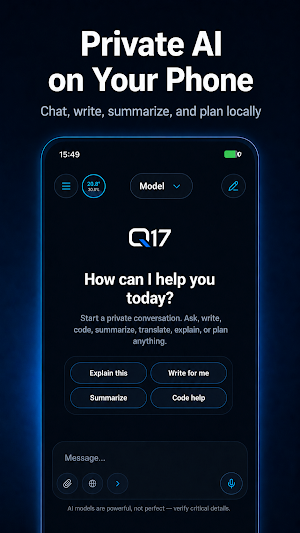
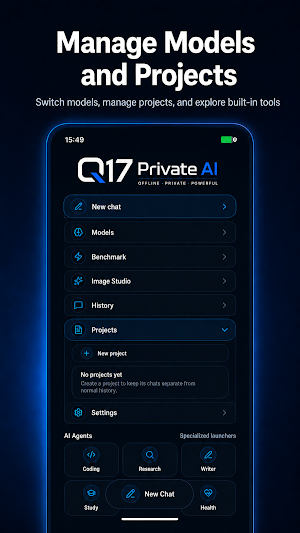
Supported models run locally after download. Choose models in the Model Manager, download the ones that fit your phone, and switch between chat, coding, reasoning, vision, and document-friendly options.
Private AI for Android
Q17 is built around local storage and on-device AI where supported. Chats, project conversations, selected files, generated image history, model choices, voice choices, and app history are stored on this device unless you choose an online feature or manually submit a report.
What you can do with Q17
• Private local AI chat with supported downloaded models
• Model Manager for downloading and managing local AI models
• Image Studio for on-device image generation with supported image packs
• Image understanding with supported vision models
• Voice input through Android speech recognition
• Offline text-to-speech with downloadable offline voices
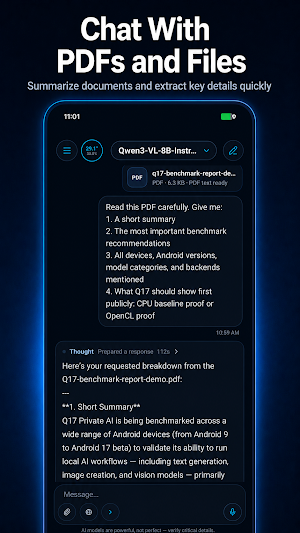
• Work with PDFs, documents, XML, CSV, JSON, YAML, TXT, Markdown, images, files, and attachments
• Organize work with projects and local conversation history
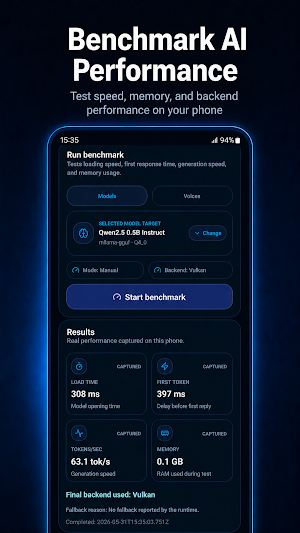
• Benchmark models and check device compatibility
• CPU Safe Mode for more stable local runtime behavior
• Localized interface in supported languages with a separate assistant reply language setting
• Optional privacy-safe diagnostics and reports
Image Studio
Create images directly on your Android device with installed image-generation packs. Choose faster modes for quick results or quality-focused CPU modes when you want more detail. Image generation speed depends on your device, RAM, selected image pack, and runtime mode.
Voice and offline speech
Use voice input for prompts and downloadable offline voices for spoken replies. Voice input may use Android speech recognition, while supported text-to-speech voices can run offline after download.
Documents and files
Use Q17 with PDF text, documents, XML, CSV, JSON, YAML, TXT, Markdown, images, and attachments. This makes Q17 useful for summaries, study notes, coding help, document review, structured file understanding, and project-based AI work.
Multilingual interface
Q17 includes a localized interface in supported languages, including English, Hindi, Spanish, Arabic, French, German, Portuguese, Indonesian, Simplified Chinese, Japanese, and Tamil. Assistant reply language can be set separately.
Important notes
Q17 is not a 100% offline app. Internet may be used for model downloads, voice downloads, image pack downloads, optional web search, Google Play billing, app updates, support, and manually submitted reports or diagnostics.
Large AI models, voices, and image packs may require significant storage, so Wi-Fi is recommended. Performance depends on your Android device, RAM, storage, chipset, battery state, thermal state, model size, and selected runtime mode.
Not every model supports every feature. Vision requires a vision-capable model, Image Studio requires installed image-generation packs, and voice playback requires installed voices. AI outputs may be inaccurate, so verify important information.
Some models, voice engines, Image Studio packs, and Pro workflows may require Q17 Pro or premium access.
Q17 Private AI gives Android users a private local AI workspace for chat, images, voice, documents, files, and model control.
What’s new
Version 1.0.20 · Updated August 23, 2026
• Expanded Vulkan compatibility and stability for Samsung Galaxy S25 Ultra. • Improved model download recovery and integrity checks after restarts or interruptions. • Improved GPU backend switching and Benchmark detection after app restarts. • Improved response stability, Continue behavior, and recovery after interrupted generations. • Improved Markdown rendering for headings, lists, tables, and structured responses. • Refined Q17 Pro Founder purchase screens and premium model presentation.
User reviews

Best of best

Like this apps, 👌🏻 faster and easy to use. Thank you 😊

very useful app

Great app, very usefull apps. Thank you

wow it's so fast and good.

Working perfectly
Alternatives to Q17 Private AI
Looking for apps like Q17 Private AI? Here are 6 similar Android apps on Google Play. The highest rated is ChatBox: AI Chat Bot Assistant (4.3/5), and all 6 are free to download.
-
AI Novel Writer - Write Novels 4.3
-
ChatBox: AI Chat Bot Assistant 4.3
-
Luca AI 3.8
-
AI Chatbot - Bluu 4.1
-
Taskade - One Prompt. One App. 3.8
-
GitMind: AI Mind Mapping App 4.0
| App | Rating | Price | Installs | Last updated | Compare |
|---|---|---|---|---|---|
| Q17 Private AI | – | Free | 1,000+ | Aug 23, 2026 | |
| AI Novel Writer - Write Novels | 4.3 / 5 | Free | 50,000+ | Sep 28, 2026 | Compare |
| ChatBox: AI Chat Bot Assistant | 4.3 / 5 | Free | 5,000,000+ | Sep 28, 2026 | Compare |
| Luca AI | 3.8 / 5 | Free | 10,000+ | Oct 28, 2025 | Compare |
| AI Chatbot - Bluu | 4.1 / 5 | Free | 100,000+ | Jul 4, 2025 | Compare |
| Taskade - One Prompt. One App. | 3.8 / 5 | Free | 1,000,000+ | Sep 15, 2026 | Compare |
| GitMind: AI Mind Mapping App | 4.0 / 5 | Free | 1,000,000+ | Sep 28, 2026 | Compare |
Compare Q17 Private AI with the top alternatives: ratings, updates, ASO score and keyword gaps →
Similar apps on Google Play
- AI Novel Writer - Write Novels
- ChatBox: AI Chat Bot Assistant
- Luca AI
- AI Chatbot - Bluu
- Taskade - One Prompt. One App.
- GitMind: AI Mind Mapping App
- EdrawMind: AI Mind map & Note
- Jasper AI Copy Content Writer
- AI Writer: Any Content Writing
- Fergus Go
- RAFA - AI Investment Agents
- Writecream - AI Content Writer
- Replit: Vibe Code with AI Fast
- Sage AI - AI Coach & Assistant
- Ark7: Real Estate Investing
- SleekFlow
- MyToken-Crypto OnChain Tracker
- Zeely: AI Marketing Platform
- Clever AI Hub - Pro AI Agents
- Mobile Hotel PMS by Hotel Sync
- Confluence Cloud
- KYRO: Storm, Linemen & VM
- Liner - AI Search and Finance
- Krisp AI Meeting Note Taker
- ai LaMo: Learn AI & Chat GPT
- EmoSea: AI Mental Health
- Frec: Tax-aware investing
- Hedy: AI Meeting Coach & Notes
- Mindbook Pro: Markdown Notes
- AiPPT- AI Presentation Maker
- TicNote: AI Recorder & Agent
- Fig - AI Agents & Automation
- CyberTrophy
- Sintra: AI Employees
- Encompass One
- The Crypto App: News & Alerts
- Crypto News: Prices, Alerts
- Miro: your visual workspace
- Xmind: Mind Map & Brainstorm
- Seeing AI
- Friday: AI E-mail Assistant
- MakerFlo
- Socie
- Chaos Control 2: AI Organizer
- Fireflies: AI notetaker
- Vibe by Mistral (ex-Le Chat)
- VisualMind: AI MindMap/Chatbot
- Plaud: AI Note Taker
- Plusfinity AI - Study Better
- Wix - Website Builder
- VistaCreate: AI Graphic Design
- Zoho Creator:Low-code Platform
- AI ChatBot GPTalk AI Generator
- FYI.AI
- Tykr: Confident Investing
- Memento Database
- Learn Blockchain Programming
- Merlin AI: AI Chat Assistant
- myReach - AI Assistant
- Kagi
- Promeo - Story & Reels Maker
- Layla
- Procore
- Learn Web Development
- Letterly: Write by Voice & AI
- Deep Think - AI Seek Chatbot
- Moonshot
- WaiverForever - Online Waiver
- Daily AI Writer: Email, Letter
- Airtable
- AI Photo Generator - Fotorama
- Glance – My Personal Shopper
- Acrobits: VoIP SIP Softphone
- monday.com - AI Work Platform
- GoArt - AI Art Image Generator
- Alux: Build Wealth Faster
- Ladda: Save and invest
- Limitless AI・ChatBot Assistant