

PomoDone App – Timer for your Task List and ToDo
Pomodone UAB Productivity
PomoDone App enhances your task management system with timeboxing (Pomodoro)
- Rating
- 3.3
- 223 ratings
- Downloads
- 10K+
- on Google Play
- Price
- Free
- No in-app purchases
- Updated
- Jul 26
- 2020 · v1.5.41
Screenshots


About PomoDone App – Timer for your Task List and ToDo
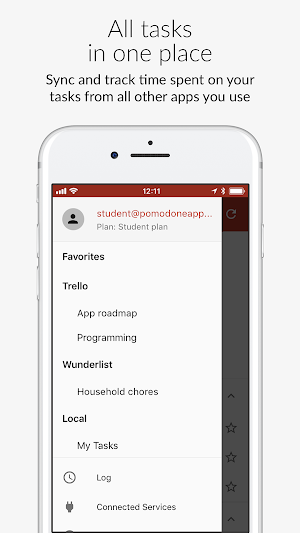
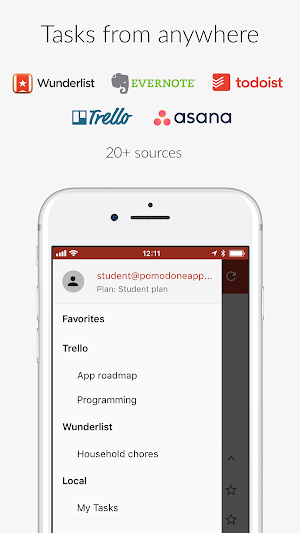
Productivity Countdown timer to apply a timeboxing methodology for your Todoist™, Trello™, Wunderlist™, Asana™, Evernote™, Slack, Microsoft™ To-Do and Microsoft™ Outlook Tasks, Google Calendar etc.
Create PomoDoneApp account, connect your existing tool, sync your tasks, focus and get the work done.
PomoDoneApp enhances your task management system with timeboxing methodology (including Pomodoro technique™ and many others) to boost your efficiency.
NB: PomoDoneApp is NOT related to the Pomodoro Technique™/Pomodoro™'s trademark holder Cirillo Company and respects its trademarks.
Key features:
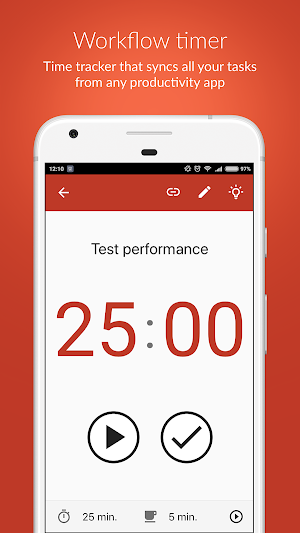
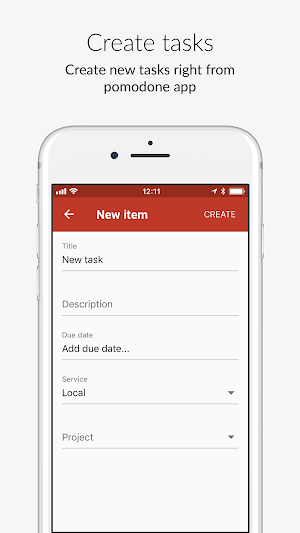
• Sync your tasks from your Task Management systems or create tasks within the app
• Customize to maximize productivity the length of your Timer and break
• Start, pause, or stop the timer
• Switch between tasks within one timer
• Complete the task - with sync back to your task management system!
• Favorite your task from different sources
PomoDoneApp service is free!
More integrations and advanced access to the statistics (timers history) are available via our Premium Plans that help us to keep the lights on, develop and maintain this service.
Integration with tasks and notes management systems:
• Trello
• Todoist
• Wunderlist
• Evernote
• 印象笔记 (YinXiang)
• Google Calendar & iCal
• Microsoft ToDo
• Zapier
• Toodledo
• Google Tasks
Outbound integrations:
• Slack
• iCal & Google Calendar
• Zapier
• Microsoft Teams
• Toggl
Additional integrations for Premium Users:
• JIRA
• ClickUp
• Basecamp
• Asana
• Microsoft Outlook Tasks
• Slack Pro
• MeisterTasks
• Nozbe
• GitKraken Glo
• Scoro
• Paymo
• YouTrack
• Microsoft Planner
• Clubhouse
• Luxafor
Don’t see yours? Let us know, we’re adding new services all the time.
HAVE FUN
Brilliant things are simple. 25 minutes of work + 5 minutes break. That’s all you need to keep your mind sharp all day. With PomoDoneApp you can be sure you won’t miss a break.
EASY TO USE
Don’t enter tasks manually! Connect your task management system and start using PomoDoneApp just in 3 minutes.
TRACK TIME
Use the Pomodoro technique™ to keep track of the time you spend on your tasks. All your time boxes are being logged to your account and can be filtered out by source, project, list, date range or bucket. Download raw data as CSV anytime. Receive your reports via email daily, weekly and monthly.
ANALYZE
Connect iCal/Google Calendar and see your achievements in Calendar View.
INTERRUPTION SHIELD
Connect Slack™ or Microsoft™ Teams and notify your team when you're busy and when you're done.
Turn on Slack's DND mode, customize your Status while your timer is ticking.
Block certain websites while during your timer (whitelist and blacklist) using our Chrome extension integration.
Show your colleagues in co-working space and open office that you're busy or available, with the help of Luxafor and our Integration.
FAQ: http://pomodoneapp.com/faq.html
Blog: http://pomodoneapp.com/blog.html
LEGAL NOTICE
PomoDoneApp is not affiliated with Francesco Cirillo.
Pomodoro Technique™ and Pomodoro™ are registered trademarks of Francesco Cirillo.
All logos and marks contained herein are the property of their respective owners.
Create PomoDoneApp account, connect your existing tool, sync your tasks, focus and get the work done.
PomoDoneApp enhances your task management system with timeboxing methodology (including Pomodoro technique™ and many others) to boost your efficiency.
NB: PomoDoneApp is NOT related to the Pomodoro Technique™/Pomodoro™'s trademark holder Cirillo Company and respects its trademarks.
Key features:
• Sync your tasks from your Task Management systems or create tasks within the app
• Customize to maximize productivity the length of your Timer and break
• Start, pause, or stop the timer
• Switch between tasks within one timer
• Complete the task - with sync back to your task management system!
• Favorite your task from different sources
PomoDoneApp service is free!
More integrations and advanced access to the statistics (timers history) are available via our Premium Plans that help us to keep the lights on, develop and maintain this service.
Integration with tasks and notes management systems:
• Trello
• Todoist
• Wunderlist
• Evernote
• 印象笔记 (YinXiang)
• Google Calendar & iCal
• Microsoft ToDo
• Zapier
• Toodledo
• Google Tasks
Outbound integrations:
• Slack
• iCal & Google Calendar
• Zapier
• Microsoft Teams
• Toggl
Additional integrations for Premium Users:
• JIRA
• ClickUp
• Basecamp
• Asana
• Microsoft Outlook Tasks
• Slack Pro
• MeisterTasks
• Nozbe
• GitKraken Glo
• Scoro
• Paymo
• YouTrack
• Microsoft Planner
• Clubhouse
• Luxafor
Don’t see yours? Let us know, we’re adding new services all the time.
HAVE FUN
Brilliant things are simple. 25 minutes of work + 5 minutes break. That’s all you need to keep your mind sharp all day. With PomoDoneApp you can be sure you won’t miss a break.
EASY TO USE
Don’t enter tasks manually! Connect your task management system and start using PomoDoneApp just in 3 minutes.
TRACK TIME
Use the Pomodoro technique™ to keep track of the time you spend on your tasks. All your time boxes are being logged to your account and can be filtered out by source, project, list, date range or bucket. Download raw data as CSV anytime. Receive your reports via email daily, weekly and monthly.
ANALYZE
Connect iCal/Google Calendar and see your achievements in Calendar View.
INTERRUPTION SHIELD
Connect Slack™ or Microsoft™ Teams and notify your team when you're busy and when you're done.
Turn on Slack's DND mode, customize your Status while your timer is ticking.
Block certain websites while during your timer (whitelist and blacklist) using our Chrome extension integration.
Show your colleagues in co-working space and open office that you're busy or available, with the help of Luxafor and our Integration.
FAQ: http://pomodoneapp.com/faq.html
Blog: http://pomodoneapp.com/blog.html
LEGAL NOTICE
PomoDoneApp is not affiliated with Francesco Cirillo.
Pomodoro Technique™ and Pomodoro™ are registered trademarks of Francesco Cirillo.
All logos and marks contained herein are the property of their respective owners.
What’s new
Version 1.5.41 · Updated July 26, 2020
Fixed Device Rotate and Date time Range issue Microsoft Planner, Clubhouse, YouTrack integration Pomodoro App Widget: Pause / Stop / Start your timer DND mode management Auto-theme selection in Settings You can now re-arrange Local tasks and Favorites Added ambient sounds for a timer for Lite and Ultimate users Bug fixes and general improvements
User reviews

Full featured pomodoro app. I am very satisfied about syncing with cloud so I can access different devices. Also I use Trello syncing so I can organize my life. I suggest changing ui font option and better interface.

Amazing. Now I use Trello and Asana only with this timer - it makes billing my clients so much easier.

I like the app, really has everything i want, above all it is free. Just tiny change to the UI make it a great app.

This is a FANTASTIC app! If you are using ToDoist than Pomodone seems like it was built purely to enable your productivity goals in ToDoist! Together, these apps are unbeatable! If you need to plan, schedule or prioritise your time, then you must by all means try using Pomodone along with ToDoist for an unbeatable, ...

After trying a few pomodoro apps, I feel like I've found the best for me. The PomoDone app model is to integrate into your preferred ToDo app rather than try to replicate the same functionality. This strikes me as exactly right - no pomodoro app can approach the ease and functionality of a good todo app, and PomoDon...

This app help me focus on my work. Very useful to work in 5, 15, 25 minutes, you can split your big work to small task to complete, it is easier. The app also integrate with your already app like Wunderlist, Trello ... Many many extensions are free. Very happy with free license and I will consider subscription licen...
Alternatives to PomoDone App – Timer for your Task List and ToDo
Looking for apps like PomoDone App – Timer for your Task List and ToDo? Here are 6 similar Android apps on Google Play. The highest rated is Pomodoro (4.6/5), and all 6 are free to download.
-
Pomodoro Timer & ToDo Planner
-
Glan: Productivity focus timer 4.5
-
Focusmeter: Pomodoro Timer 4.6
-
Pomodoro 4.6
-
Refocus: Pomodoro Timer 4.5
-
Engross: Focus Timer & To-Do 4.5
| App | Rating | Price | Installs | Last updated | Compare |
|---|---|---|---|---|---|
| PomoDone App – Timer for your Task List and ToDo | 3.3 / 5 | Free | 10,000+ | Jul 26, 2020 | |
| Pomodoro Timer & ToDo Planner | – | Free | 5,000+ | Feb 10, 2026 | Compare |
| Glan: Productivity focus timer | 4.5 / 5 | Free | 100,000+ | Oct 20, 2026 | Compare |
| Focusmeter: Pomodoro Timer | 4.6 / 5 | Free | 100,000+ | Oct 17, 2026 | Compare |
| Pomodoro | 4.6 / 5 | Free | 500,000+ | Jan 26, 2026 | Compare |
| Refocus: Pomodoro Timer | 4.5 / 5 | Free | 100,000+ | Sep 29, 2025 | Compare |
| Engross: Focus Timer & To-Do | 4.5 / 5 | Free | 500,000+ | – | Compare |
Similar apps on Google Play
- Pomodoro Timer & ToDo Planner
- Glan: Productivity focus timer
- Focusmeter: Pomodoro Timer
- Pomodoro
- Refocus: Pomodoro Timer
- Engross: Focus Timer & To-Do
- Focus To-Do: Pomodoro & Tasks
- Interval Timer
- Pomodoro Timer Pro
- Fanya Todo List: Lists & Tasks
- Priorities: the most effective
- To Do List - Nexdo
- Skillsoft Percipio
- Grial UIKit
- ToDodo: To Do List & Reminder
- Taskiee: To-Do List & Calendar
- Minimalist Productivity Launch
- Flipd: Focus & Study Timer
- Notion - DIY Smart Monitoring
- CraigsDo: Procrastinators Todo
- FlowSavvy: Time Block Planner
- START - Intermittent Fasting
- Bookmory - reading tracker
- Todoist: to-do list & planner
- Taskade - Tasks, Notes, Chat