
Vocal Remover
Entertainment Contains ads
Remove vocals, split stems, make karaoke and lyrics with no paid exports.
- Downloads
- 1K+
- on Google Play
- Price
- Free
- No in-app purchases
- Updated
- Sep 1
- 2026 · v1.2.0
Screenshots
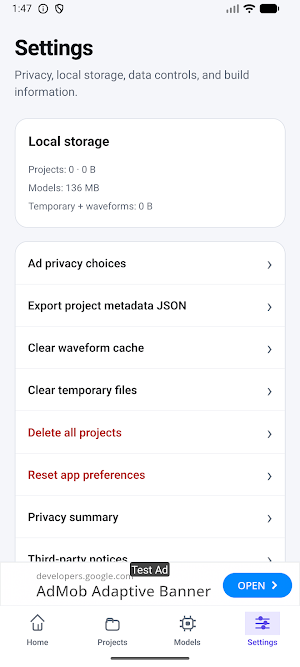
About Vocal Remover
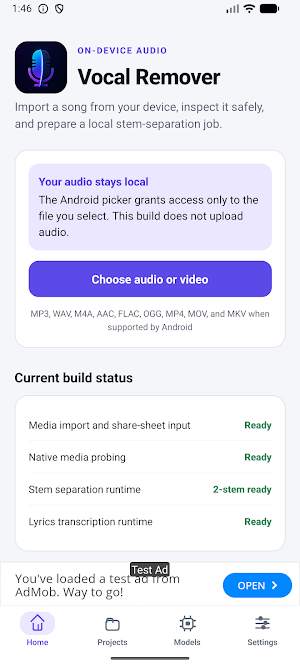
Turn audio or video you already have into useful music-practice and editing files, directly on your Android device.
Vocal Remover can create:
• Two stems: vocals and instrumental
• Four stems: vocals, drums, bass, and other
• Six stems: vocals, drums, bass, guitar, piano, and other
• Karaoke and acapella tracks
• Custom mixes from synchronized stems
• Automatically generated, timestamped lyrics
Work with every stem
Open Stem Studio to play all stems from one synchronized native mixer. Mute or solo tracks, change each stem's volume and stereo balance, set master volume, seek accurately, change playback speed, and loop a selected section. Save the mix preset, export a WAV mix, or package stems and lyrics in a ZIP file.
Create editable lyrics locally
Lyrics are transcribed from the isolated vocal track—not from an online lyrics database. The multilingual model detects the likely language and creates timestamps. Edit text and timing, replay or loop lines, split, merge, insert, delete, search, replace, undo, and redo. Export corrected lyrics as TXT, LRC, or SRT. Singing is harder than speech, so results may need correction.
Local-first processing
Audio separation, language detection, transcription, waveform generation, and mixing run on your device after the required open-source model packs are installed. Your selected audio is not uploaded to an Old Alex Hub processing server. No account or subscription is required.
Free features and exports
There are no processing credits, daily audio limits, subscriptions, export watermarks, or paid downloads. The app is supported by ads. Ads never unlock a feature and local work remains available if an ad cannot load.
Model packs
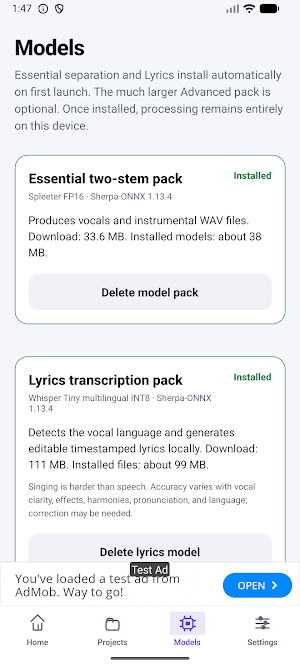
The Essential separation and Lyrics packs install automatically on first launch. The optional Advanced pack enables four- and six-stem processing on capable 64-bit devices. It is much more demanding and may be slow; processing speed depends on the device, file length, and selected mode.
Import and export safely
Choose supported audio or video with Android's document picker or share it to Vocal Remover from another app. Originals are never overwritten. Save outputs to a destination you choose or share WAV stems through Android.
Important limitations
Stem quality varies with the recording, mix, effects, and selected model. Six-stem guitar and piano isolation may be less accurate. Automatically generated lyrics are not official lyrics and may require correction.
Users should process only media they own or are authorized to use. Users are responsible for complying with applicable copyright, licensing, and intellectual-property laws.
Vocal Remover can create:
• Two stems: vocals and instrumental
• Four stems: vocals, drums, bass, and other
• Six stems: vocals, drums, bass, guitar, piano, and other
• Karaoke and acapella tracks
• Custom mixes from synchronized stems
• Automatically generated, timestamped lyrics
Work with every stem
Open Stem Studio to play all stems from one synchronized native mixer. Mute or solo tracks, change each stem's volume and stereo balance, set master volume, seek accurately, change playback speed, and loop a selected section. Save the mix preset, export a WAV mix, or package stems and lyrics in a ZIP file.
Create editable lyrics locally
Lyrics are transcribed from the isolated vocal track—not from an online lyrics database. The multilingual model detects the likely language and creates timestamps. Edit text and timing, replay or loop lines, split, merge, insert, delete, search, replace, undo, and redo. Export corrected lyrics as TXT, LRC, or SRT. Singing is harder than speech, so results may need correction.
Local-first processing
Audio separation, language detection, transcription, waveform generation, and mixing run on your device after the required open-source model packs are installed. Your selected audio is not uploaded to an Old Alex Hub processing server. No account or subscription is required.
Free features and exports
There are no processing credits, daily audio limits, subscriptions, export watermarks, or paid downloads. The app is supported by ads. Ads never unlock a feature and local work remains available if an ad cannot load.
Model packs
The Essential separation and Lyrics packs install automatically on first launch. The optional Advanced pack enables four- and six-stem processing on capable 64-bit devices. It is much more demanding and may be slow; processing speed depends on the device, file length, and selected mode.
Import and export safely
Choose supported audio or video with Android's document picker or share it to Vocal Remover from another app. Originals are never overwritten. Save outputs to a destination you choose or share WAV stems through Android.
Important limitations
Stem quality varies with the recording, mix, effects, and selected model. Six-stem guitar and piano isolation may be less accurate. Automatically generated lyrics are not official lyrics and may require correction.
Users should process only media they own or are authorized to use. Users are responsible for complying with applicable copyright, licensing, and intellectual-property laws.
What’s new
Version 1.2.0 · Updated September 1, 2026
Added high-quality M4A audio exports. Added custom mix exports from Stem Studio. Improved Firebase Analytics and AdMob reporting integration. Improved export progress, file handling, and cleanup. General stability and performance improvements.
Alternatives to Vocal Remover
Looking for apps like Vocal Remover? Here are 6 similar Android apps on Google Play. The highest rated is iRig Guitar Amp & FX · Deplike (4.5/5), and all 6 are free to download.
-
Song Maker - Music Mixer 3.8
-
AI Song Generator - Mozart 4.2
-
DJ Music Mixer - Equalizer 4.1
-
iRig Guitar Amp & FX · Deplike 4.5
-
Chaos Audio: Effects & Amp AI 4.2
-
InstaDrum - Be a Drummer Now 3.5
| App | Rating | Price | Installs | Last updated | Compare |
|---|---|---|---|---|---|
| Vocal Remover | – | Free | 1,000+ | Sep 1, 2026 | |
| Song Maker - Music Mixer | 3.8 / 5 | Free | 10,000,000+ | Oct 15, 2026 | Compare |
| AI Song Generator - Mozart | 4.2 / 5 | Free | 1,000,000+ | Oct 6, 2026 | Compare |
| DJ Music Mixer - Equalizer | 4.1 / 5 | Free | 1,000,000+ | Apr 30, 2025 | Compare |
| iRig Guitar Amp & FX · Deplike | 4.5 / 5 | Free | 1,000,000+ | Sep 18, 2026 | Compare |
| Chaos Audio: Effects & Amp AI | 4.2 / 5 | Free | 1,000+ | Sep 25, 2026 | Compare |
| InstaDrum - Be a Drummer Now | 3.5 / 5 | Free | 100,000+ | Sep 9, 2026 | Compare |
Compare Vocal Remover with the top alternatives: ratings, updates, ASO score and keyword gaps →
Similar apps on Google Play
- Song Maker - Music Mixer
- AI Song Generator - Mozart
- DJ Music Mixer - Equalizer
- iRig Guitar Amp & FX · Deplike
- Chaos Audio: Effects & Amp AI
- InstaDrum - Be a Drummer Now
- KP AI Music & Song Maker
- DJ Mixer Pro - DJ Music Mix
- DJ Mixer - DJ Music Remix Pro
- Chord ai - learn any song
- Rapchat: Music Maker Studio
- Bandpass
- AI Cover & Songs: Music AI
- Voloco: Auto Vocal Tune Studio
- MyTunes : AI Music Generator
- edjing PRO - Music DJ mixer
- Zona: AI Song Maker & Creator
- UnitedMasters: Release Music
- Tomplay Sheet Music
- Music Audio Editor, MP3 Cutter
- AI Song & Music Maker-Musicful
- Offtop Rap Studio & Song Maker
- Beat Machine: Music Maker & DJ
- n-Track Studio DAW: Make Music
- AI Vocal Remover - unMix
- Camtronome - Pro Metronome
- Soundtrap: Music Making Studio
- MicMe Karaoke by Stingray
- Vocal Remover, Cut Song Maker
- Beatport: Music for DJs App
- Shoom・AI Music Video Generator
- n-Track Studio Pro | DAW
- The Metronome by Soundbrenner
- Songsterr Guitar Tabs & Chords
- Hyph: Create With Real Music
- Jamzone - Sing & Play Along
- Music Maker JAM: Beatmaker app
- Music Theory Companion
- Up Tempo: Pitch, Speed Changer
- Cubasis 3 - DAW & Music Studio
- Mureka: AI Radio & Music Maker
- Dolby On: Record Audio & Music
- DRC - Polyphonic Synthesizer
- Splice: Make music now
- Koala Sampler
- Music Speed Changer
- AudioLab Audio Cutter & Editor
- Flat: Music Score & Tab Editor
- TonalEnergy Tuner & Metronome
- LiveMixtapes - Hip-Hop Culture
- LANDR - Master & Release Music
- Ear Gym: Ear Training & Theory
- Set List Maker
- Clony: AI Voice & Face Cloning
- AI Song Generator, Cover Music
- Sword And Scale
- edjing Mix - Music DJ app
- djay - DJ App & AI Mixer
- Reverb: Buy & Sell Music Gear
- JAMMATES
- Chordify: Song Chords & Tuner
- Moises: The Musician's AI App
- Genius — Song Lyrics Finder
- The CDub Network
- HiNotes by HiDock
- Radio Me: Live Radio, Podcasts
- Rewind: Music Discovery
- MuseScore: Music Chords & Tabs
- Songstats: Music Analytics
- Voice Recorder Audio Sound MP3
- BandLab – Music Making Studio
- musicat: Music, Stats, Reviews
- Voice Recorder & Audio Editor
- Music Worx: Play Like a DJ
- DI.FM: Electronic Music Radio
- Riverside: Record, Clip, Share
- Cross DJ - Music Mixer App
- Music Equalizer - Bass Booster
- FiiO Music
- Learn Spanish Fast – Sounter
- AmpMe - Speaker Booster
- Singit : Online Karaoke, KPOP
- Amuse Music Distribution
- Singing Machine Karaoke