
Keyboard Techniques For Produc
NonLinear Educating Inc. Education
Producers learn essential Keyboard Techniques with piano teacher Matt Vanacoro !
- Downloads
- 1+
- on Google Play
- Price
- $8.99
- No in-app purchases
- Updated
- May 18
- 2018 · v7.1
Screenshots
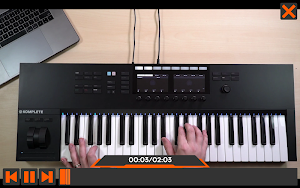


About Keyboard Techniques For Produc
If you’re a music producer with little or no keyboard experience, this course is made for you! Join piano teacher Matt Vanacoro, and learn essential keyboard techniques that will take your chord progressions, basslines and melodies to the next level!
There is no better way to improve your music productions than to develop basic keyboard skills. Of course you don’t need to be a virtuoso to produce music, but having some keyboard techniques and musicianship is very important. Even if you never played a keyboard before, or if you’re paranoid at the thought of learning chords and scales, have no fear. Matt Vanacoro is here to show you how easy it can be to learn to play the keys. No sight-reading necessary!
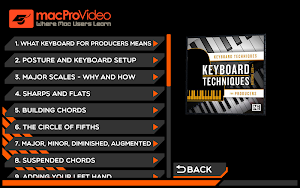
Matt starts by explaining the importance of having a comfortable keyboard setup and a good posture when playing. As he says, playing long hours with a bad posture is a recipe for disaster for your body! He then reveals, in very simple terms, the music theory concepts that every producer should know. You learn how to build and play major and minor scales, and you discover how to integrate those scary black notes (also called accidentals, or sharps and flats) in your playing. Next, Matt shows you how to build and play chords, and he explains the difference between major, minor, diminished and augmented chords. You learn to play with both hands, by playing chords and bass lines with your left hand. Matt also demystifies other important music theory concepts such as the circle of fifths, suspended chords, inversions, intervals, arpeggios and how to integrate all this in your playing... and in your music productions.
Learning basic keyboard techniques and music theory doesn’t have to be scary! Watch this course, and start to get more use of that keyboard in your studio. This course is perfect for electronic music producers... EDM, Hip Hop, Pop and more!
Keyboard Techniques 101
Keyboard Techniques for Producers
24 videos | 79 minutes | by Matt Vanacoro
There is no better way to improve your music productions than to develop basic keyboard skills. Of course you don’t need to be a virtuoso to produce music, but having some keyboard techniques and musicianship is very important. Even if you never played a keyboard before, or if you’re paranoid at the thought of learning chords and scales, have no fear. Matt Vanacoro is here to show you how easy it can be to learn to play the keys. No sight-reading necessary!
Matt starts by explaining the importance of having a comfortable keyboard setup and a good posture when playing. As he says, playing long hours with a bad posture is a recipe for disaster for your body! He then reveals, in very simple terms, the music theory concepts that every producer should know. You learn how to build and play major and minor scales, and you discover how to integrate those scary black notes (also called accidentals, or sharps and flats) in your playing. Next, Matt shows you how to build and play chords, and he explains the difference between major, minor, diminished and augmented chords. You learn to play with both hands, by playing chords and bass lines with your left hand. Matt also demystifies other important music theory concepts such as the circle of fifths, suspended chords, inversions, intervals, arpeggios and how to integrate all this in your playing... and in your music productions.
Learning basic keyboard techniques and music theory doesn’t have to be scary! Watch this course, and start to get more use of that keyboard in your studio. This course is perfect for electronic music producers... EDM, Hip Hop, Pop and more!
Keyboard Techniques 101
Keyboard Techniques for Producers
24 videos | 79 minutes | by Matt Vanacoro
What’s new
Version 7.1 · Updated May 18, 2018
Updated to work across all platforms and simplified the UI. Works on more devices using the latest architecture available. This app has no in-app purchase functionality.
Alternatives to Keyboard Techniques For Produc
Looking for apps like Keyboard Techniques For Produc? Here are 6 similar Android apps on Google Play.
-
Killer Sound Design For Live 9
-
Advanced Max for Live Course f
-
The Producer Film Craft 101
-
Video Manual for Pigments 3 fo
-
Basics Guide for Dorico : Nota
-
Creating Titles and 3D Effects
| App | Rating | Price | Installs | Last updated | Compare |
|---|---|---|---|---|---|
| Keyboard Techniques For Produc | – | $8.99 | 1+ | May 18, 2018 | |
| Killer Sound Design For Live 9 | – | 7.99 USD | 1+ | Jul 28, 2021 | Compare |
| Advanced Max for Live Course f | – | 7.99 USD | 0+ | Jul 20, 2021 | Compare |
| The Producer Film Craft 101 | – | 7.99 USD | 1+ | Jul 20, 2021 | Compare |
| Video Manual for Pigments 3 fo | – | 7.99 USD | 0+ | Jul 14, 2021 | Compare |
| Basics Guide for Dorico : Nota | – | 7.99 USD | 5+ | Jul 14, 2021 | Compare |
| Creating Titles and 3D Effects | – | 7.99 USD | 0+ | Jun 18, 2021 | Compare |
Similar apps on Google Play
- Killer Sound Design For Live 9
- Advanced Max for Live Course f
- The Producer Film Craft 101
- Video Manual for Pigments 3 fo
- Basics Guide for Dorico : Nota
- Creating Titles and 3D Effects
- Spatial Effects Recording Cour
- Recording Strings Course
- Advanced Class For Alchemy in
- Explore Guide for Alchemy in L
- Recording From Demo to Master
- Creating 3D Text For Motion
- Creating FCPX Content in Motio
- Work in 3D Course For Motion b
- Editing Course for Motion by m
- Animating Effect Course for Mo
- Graphics Effects Course for Mo
- Animating Text Course for Moti
- Working With Objects Course fo
- Exposed ES2 Course for Logic P
- Beginners Guide For Final Cut
- Render and Output in Motion 5
- Logic Pro's Library Course by
- MIDI Advanced Course For Logic
- External MIDI Basics Course fo
- Beginner Guide to Logic Pro X
- Bouncing, Sharing & Archiving
- Follow Actions for Live 11 by
- In Depth Course for Keynote by
- Mulithreading and Performance
- Foundation Classes Course for
- Design Patterns Course for IOS
- Debugging and Exceptions Cours
- Structure and Classes Course f
- Tools and Language Course for
- In Depth Course for iMovie by
- Basics Course for Motion by ma
- Core Course for Lightroom by m
- Designing CSS Floating Layouts
- Deeper Into XHTML Course for W
- XHTML Basics Guide for Web Des
- Dubstep Essentials Course by m
- MIDI FX Course For Ableton Liv
- Advanced Course for Melodyne b
- Core Melodyne Course by macPro
- Scoring To Picture Toolbox Cou
- Global Tracks Course for Logic
- Dubstep Course for Logic Pro 9
- Advanced Editing Course for FC
- Clips: Import & Organize Guide
- Sound Design Course for Logic
- More All Star TNT Course for L
- Drum Design Course for Logic P
- Make EDM Course For GarageBand
- DSLR Workflows Courses for Pre
- Drum and Bass Course for Logic
- Whats New Course for Logic Pro
- Mixer and Filters Course for E
- Explore CSS Course for Dreamwe
- Exploring Trilian Course by ma
- Whats New Course for Final Cut
- Logic Remote Course for Logic
- Discover Logic Remote Course f
- Synthesis with Sculpture Cours
- MIDI FX Course for Logic Pro b
- Vintage Electric Piano Course
- Touch Bar Course For FCPX by m
- Vintage B3 Organ Course for LP
- Graphics, Titles and Transitio
- Pro Audio Course for Final Cut
- Multicam Course for Final Cut
- Mastering Essentials Course Fo
- Quick and Auto Sampler Course
- Hip Hop Course For LPX by mPV
- Tracks & Alternatives Course f
- M/S Processing Course in LP X
- the Art of House Music For Log
- Step Sequencer Couse for Logic
- Mastering EDM Course by Ask.Vi
- What's New Course for Logic Pr
- Everywhere Course for Garageba
- Core Omnisphere Course by macP
- O-Coast Course For Make Noise
- Core Course for MainStage 2 by
- Live Loops Course for Logic Pr
- Body Modification Course For P
- Lighting & Effects Course For
- Distortion Course For Live 9 b
- Composing For Commercials Cour
- Vocal Production Course For Ou
- Razor Course For Native Instru
- Battery The Art of Drum Progra
- Working with Audio Course For
- Exploring Drum Racks Course Fo
- Working With Audio Course in M
- Adv Editing Course For Media C
- Deep House Course For Logic Pr
- Distortion Plugins Course For
- Motion Tracking Course For Aft
- Cartoon Animation Course For A
- GarageBand for IOS Course By m
- More Tips For Final Cut Pro X
- Compression Course For Univers
- Reaktor Course For Native Inst
- Pro Mixing Techniques in Pro T
- Start Course For Maschine For
- Essentials Course For MASSIVE
- Studio Drummer Course for Nati
- Delay & Reverb Course For Logi
- Modulations Plugins Course For
- Compressors Course For Logic P
- Basics Course For Max For Live
- Exporting & Sharing in Media C
- Making Electronic Dance Music
- Toolbox Course For Ozone 9 By
- Tips For Final Cut Pro X by ma
- Recording Drums Course For Log
- EDM Production Course For Logi
- Adv Audio Editing Course in Lo
- Recording Vocals Course in Log
- Whats New in Logic Pro 10.4.5
- MainStage 3 Explored Course By
- MIDI Demystified Course By mPV
- Letters Course in Word for Mac
- FX Templates Course For Motion
- Workflow Guide For Motion 5 By
- What's New In Logic Pro X Cour
- Adv Lead Synths Course by macP
- Recording Guitars Course for L
- Smart Controls Guide For Logic
- Touring a SSL Console Course b
- Visual FX Course For Final Cut
- Voiceover Course For Logic Pro
- Working With Audio Course For
- Introduction To Pro Tools By m
- Smart Tempo Course For Logic P
- mPV Course Exploring The Mixer
- mPV Course Tozzolis Mixing Too
- macProVideo Course Mixing Pop
- macProVideo Mastering Course F
- mPV Beat Detective Course For
- mPV Exploring MIDI Course For
- mPV Exploring The Workspace Co
- Ableton Live 8 Course by mPV
- Mastering Essentials Course Fo
- ASK.Video Course Workflows For
- Video Manual Course For Nectar
- Course For Gaining Insight 2
- Whats New Course For Cubase 10
- Recording & Editing Audio Cour