
Cadence Lift: Workout Tracker
LightPath Apps Health & Fitness In-app purchases
Gym workout tracker for lifters — one-tap logging, smart rest timers, auto PRs.
- Downloads
- 14+
- on Google Play
- Price
- Free
- In-app purchases
- Updated
- Sep 18
- 2026
Screenshots


About Cadence Lift: Workout Tracker
Cadence Lift is a lifting logger built around the three numbers that move when you grow: weight, reps, and time. More weight is progress. More reps is progress. Same weight and same reps in less time is also progress. Every screen is built to make those three numbers impossible to ignore.
LOG IN A TAP OR THREE
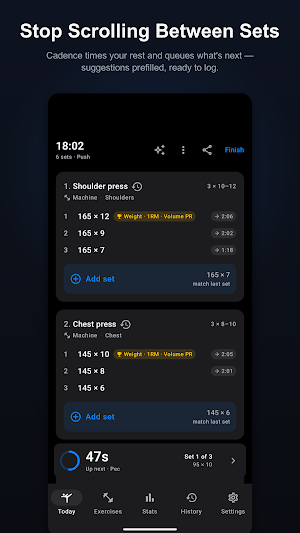
The default action on every screen is "log the next set" — nothing else competes for taps mid-workout. Tap to nudge the prefilled weight, tap to nudge reps, tap save — and when the suggestion is already right, one tap logs the set. Tap a number to type. Built-in plate calculator. Undo on every save.
WHAT'S NOT HERE
— No account. Open the app and lift.
— No ads. Not anywhere, ever, especially not during the active workout flow.
— No analytics, no ad SDKs, no trackers. Nothing profiles you.
— No social feed, no friends list, no leaderboard. Your training is your business.
SEE EVERY REP COUNT
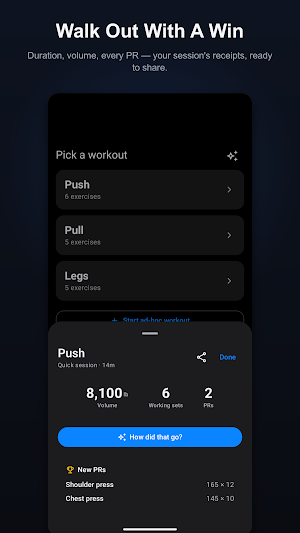
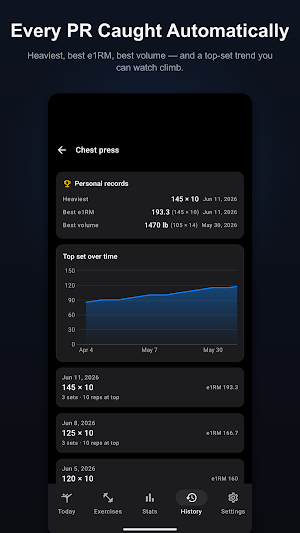
Every exercise card shows your last session inline ("185×8, 185×7, 175×6") and a trend readout flagging whether you're up on weight or reps versus your last top set. Personal records — heaviest, best estimated 1RM, best single-set volume — are calculated automatically and badged on the row that holds them. Per-exercise charts plot your top-set weight over time, and every session lists its estimated 1RM.
SUGGESTIONS THAT SHOW THEIR WORK
Every set comes with a suggested weight and reps, plus a label that tells you where the number came from — "from yesterday," a specific date, or "starting estimate" if the app has no history yet. No black box. You see the source, you trust the number, you decide whether to push.
TIMING THAT MATCHES YOUR GOAL
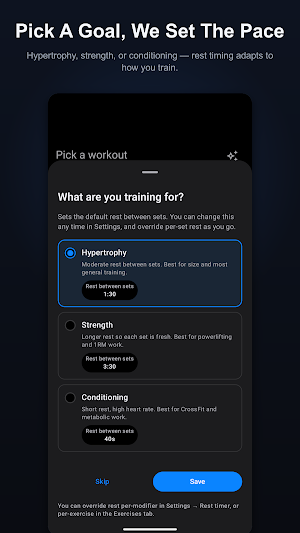
Pick hypertrophy, strength, or conditioning at first launch and the rest timer adapts. Override per set type or per exercise when you want to push density on a specific lift. The rest alert fires as a notification even when you've switched apps — no babysitting the timer.
ON YOUR WRIST (WEAR OS)
A Wear OS companion app: see your active session, log sets from your wrist, watch your live heart rate, and get the rest timer on your watch too. It can even sense when you finish a set from your heart rate and start your rest automatically — no taps.
DROP SETS AND REST-PAUSE, IF YOU LIFT THAT WAY
First-class support for techniques most loggers make you fake with notes. Tag any set as a drop set or rest-pause to push a working set past failure — each with its own rest behavior: no rest between drops, a short pause between rest-pause bursts.
SWITCHING FROM ANOTHER APP?
Import your full history from a Strong CSV export. Exercises map to Cadence's library automatically, and re-importing is safe — no duplicates.
WHAT ELSE IS IN THE APP
— Pick a starter routine on first launch — Push/Pull/Legs, Upper/Lower, Arnold Split, PHUL, Bro Split, or Full Body — all editable, with a curated library of 100+ exercises.
— Add an exercise mid-workout and it's auto-adopted into the underlying template. Next session, it's already there.
— Supersets with grouped cards, and adaptive ordering that learns the order you actually train in.
— GitHub-style 12-week heatmap, tonnage trend, volume by muscle group, sessions per week, working-set count by muscle.
— Workout reminders per weekday.
— Body-weight log with 30-day delta. Connect Health Connect to save your workouts, weight and body-fat there, and import weight and body-fat history from your scale or other apps.
— Share any session as Markdown (paste into ChatGPT or Claude for analysis).
— Light and dark themes, lb or kg.
Your data lives on your phone in a local database. Back up and restore your full history as a JSON file you own (Settings → Data) — it even round-trips with Cadence Lift on iPhone. Uninstalling deletes everything, and phone-to-phone transfer doesn't copy app data — so export a backup first.
Built for Android 9 and up. Made by LightPath Apps. Questions: [email protected].
LOG IN A TAP OR THREE
The default action on every screen is "log the next set" — nothing else competes for taps mid-workout. Tap to nudge the prefilled weight, tap to nudge reps, tap save — and when the suggestion is already right, one tap logs the set. Tap a number to type. Built-in plate calculator. Undo on every save.
WHAT'S NOT HERE
— No account. Open the app and lift.
— No ads. Not anywhere, ever, especially not during the active workout flow.
— No analytics, no ad SDKs, no trackers. Nothing profiles you.
— No social feed, no friends list, no leaderboard. Your training is your business.
SEE EVERY REP COUNT
Every exercise card shows your last session inline ("185×8, 185×7, 175×6") and a trend readout flagging whether you're up on weight or reps versus your last top set. Personal records — heaviest, best estimated 1RM, best single-set volume — are calculated automatically and badged on the row that holds them. Per-exercise charts plot your top-set weight over time, and every session lists its estimated 1RM.
SUGGESTIONS THAT SHOW THEIR WORK
Every set comes with a suggested weight and reps, plus a label that tells you where the number came from — "from yesterday," a specific date, or "starting estimate" if the app has no history yet. No black box. You see the source, you trust the number, you decide whether to push.
TIMING THAT MATCHES YOUR GOAL
Pick hypertrophy, strength, or conditioning at first launch and the rest timer adapts. Override per set type or per exercise when you want to push density on a specific lift. The rest alert fires as a notification even when you've switched apps — no babysitting the timer.
ON YOUR WRIST (WEAR OS)
A Wear OS companion app: see your active session, log sets from your wrist, watch your live heart rate, and get the rest timer on your watch too. It can even sense when you finish a set from your heart rate and start your rest automatically — no taps.
DROP SETS AND REST-PAUSE, IF YOU LIFT THAT WAY
First-class support for techniques most loggers make you fake with notes. Tag any set as a drop set or rest-pause to push a working set past failure — each with its own rest behavior: no rest between drops, a short pause between rest-pause bursts.
SWITCHING FROM ANOTHER APP?
Import your full history from a Strong CSV export. Exercises map to Cadence's library automatically, and re-importing is safe — no duplicates.
WHAT ELSE IS IN THE APP
— Pick a starter routine on first launch — Push/Pull/Legs, Upper/Lower, Arnold Split, PHUL, Bro Split, or Full Body — all editable, with a curated library of 100+ exercises.
— Add an exercise mid-workout and it's auto-adopted into the underlying template. Next session, it's already there.
— Supersets with grouped cards, and adaptive ordering that learns the order you actually train in.
— GitHub-style 12-week heatmap, tonnage trend, volume by muscle group, sessions per week, working-set count by muscle.
— Workout reminders per weekday.
— Body-weight log with 30-day delta. Connect Health Connect to save your workouts, weight and body-fat there, and import weight and body-fat history from your scale or other apps.
— Share any session as Markdown (paste into ChatGPT or Claude for analysis).
— Light and dark themes, lb or kg.
Your data lives on your phone in a local database. Back up and restore your full history as a JSON file you own (Settings → Data) — it even round-trips with Cadence Lift on iPhone. Uninstalling deletes everything, and phone-to-phone transfer doesn't copy app data — so export a backup first.
Built for Android 9 and up. Made by LightPath Apps. Questions: [email protected].
What’s new
Updated September 18, 2026
• Get more helpful Coach guidance tailored to your training. • Enjoy a smoother Cadence Pro subscription experience.
Alternatives to Cadence Lift: Workout Tracker
Looking for apps like Cadence Lift: Workout Tracker? Here are 6 similar Android apps on Google Play. The highest rated is eBike Flow (4.7/5), and all 6 are free to download.
-
STNDRD Workout & Fitness Plans 3.2
-
MyFitnessCoach: AI Fitness App 4.2
-
eBike Flow 4.7
-
Resistance Band Training App 4.4
-
Workout Quest - Fitness RPG 3.3
-
Pumped Workout Tracker Gym Log 4.6
| App | Rating | Price | Installs | Last updated | Compare |
|---|---|---|---|---|---|
| Cadence Lift: Workout Tracker | – | Free | 10+ | Sep 18, 2026 | |
| STNDRD Workout & Fitness Plans | 3.2 / 5 | Free | 100,000+ | Oct 2, 2026 | Compare |
| MyFitnessCoach: AI Fitness App | 4.2 / 5 | Free | 1,000,000+ | Sep 30, 2026 | Compare |
| eBike Flow | 4.7 / 5 | Free | 1,000,000+ | Oct 5, 2026 | Compare |
| Resistance Band Training App | 4.4 / 5 | Free | 100,000+ | Aug 16, 2025 | Compare |
| Workout Quest - Fitness RPG | 3.3 / 5 | Free | 10,000+ | Oct 4, 2026 | Compare |
| Pumped Workout Tracker Gym Log | 4.6 / 5 | Free | 100,000+ | Jul 28, 2026 | Compare |
Similar apps on Google Play
- STNDRD Workout & Fitness Plans
- MyFitnessCoach: AI Fitness App
- eBike Flow
- Resistance Band Training App
- Workout Quest - Fitness RPG
- Pumped Workout Tracker Gym Log
- Virtuagym Coach
- Aeromatic: AeroPress Recipes
- Map My Run GPS Running Tracker
- Speediance - Home Workout
- FitHero - Gym Workout Tracker
- TrainerRoad
- RunGo: voice-guided run routes
- Blue Sky Vitamin
- Big City Volleyball
- Carbs & Cals: Diet & Diabetes
- MacroFactor - Macro Tracker
- tado°