

Kukirri Control Parental
Kukirri Parenting
Parent app. Locate your children and track their routes. Time management...
- Downloads
- 2.7K+
- on Google Play
- Price
- Free
- No in-app purchases
- Updated
- Sep 16
- 2026 · v2.0.5
Screenshots


About Kukirri Control Parental
Kukirri Parents – Parental Control and Family Supervision
Kukirri Parents is the main app in the Kukirri ecosystem, designed to help mothers and fathers supervise, protect, and guide their children in the responsible use of Android mobile devices.
It works in conjunction with Kukirri Kids, which must be installed on the child's device and configured by the legal guardian.
👨👩👧 Designed for families with children aged 6 to 14
Kukirri focuses on family supervision, promoting healthy digital habits and offering clear tools to guide children in their daily digital lives.
📍 Location and Movement
View the child's device's real-time location.
Recent location history.
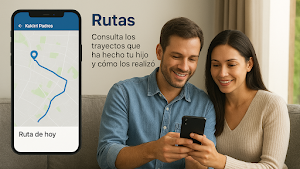
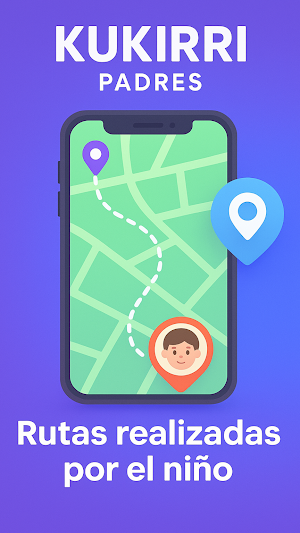
View routes and movements.
Set up safe zones with entry and exit alerts.
📱 App Control
View apps installed on the child's device.
Block apps completely or by schedule.
📱 App Control
View apps installed on the child's device.
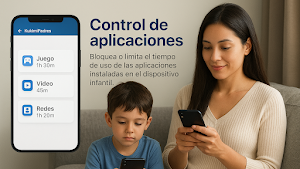
Block apps completely or by time. Set daily usage limits per app.
Manually authorize new apps.
Receive alerts when new apps are installed.
⏱️ Screen Time and Digital Habits
Create personalized schedules (study, rest, bedtime).
View daily usage time per app.
Daily activity timeline.
Usage statistics to help improve habits.
🚨 Smart Alerts
Receive alerts when relevant activity is detected, such as:
Usage outside of permitted hours.
Leaving a safe zone.
Attempts to uninstall or tamper with the app.
Prolonged device use.
Alerts can be displayed as:
Visual notifications.
Full-screen attention alerts.
📸 Screenshots (advanced plans)
On-demand screenshots from the children's app.
Secure viewing from Kukirri Parents.
Encrypted storage.
Exclusive access for the legal guardian.
Screenshots are only taken on the child's device, with explicit consent and permissions granted by the guardian.
🌐 Supervised Digital Activity
Kukirri allows you to monitor the general use of certain apps and services, always within the limitations of the Android system:
YouTube Activity:
Videos viewed.
Searches performed.
Use of compatible music apps (e.g., Spotify).
Web Browsing Activity:
Websites visited.
Searches performed.
Record of incoming and outgoing calls (without recording).
Access to this information depends on the permissions granted, device compatibility, and Android system limitations.
🔐 Privacy and Security
Complies with Google Play policies and child protection regulations.
All data is transmitted encrypted.
Only the legal guardian can access the child's information.
Data is not shared with third parties.
Sensitive permissions are requested only in the children's app and always with the guardian's authorization.
Kukirri is not designed for spying, but for responsible supervision within the family.
🧠 Available Plans
🆓 Free Account
Real-time location tracking
Basic app control
Basic alerts
24-hour history
💡 Basic Plan
Includes everything above, plus:
Full app blocking
7-day history
Call and contact management
Custom alerts
YouTube and music tracking
Safe zones
Manual app approval
⭐ Premium Plan
Includes everything above, plus:
Real-time screenshots
Up to 30 days of timeline history
Up to 30 days of statistics history
Detailed routes and movements
Advanced alerts based on usage patterns
Priority support
Early access to new features
⚙️ Installation
Install Kukirri Parents on the guardian's device.
Create an account and profile for the child.
Install Kukirri Kids on the child's device.
Grant the necessary permissions with the legal guardian's authorization.
💬 Help and support
🌐 https://www.kukirri.com/support
📧 [email protected]
Kukirri Parents is the main app in the Kukirri ecosystem, designed to help mothers and fathers supervise, protect, and guide their children in the responsible use of Android mobile devices.
It works in conjunction with Kukirri Kids, which must be installed on the child's device and configured by the legal guardian.
👨👩👧 Designed for families with children aged 6 to 14
Kukirri focuses on family supervision, promoting healthy digital habits and offering clear tools to guide children in their daily digital lives.
📍 Location and Movement
View the child's device's real-time location.
Recent location history.
View routes and movements.
Set up safe zones with entry and exit alerts.
📱 App Control
View apps installed on the child's device.
Block apps completely or by schedule.
📱 App Control
View apps installed on the child's device.
Block apps completely or by time. Set daily usage limits per app.
Manually authorize new apps.
Receive alerts when new apps are installed.
⏱️ Screen Time and Digital Habits
Create personalized schedules (study, rest, bedtime).
View daily usage time per app.
Daily activity timeline.
Usage statistics to help improve habits.
🚨 Smart Alerts
Receive alerts when relevant activity is detected, such as:
Usage outside of permitted hours.
Leaving a safe zone.
Attempts to uninstall or tamper with the app.
Prolonged device use.
Alerts can be displayed as:
Visual notifications.
Full-screen attention alerts.
📸 Screenshots (advanced plans)
On-demand screenshots from the children's app.
Secure viewing from Kukirri Parents.
Encrypted storage.
Exclusive access for the legal guardian.
Screenshots are only taken on the child's device, with explicit consent and permissions granted by the guardian.
🌐 Supervised Digital Activity
Kukirri allows you to monitor the general use of certain apps and services, always within the limitations of the Android system:
YouTube Activity:
Videos viewed.
Searches performed.
Use of compatible music apps (e.g., Spotify).
Web Browsing Activity:
Websites visited.
Searches performed.
Record of incoming and outgoing calls (without recording).
Access to this information depends on the permissions granted, device compatibility, and Android system limitations.
🔐 Privacy and Security
Complies with Google Play policies and child protection regulations.
All data is transmitted encrypted.
Only the legal guardian can access the child's information.
Data is not shared with third parties.
Sensitive permissions are requested only in the children's app and always with the guardian's authorization.
Kukirri is not designed for spying, but for responsible supervision within the family.
🧠 Available Plans
🆓 Free Account
Real-time location tracking
Basic app control
Basic alerts
24-hour history
💡 Basic Plan
Includes everything above, plus:
Full app blocking
7-day history
Call and contact management
Custom alerts
YouTube and music tracking
Safe zones
Manual app approval
⭐ Premium Plan
Includes everything above, plus:
Real-time screenshots
Up to 30 days of timeline history
Up to 30 days of statistics history
Detailed routes and movements
Advanced alerts based on usage patterns
Priority support
Early access to new features
⚙️ Installation
Install Kukirri Parents on the guardian's device.
Create an account and profile for the child.
Install Kukirri Kids on the child's device.
Grant the necessary permissions with the legal guardian's authorization.
💬 Help and support
🌐 https://www.kukirri.com/support
📧 [email protected]
What’s new
Version 2.0.5 · Updated September 16, 2026
2.0.596
Alternatives to Kukirri Control Parental
Looking for apps like Kukirri Control Parental? Here are 6 similar Android apps on Google Play. The highest rated is Trend Micro ID Protection (4.5/5), and 5 of the 6 are free to download.
-
Parental Control App Blocker 4.3
-
Parental Control - Kidslox 4.2
-
WhatsGPS 3.6
-
Trend Micro ID Protection 4.5
-
App Usage - Manage/Track Usage 4.4
-
TapSlide
| App | Rating | Price | Installs | Last updated | Compare |
|---|---|---|---|---|---|
| Kukirri Control Parental | – | Free | 1,000+ | Sep 16, 2026 | |
| Parental Control App Blocker | 4.3 / 5 | Free | 5,000,000+ | Oct 5, 2026 | Compare |
| Parental Control - Kidslox | 4.2 / 5 | Free | 1,000,000+ | Sep 14, 2026 | Compare |
| WhatsGPS | 3.6 / 5 | Free | 500,000+ | Sep 22, 2026 | Compare |
| Trend Micro ID Protection | 4.5 / 5 | Free | 50,000+ | Oct 22, 2026 | Compare |
| App Usage - Manage/Track Usage | 4.4 / 5 | Free | 1,000,000+ | Oct 5, 2026 | Compare |
| TapSlide | – | – | – | Jan 4, 2026 | Compare |
Similar apps on Google Play
- Parental Control App Blocker
- Parental Control - Kidslox
- WhatsGPS
- Trend Micro ID Protection
- App Usage - Manage/Track Usage
- TapSlide
- Mobile Hotel PMS by Hotel Sync
- Duplifix: Duplicate Photos
- Qustodio Parental Control App
- Quick Share: File Transfer
- Parental Control App- FamiSafe
- LockTrip
- Vcf viewer by Leading Tech
- AnyTracker - track anything!
- Deye Cloud
- Anti Spy Detector - Spyware
- IronVest - Security & Privacy
- ParentSider
- Tetra Browser & VPN
- TAP Kiln Control Mobile
- Smart Switch - File Transfer
- Airthings
- HealthyHeart
- Sleep Tracker
- Envision
- Dot Conner: Webtective
- Authenticator 2FA - OTP
- Radar-Stay Connected Privately
- seca myAnalytics
- F-Secure Mobile Security
- PDK Access by ProdataKey
- CuboAi Smart Baby Monitor
- Bitdefender Central
- Dokobit
- Engross: ADHD Focus Timer
- Swift Backup
- Recycle Right
- Linksys
- Heima - Chores Tracker
- WhatisRemoved+
- Illumine - Childcare App
- QmetaRam AI: Quantum Assistant
- Screen time: App blocking
- Phone Clone Tool: Switch data
- Bitdefender Mobile Security
- Kisi
- SafetyCulture (iAuditor)
- Wristcheck
- AI Call Assistant - Ringia Ai
- Basit Hesap Makinesi
- TimeMark Alarm: Time & Loc Cam
- Phone Cleaner - Space Cleanup
- Homey — A better smart home
- Groundwire: VoIP SIP Softphone
- WaiverForever - Online Waiver
- GlassWire Data Usage Monitor
- AirDroid Parental Control
- Ruuvi Station
- Tractive GPS for Cats & Dogs
- AppDash: App Manager & Backup
- Aegis Authenticator - 2FA App
- Philips Avent Baby Monitor+
- Castro Premium - system info
- Rogervoice Phone Call Captions
- Lookout - Assisted vision