Face Mosaic: Auto Photo Blur
Auto-detect faces and batch blur photos before sharing in chats or social apps.
About Face Mosaic: Auto Photo Blur
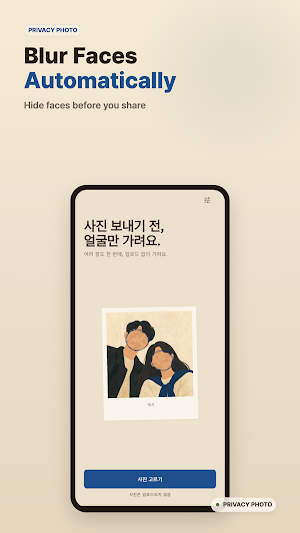
Before you share, blur the faces.
Photos posted to social media, messaging apps, or buy-and-sell apps often include people who never agreed to be in your post.
This app uses on-device face detection to batch-blur photos so you can share with less exposure of other people's faces.
Key features
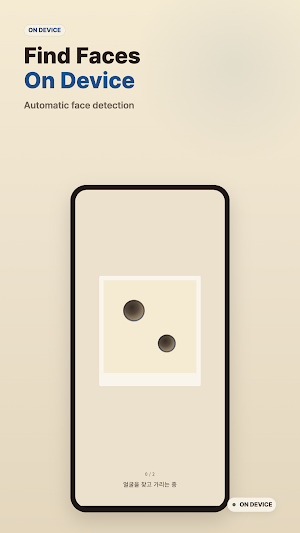
- Automatic face detection (frontal and partial side angle)
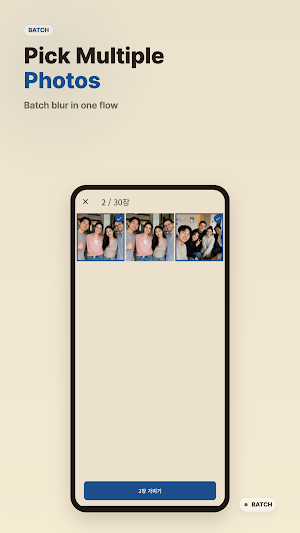
- Batch blur multiple photos at once
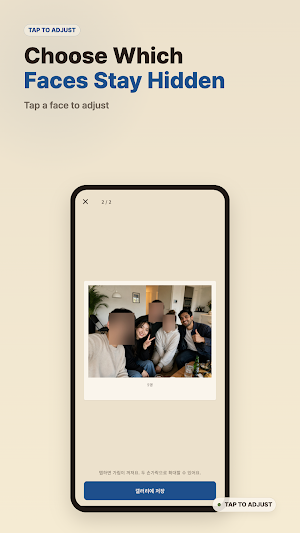
- Per-face control: choose which detected faces to leave visible
- Ink-tone polaroid mosaic with a softer look
- Keeps saved photos from turning sideways
- Saves results as new photos to your gallery
- All processing runs on your device, no server upload
Use it before
- Posting group photos, parties, or gatherings to social media
- Sharing pictures that include strangers in the background
- Protecting children or family members in shared photos
- Uploading to buy-and-sell apps, blogs, or community forums
- Sending photos through messengers
How it works
The app uses on-device face detection to locate faces and applies a mosaic blur to those areas. Photo files never leave your device.
Notes
- Android 9 (API 28) and above.
- Side profiles, partial faces, or heavily occluded faces may not be detected. The result screen is being extended to let you add missing regions manually.
- Some social platforms re-compress your photos on upload, but they do not blur faces for you. Cleaning the photo before sharing is a separate step.
- Face mosaic is not a security tool. It does not guarantee that an already-shared photo cannot be reconstructed — it is designed for cleaning before you share.
Face Mosaic: Auto Photo Blur details
Face Mosaic: Auto Photo Blur is a free Photography app for Android with 100+ installs on Google Play. It was released on May 5, 2026 and last updated on May 5, 2026. It's developed by Kinderia. It requires Android 9 or later. The app contains ads.
- Category
- Photography
- Installs
- 100+
- Price
- Free
- In-app purchases
- No
- Ads
- Contains ads
- Current version
- 1.0.0
- Requires Android
- 9
- Content rating
- Everyone
- Released
- May 5, 2026
- Last updated
- May 5, 2026
- Developer
- Kinderia
What’s new in Face Mosaic: Auto Photo Blur
Face Mosaic v1.0 🎞️ Find faces in your photos and add a mosaic blur. 🎞️ Process multiple photos at once. 🎞️ Choose which detected faces to cover or leave visible. 🎞️ Keep saved photos from turning sideways. 🎞️ Photos are processed on your device and are not uploaded to a server. Use it before sharing group photos, family photos, or photos with people in the background. Feedback: [email protected]
Version 1.0.0 · Updated May 5, 2026
Alternatives to Face Mosaic: Auto Photo Blur
Looking for apps like Face Mosaic: Auto Photo Blur? Here are 6 similar Android apps on Google Play. All of them are free to download.
Mosquito Repeller: Sound
Eight mosquito sound profiles with background timers for indoor and outdoor use.

Merry Day: Christmas Planner
Christmas planner with advent countdown, tasks, notes, and a room you decorate.
Dogak: Keycap Clicker & ASMR
Collect 100 keyboard switch sounds & 100 keycaps — a cozy ASMR clicker.

Korean Phrasebook for Travel
Offline Korean phrasebook with pronunciation, Seoul guides and transit tips.
Jibang & Jesa Table Helper
Write the Korean jibang tablet in hanja, see the jesa table layout, prep offline
Opening Gym: Chess Openings
Learn chess openings by spaced repetition. Daily 5-minute repertoire drills.
| App | Rating | Price | Installs | Last updated |
|---|---|---|---|---|
| Face Mosaic: Auto Photo Blur | – | Free | 100+ | May 5, 2026 |
| Mosquito Repeller: Sound | – | Free | 0+ | – |
| Merry Day: Christmas Planner | – | Free | 0+ | – |
| Dogak: Keycap Clicker & ASMR | – | Free | 1+ | – |
| Korean Phrasebook for Travel | – | Free | 5+ | Jul 29, 2026 |
| Jibang & Jesa Table Helper | – | Free | 10+ | Jul 29, 2026 |
| Opening Gym: Chess Openings | – | Free | 1+ | – |
