

우편번호 찾기 · 영문주소 변환 - 도로명주소 검색
Kinderia Tools Contains ads
Convert Korean addresses to English addresses via zip codes and road names with a single search, and instantly copy international shipping address input forms.
- Downloads
- 19+
- on Google Play
- Price
- Free
- No in-app purchases
- Updated
- Oct 17
- 2026 · v1.0.1
Screenshots

About 우편번호 찾기 · 영문주소 변환 - 도로명주소 검색
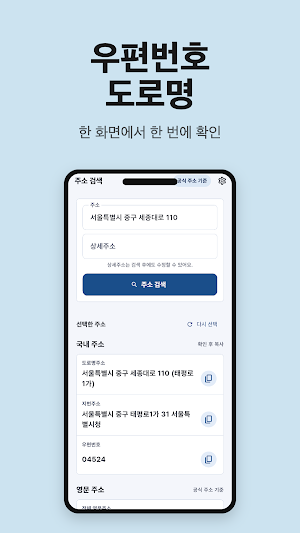
Get your Korean address, including zip code, street address, and English address, all on one screen with a single search.
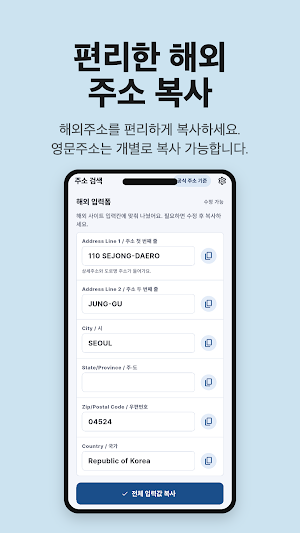
It automatically fills in six fields—Address Line 1 & 2, City, State, Zip, and Country—so you can copy and paste directly into input forms on overseas websites.
If you enter detailed address information such as building number, unit number, and floor, it organizes it into English and inserts it before Address Line 1. ━━━━━━━━━━━━━━━━━━
📌 Recommended for:
━━━━━━━━━━━━━━━━━━
• Those who enter shipping addresses for overseas direct purchases from Amazon, iHerb, AliExpress, etc.
• Those who need to enter an English address when shopping at overseas malls, applying for a visa, or signing up for an international account
• Those who want to check Road Name Addresses, Lot Number Addresses, and Zip Codes all at once
• Those who find it bothersome to switch back and forth between Naver and the Post Office website to convert addresses to English
• Those who used to have to search for the English spelling of apartment building and unit numbers every time
━━━━━━━━━━━━━━━━━━
📌 Main Features
━━━━━━━━━━━━━━━━━━━
✓ Korean Address Search — Results available regardless of Road Name, Lot Number, or Building Name search
✓ Automatic Zip Code Display — Check 5-digit zip codes at once
✓ Simultaneous Display of Road Name Address + Lot Number Address — Copy directly to forms requiring both
✓ Display English Address — Road Name Address Use English notation provided by OpenAPI
✓ Auto-fill 6 fields in overseas input forms
· Address Line 1 (Detailed address + Street name in English)
· Address Line 2 (District/County/Administrative Dong)
· City
· State/Province
· Zip/Postal Code
· Country (Republic of Korea)
✓ Copy each field individually + Copy all
✓ Organize entered building/unit/floor notations — Organize Korean inputs such as `Building 101, Unit 1502` into English notation and combine them at the beginning of Line 1. Free editing possible as notation varies by site
✓ Recent Search History — Quickly recall frequently used addresses
━━━━━━━━━━━━━━━━━
📌 Why This App
━━━━━━━━━━━━━━━━━━
When making an overseas purchase or applying for a visa, it is common to find the zip code at the post office, the English address on Naver, and the building/unit number notation on blogs, and then manually move them one by one into the input form.
This app combines that entire process into a single stream. With a single search, the zip code, road name address, lot number address, and English address appear together, and the six fields of the overseas input form—Address Line 1 & 2, City, State, Zip, and Country—are automatically filled in. You can manually edit and copy parts that differ in notation across sites, such as building and unit numbers.
The English address is displayed based on the English notation provided by the Ministry of the Interior and Safety's Road Name Address System.
━━━━━━━━━━━━━━━━━━
📌 Advertising
━━━━━━━━━━━━━━━━━━
Only banner ads are displayed. We do not display full-screen ads that interrupt the search or copy flow.
Inquiries: [email protected]
It automatically fills in six fields—Address Line 1 & 2, City, State, Zip, and Country—so you can copy and paste directly into input forms on overseas websites.
If you enter detailed address information such as building number, unit number, and floor, it organizes it into English and inserts it before Address Line 1. ━━━━━━━━━━━━━━━━━━
📌 Recommended for:
━━━━━━━━━━━━━━━━━━
• Those who enter shipping addresses for overseas direct purchases from Amazon, iHerb, AliExpress, etc.
• Those who need to enter an English address when shopping at overseas malls, applying for a visa, or signing up for an international account
• Those who want to check Road Name Addresses, Lot Number Addresses, and Zip Codes all at once
• Those who find it bothersome to switch back and forth between Naver and the Post Office website to convert addresses to English
• Those who used to have to search for the English spelling of apartment building and unit numbers every time
━━━━━━━━━━━━━━━━━━
📌 Main Features
━━━━━━━━━━━━━━━━━━━
✓ Korean Address Search — Results available regardless of Road Name, Lot Number, or Building Name search
✓ Automatic Zip Code Display — Check 5-digit zip codes at once
✓ Simultaneous Display of Road Name Address + Lot Number Address — Copy directly to forms requiring both
✓ Display English Address — Road Name Address Use English notation provided by OpenAPI
✓ Auto-fill 6 fields in overseas input forms
· Address Line 1 (Detailed address + Street name in English)
· Address Line 2 (District/County/Administrative Dong)
· City
· State/Province
· Zip/Postal Code
· Country (Republic of Korea)
✓ Copy each field individually + Copy all
✓ Organize entered building/unit/floor notations — Organize Korean inputs such as `Building 101, Unit 1502` into English notation and combine them at the beginning of Line 1. Free editing possible as notation varies by site
✓ Recent Search History — Quickly recall frequently used addresses
━━━━━━━━━━━━━━━━━
📌 Why This App
━━━━━━━━━━━━━━━━━━
When making an overseas purchase or applying for a visa, it is common to find the zip code at the post office, the English address on Naver, and the building/unit number notation on blogs, and then manually move them one by one into the input form.
This app combines that entire process into a single stream. With a single search, the zip code, road name address, lot number address, and English address appear together, and the six fields of the overseas input form—Address Line 1 & 2, City, State, Zip, and Country—are automatically filled in. You can manually edit and copy parts that differ in notation across sites, such as building and unit numbers.
The English address is displayed based on the English notation provided by the Ministry of the Interior and Safety's Road Name Address System.
━━━━━━━━━━━━━━━━━━
📌 Advertising
━━━━━━━━━━━━━━━━━━
Only banner ads are displayed. We do not display full-screen ads that interrupt the search or copy flow.
Inquiries: [email protected]
What’s new
Version 1.0.1 · Updated October 17, 2026
주소 검색 한 번으로 우편번호·도로명·영문주소를 확인하고, 해외 사이트 입력폼 6칸을 그대로 복사할 수 있습니다. - 도로명·지번·건물명 검색 - 영문주소 자동 변환 - 동·호수 표기 정리 - 필드별 복사 + 전체 복사 - 최근 검색 빠른 호출
Alternatives to 우편번호 찾기 · 영문주소 변환 - 도로명주소 검색
Looking for apps like 우편번호 찾기 · 영문주소 변환 - 도로명주소 검색? Here are 6 similar Android apps on Google Play. All of them are free to download.
-
Mosquito Repeller: Sound
-
Merry Day: Christmas Planner
-
Dogak: Keycap Clicker & ASMR
-
Korean Phrasebook for Travel
-
Jibang & Jesa Table Helper
-
Opening Gym: Chess Openings
| App | Rating | Price | Installs | Last updated | Compare |
|---|---|---|---|---|---|
| 우편번호 찾기 · 영문주소 변환 - 도로명주소 검색 | – | Free | 10+ | Oct 17, 2026 | |
| Mosquito Repeller: Sound | – | Free | 1,000+ | Sep 18, 2026 | Compare |
| Merry Day: Christmas Planner | – | Free | 10+ | Aug 11, 2026 | Compare |
| Dogak: Keycap Clicker & ASMR | – | Free | 50+ | Oct 17, 2026 | Compare |
| Korean Phrasebook for Travel | – | Free | 5+ | – | Compare |
| Jibang & Jesa Table Helper | – | Free | 50+ | Oct 16, 2026 | Compare |
| Opening Gym: Chess Openings | – | Free | 50+ | Jul 26, 2026 | Compare |
Similar apps on Google Play
- Mosquito Repeller: Sound
- Merry Day: Christmas Planner
- Dogak: Keycap Clicker & ASMR
- Korean Phrasebook for Travel
- Jibang & Jesa Table Helper
- Opening Gym: Chess Openings
- Fruit Fly Repeller: Sound
- Munggram - Nonogram Dog Puzzle
- Travel Vietnamese for Koreans
- 전기요금 계산기 - 에어컨 전기세 누진세계산기
- Duty Pocket: Nurse Shift Cal
- Travel Spanish Phrases
- Travel Chinese for Taiwan
- Travel English for Koreans
- Travel Thai for Koreans
- Travel Chinese for Koreans
- Sumbi: Haenyeo Dive Roguelike
- Idiom Puzzle: Learn Hanja
- Verse Puzzle: Bible Words
- 韓国語 旅行会話 カタカナ発音 - ハングルポケット
- Gomoku Offline - AI & Renju
- 공시알림 플러스 - 주식 전자공시 관심종목 알림
- Photo Recovery: Restore Trash
- First Go - Learn Baduk Rules
- Janggi: Korean Chess Mate
- Loan Calculator & Amortization
- 주택관리사보 Exam: Past Q&A CBT
- Currency Converter & Widget
- 경마파파 : 경마 출주표 경주결과 배당 전적
- Travel Japanese for Koreans
- 현장 보드판 - 공사 사진대지 현장사진 카메라
- Goldmark - Gold Silver Tracker
- Darts 501 Scoreboard & Cricket
- Calorie Counter Photo Food Log
- Blood Pressure Glucose Tracker
- 정부지원금 레이더 - 근로·자녀장려금 대상자 조회 계산
- 아침인사 이미지 - 카톡 인사말 좋은아침
- 공인노무사 1차 기출문제 해설 · 노무사 시험 CBT
- 경비지도사 1차 기출문제 해설 · 자격증 시험 CBT
- 조선 왕조 순서 외우기 - 연표·가계도
- 아기 이모티콘 만들기 - 사진 AI 스티커
- 말씀일기 - 오늘의 말씀, 성경 구절 묵상
- 오늘의 운세 AI 사주풀이 - 띠별 운세 궁합
- 로또 당첨확인·QR스캔 - 로또파파
- 연산군의 일기 — 조선왕조실록 1인칭 리더
- 단종·사육신 조선왕조실록 소설 - 성삼문일기
- 도서관 찾기 - ISBN 바코드·전국 도서관 책 찾기
- 우리아이 예방접종 수첩 - 일정 알림 성장곡선
- 음력달력
- Face Mosaic: Auto Photo Blur
- EXIF Remover Photo Metadata
- Car Specs Database: 0-60 & EV
- 난중일기: 이순신의 일기, 소설체 원문
- 맞춤법 퀴즈 게임 - 띄어쓰기 한국어 달인