

Screenshot Pro 2
Tools
The most simplified tool to take screenshots and screen videos!
- Rating
- 3.6
- 3.3K ratings
- Downloads
- 100K+
- on Google Play
- Price
- $1.53
- No in-app purchases
- Updated
- Feb 21
- 2018 · v1.0
Screenshots


About Screenshot Pro 2
Info: The microphone permission is needed to be able to take videos with sound.
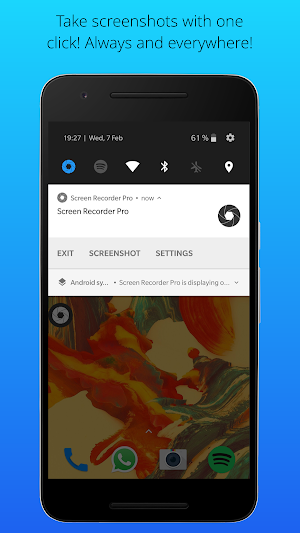
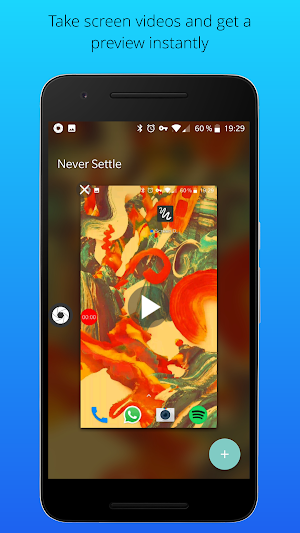
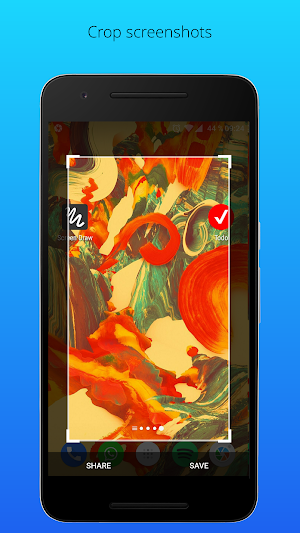
The times are over, where you had to trigger complicated key combinations just to take a screenshot or a screen video. With Screenshot Pro you can take screenshots and screen videos with just 1 click, share it with any app or crop it. Screenshot Pro is hided to the notification bar, once it is launched. That means it is always and everywhere accessible, no matter on which screens you are. You can also add a floating button to have it accessible even more quickly. By clicking on the button or the notification you can take screenshots or screen videos instantly. All screenshots and videos are stored in the gallery.
That's all! It is as easy as that!
• Screenshots and screen videos with just one click
• Floating icon
• Crop screenshots
• Share screenshots
• Always and everywhere accessible
• Shortcut in quick settings (for Android 7.0 and larger)
• Autostart after boot of device
• Delete status bar from screenshots
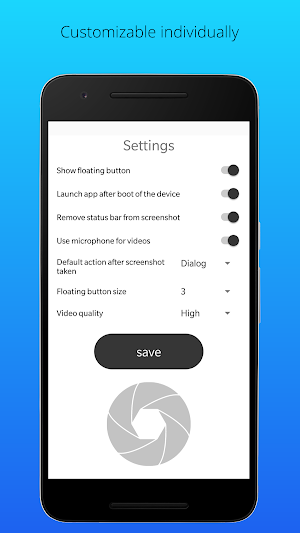
• Choose default action after screenshot taken
The times are over, where you had to trigger complicated key combinations just to take a screenshot or a screen video. With Screenshot Pro you can take screenshots and screen videos with just 1 click, share it with any app or crop it. Screenshot Pro is hided to the notification bar, once it is launched. That means it is always and everywhere accessible, no matter on which screens you are. You can also add a floating button to have it accessible even more quickly. By clicking on the button or the notification you can take screenshots or screen videos instantly. All screenshots and videos are stored in the gallery.
That's all! It is as easy as that!
• Screenshots and screen videos with just one click
• Floating icon
• Crop screenshots
• Share screenshots
• Always and everywhere accessible
• Shortcut in quick settings (for Android 7.0 and larger)
• Autostart after boot of device
• Delete status bar from screenshots
• Choose default action after screenshot taken
What’s new
Version 1.0 · Updated February 21, 2018
● Improvements ● Video function added ● Floating button size is adjustable ● Bugfixes
User reviews

A good app. It does what's supposed to do.

Great app

Giod

Need More Updates Design and performance boost..

All gooD! quick and easy simple

So far I love this app. Simple, straightforward. NOV 2, 2020 Still love the app and use it often.
Alternatives to Screenshot Pro 2
Looking for apps like Screenshot Pro 2? Here are 6 similar Android apps on Google Play. The highest rated is Todo List, Reminder and Widget (4.1/5), and all 6 are free to download.
-
Name Test 4.0
-
Todo List, Reminder and Widget 4.1
-
Transcribr-Voice to text
-
Pedometer - step counter & cal
-
Job Test
-
Which animal fits to you?
| App | Rating | Price | Installs | Last updated | Compare |
|---|---|---|---|---|---|
| Screenshot Pro 2 | 3.6 / 5 | $1.53 | 100,000+ | Feb 21, 2018 | |
| Name Test | 4.0 / 5 | Free | 100,000+ | – | Compare |
| Todo List, Reminder and Widget | 4.1 / 5 | Free | 100,000+ | – | Compare |
| Transcribr-Voice to text | – | Free | 500+ | – | Compare |
| Pedometer - step counter & cal | – | Free | 1,000+ | May 19, 2021 | Compare |
| Job Test | – | Free | 500+ | Nov 22, 2017 | Compare |
| Which animal fits to you? | – | Free | 100+ | Nov 19, 2017 | Compare |
Compare Screenshot Pro 2 with the top alternatives: ratings, updates, ASO score and keyword gaps →
Similar apps on Google Play
- Name Test
- Todo List, Reminder and Widget
- Transcribr-Voice to text
- Pedometer - step counter & cal
- Job Test
- Which animal fits to you?
- Screenshot Pro 2
- Fredo the crazy frog
- Screen Draw Screenshot Pro
- Lie detector prank
- BFF Friendship Test
- Mobile Paint
- CATCH THE CHEESE Game free
- Love Test - Test your love