Screen Draw Screenshot Pro
Draw on every screen & take screenshots and videos with Screen Draw Screenshot!
About Screen Draw Screenshot Pro
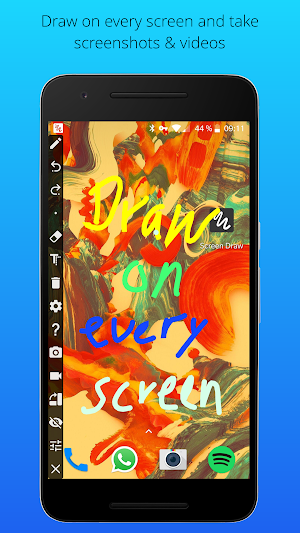
With Screen Draw Screenshot you can draw on every screen of your smartphone and take screenshots and videos. Quick accessible, always and everywhere! Screen Draw Screenshot is perfect for presentations, video tutorials or screenshots to highlight texts or images on the screen. The Screen Draw Screenshot toolbox is individual placeable per drag and drop. Addtional you can rotate the draw toolbox horizontal or vertical that you can place it at the best position on your screen or you just hide it in the notification bar.
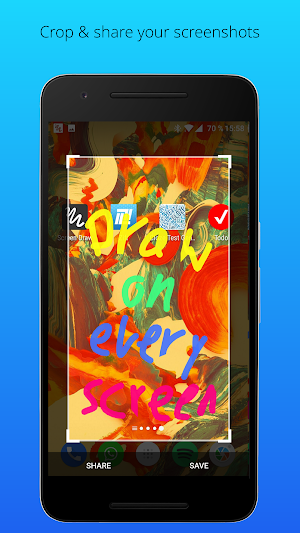
Forget the inconvenient steps and key combinations to take and edit a screenshot. With Screen Draw Screenshot you can take screenshots and videos with just 1 click! Activate the draw mode, draw or mark something and click on the screenshot button. You can share your screenshot instantly!
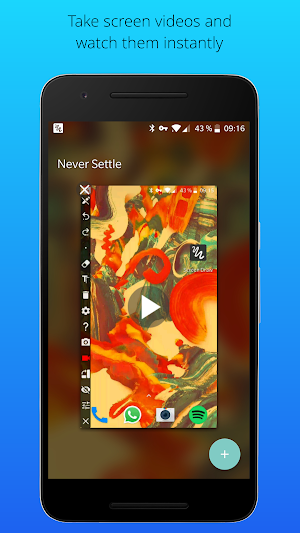
• Take screenshots and videos (Android Lollipop required)
• Export screenshots as pdf
• Crop screenshots
• Draw everywhere
• Add text
• Stroke color and width selectable
• Hide-mode
• Always accessible
• Individual placeable per drag and drop (horizontal and vertical)
• Undo/delete drawing function
• Accessible with one click
• Add screen draw icon to quick settings (Android 7 required)
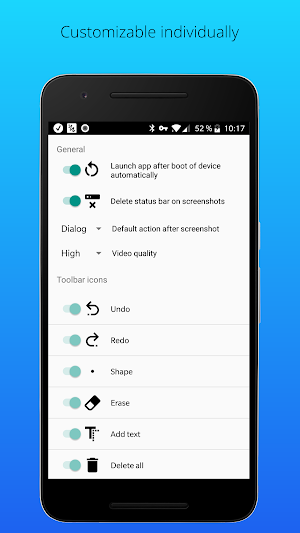
• Autostart on boot of device
• Delete status bar from screenshots
Screen Draw Screenshot Pro details
Screen Draw Screenshot Pro is a paid Tools app for Android with 100,000+ installs on Google Play and a 4.2/5 average rating from 2,916 ratings. It was released on May 9, 2015 and last updated on February 26, 2018. It requires Android 4.0 or later.
- Category
- Tools
- Rating
- 4.2 / 5 (2,916 ratings)
- Installs
- 100,000+
- Price
- $3.63
- In-app purchases
- No
- Ads
- No ads
- Current version
- 1.0
- Size
- 7.1M
- Requires Android
- 4.0 and up
- Content rating
- Everyone
- Released
- May 9, 2015
- Last updated
- February 26, 2018
What’s new in Screen Draw Screenshot Pro
● Fonts added ● Improvements ● Video function added ● Autostart after boot ● Delete status bar from screenshots automatically ● Default action after screenshot ● Bugfixes
Version 1.0 · Updated February 26, 2018
Similar Apps

Name Test & Love Test
Are you wondering if you and your significant other have compatible names?...
Fredo the crazy frog
Fredo the frog is an endless Jump ’n’ Run game with the...

Transcribr-Voice to text
Everyone knows the situation: you're sitting on the bus, in the library...

Pedometer - step counter & cal
The pedometer/step counter enables energy-saving counting of your steps in the background....

Job Test
With this fun app you can calculate which job does fit best...

Which animal fits to you?
With this calculator, you can calculate which animal fits best to you....
Frequently Asked Questions (FAQ)
What can Screen Draw Screenshot Pro do?
How do I take a screenshot or video using Screen Draw Screenshot Pro?
Can I customize the placement of the draw toolbox on my screen?
Is Screen Draw Screenshot Pro compatible with Android Lollipop?
Does Screen Draw Screenshot Pro have a feature to hide the status bar from screenshots?
Can I add the screen draw icon to quick settings?
Does Screen Draw Screenshot Pro have an undo/delete drawing function?
Does Screen Draw Screenshot Pro autostart on boot of the device?
Is the stroke color and width selectable in Screen Draw Screenshot Pro?