
Compass
Tools Contains ads
Uses the magnetic field sensor to convert your device into a compass.
- Rating
- 4.4
- 320 ratings
- Downloads
- 50K+
- on Google Play
- Price
- Free
- No in-app purchases
- Updated
- Feb 4
- 2021
Screenshots


About Compass
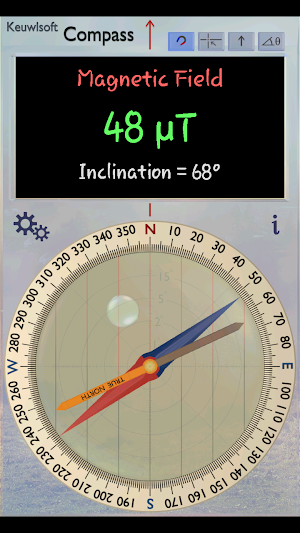
Uses the Magnetic Field Sensor to convert your device into a Compass. Does not need to be level. Magnetic North and True North Needles.
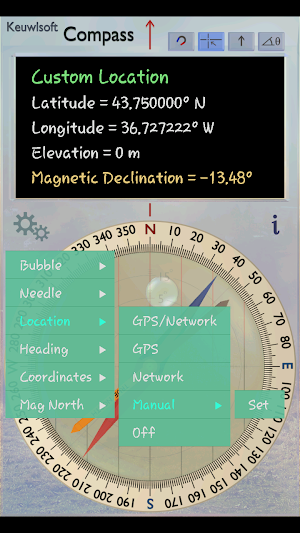
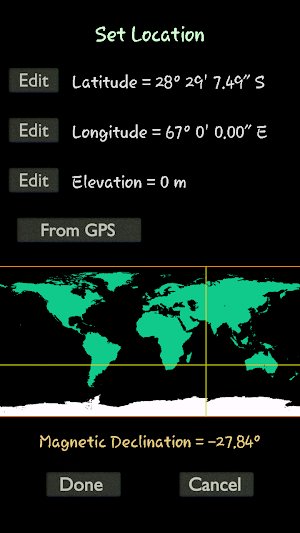
Location is required to determine the magnetic declination - the difference between magnetic north and true north (Hence the ACCESS_FINE_LOCATION Permission). If GPS/Network location is not available or turned off, then the location can still be entered manually.
Normally a compass needs to be level to get the correct reading, but this app uses the accelerometer reading to convert the magnetic field reading back to the horizontal plane. If you would prefer it to act like a real compass (which requires being level for a correct reading), in Settings > Mag North, select the magnetic north to point to the maximum field in the plane of the device.
Also:
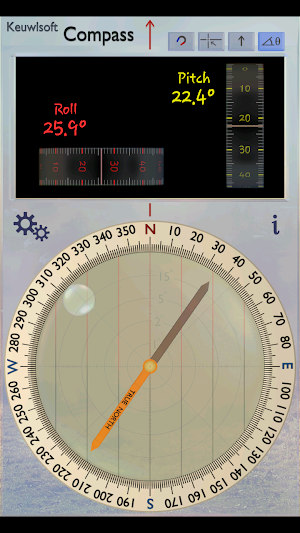
• Bull's eye Bubble in Compass to show how level it is.
• Roll and Pitch Gauges.
• Calibrate Bubble Level Option.
• Heading in Azimuth or Quadrant Notation.
• Magnetic Field Strength and Inclination.
• Rotatable dial with orienting lines.
• GPS/Network Location – Latitude, Longitude and Elevation (GPS can consume a lot of battery, therefore it is only measured continually when the location display is shown. Otherwise just one reading is taken from which the magnetic declination is determined).
Your device must have a Magnetic Field Sensor for this app to work. Magnetic field direction can be affected by nearby ferromagnetic material - Therefore move into a clear area and remove any metallic casing that might interfere with the sensor. Some sensors can become magnetized or gain an offset resulting in false readings – rotating the device around each of the three axis can sometimes help. Results depend on quality of magnetic sensor, so use for indication only.
Location is required to determine the magnetic declination - the difference between magnetic north and true north (Hence the ACCESS_FINE_LOCATION Permission). If GPS/Network location is not available or turned off, then the location can still be entered manually.
Normally a compass needs to be level to get the correct reading, but this app uses the accelerometer reading to convert the magnetic field reading back to the horizontal plane. If you would prefer it to act like a real compass (which requires being level for a correct reading), in Settings > Mag North, select the magnetic north to point to the maximum field in the plane of the device.
Also:
• Bull's eye Bubble in Compass to show how level it is.
• Roll and Pitch Gauges.
• Calibrate Bubble Level Option.
• Heading in Azimuth or Quadrant Notation.
• Magnetic Field Strength and Inclination.
• Rotatable dial with orienting lines.
• GPS/Network Location – Latitude, Longitude and Elevation (GPS can consume a lot of battery, therefore it is only measured continually when the location display is shown. Otherwise just one reading is taken from which the magnetic declination is determined).
Your device must have a Magnetic Field Sensor for this app to work. Magnetic field direction can be affected by nearby ferromagnetic material - Therefore move into a clear area and remove any metallic casing that might interfere with the sensor. Some sensors can become magnetized or gain an offset resulting in false readings – rotating the device around each of the three axis can sometimes help. Results depend on quality of magnetic sensor, so use for indication only.
What’s new
Updated February 4, 2021
minor tweaks/fixes.
User reviews

Simply good

5 star excellent app fully loaded compass thank you developers.

It does the job, very well. No ads!

Most compass apps are simple & compete just on appearance. Some paid/add-supported compass apps have features like adjustable bezel, showing magnetic strength, leveling, etc. This is free, has all the features, AND has a simple, elegant UI!

Very Nice!!

The perfect tool for setting up my satellite dish.
Alternatives to Compass
Looking for apps like Compass? Here are 6 similar Android apps on Google Play. The highest rated is Function Generator (4.4/5), and all 6 are free to download.
-
3x3 Cube Solver 3.6
-
Function Generator 4.4
-
Audio Frequency Counter 4.2
-
Metronome 4.3
-
Sand Timer 4.2
-
Protractor 3.5
| App | Rating | Price | Installs | Last updated | Compare |
|---|---|---|---|---|---|
| Compass | 4.4 / 5 | Free | 50,000+ | Feb 4, 2021 | |
| 3x3 Cube Solver | 3.6 / 5 | Free | 50,000+ | Jun 17, 2020 | Compare |
| Function Generator | 4.4 / 5 | Free | 1,000,000+ | Jun 20, 2020 | Compare |
| Audio Frequency Counter | 4.2 / 5 | Free | 500,000+ | Mar 20, 2020 | Compare |
| Metronome | 4.3 / 5 | Free | 1,000,000+ | Jun 7, 2020 | Compare |
| Sand Timer | 4.2 / 5 | Free | 1,000,000+ | Apr 27, 2020 | Compare |
| Protractor | 3.5 / 5 | Free | 500,000+ | Mar 26, 2019 | Compare |
Compare Compass with the top alternatives: ratings, updates, ASO score and keyword gaps →
Similar apps on Google Play
- 3x3 Cube Solver
- Function Generator
- Audio Frequency Counter
- Metronome
- Sand Timer
- Protractor
- Gauss Meter
- Bluetooth Electronics
- Counter
- SPL Meter
- Spectrum Analyser
- IR Remote Creator
- Spirit Level
- Accelerometer Meter
- Wifi Analyser
- Pulse Echo Sonar Meter
- BLE Analyser
- Guitar Tuner
- AC Magnetic Field Meter
- USB Host Test
- Camera RGB Color Picker
- Ruler
- Stopwatch
- USB Serial Monitor
- Clap Counter
- Light Meter
- Proximity Sensor Counter
- Calculator
- GPS Waypoint Finder
- Camera Color Counter
- Egg Timer
- Accelerometer Counter
- Harmonicity Meter
- Compass
- Music Pad
- Magnetic Field Counter
- Chess Timer
- Tabata Timer
- Draw A Balance Labyrinth
- Torch
- RMS Displacement Meter
- Light Sensor Counter
- Gyroscope Counter
- Base Converter
- Guitar Tuner Pro
- Geo Protractor
- Car Challenge
- LED Banner Scroller
- Flashlight
- Universal Guitar Tuner
- Multi Piano