
Mobile To Pc File Transfer
Productivity
Manage, upload, and download your Android files from any PC browser
- Downloads
- 100+
- on Google Play
- Price
- Free
- No in-app purchases
- Updated
- May 4
- 2026 · v2.0
Screenshots
About Mobile To Pc File Transfer
You know the exact frustration.
You need to get a batch of photos, a specific video, or a document from your phone to your PC. You search for a USB cable. You try emailing it to yourself. You wait for a slow cloud sync, only to realize you are out of storage.
It’s the digital age—why is moving your own files still such a nightmare?
Stop the struggle. There is a better way.
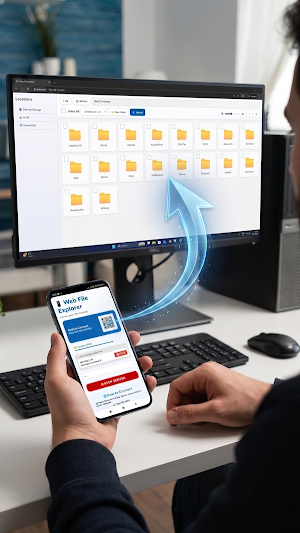
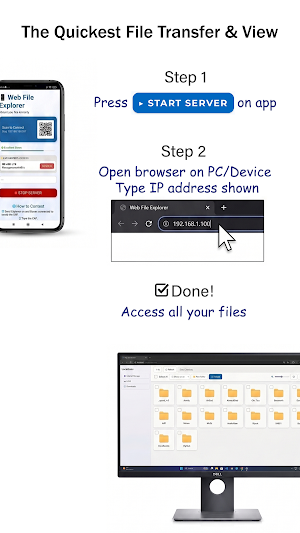
Welcome to the absolute fastest, most effortless way to bridge your phone and your computer. Just connect to the same Wi-Fi or Mobile Hotspot, press "Start," and type the IP address into your PC browser.
Instantly, your entire phone files and photos is on your big screen.
👁️ THE ONLY APP WITH A REAL "UNIVERSAL VIEWER"
Other Wi-Fi transfer apps just give you a boring, confusing text list of files. You have to blindly download a file just to see if it’s the right one. Not anymore.
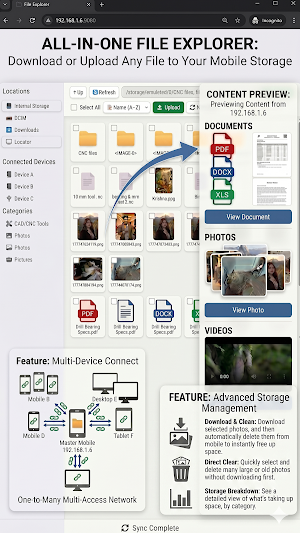
We built a high-speed media engine right into the web browser. You can actually watch your phone's videos, flip through high-res photos, and read PDFs directly on your PC monitor before you transfer anything. Finding the exact file you need has never been this fast.
⚡ EFFORTLESS EXPORT & IMPORT
Select dozens of photos or massive video files and transfer them to your PC instantly. Need to put a movie or a PDF onto your phone? Just upload it through the browser. No limits, no compressing, no waiting on the internet.
👤 A MESSAGE FROM THE DEVELOPER:
"I built this because I hated everything else on the market. I’m a minimalist. I hate useless animations, confusing menus, and annoying ads. I just wanted the easiest, most direct way to get my media onto my PC without the cloud. No fluff, no bloat—just an app that does exactly what it says."
🔥 WHY THIS WILL BE YOUR NEW FAVORITE APP:
🔒 100% Offline & Private
Your files never touch the internet. Everything transfers strictly over your local Wi-Fi or Hotspot. No cloud servers means nobody can ever intercept your data.
🛡️ God-Mode Security Monitor
See exactly who is looking at your files in real-time. See an IP address you don't recognize? Block them instantly with one tap. You can also lock your server with a custom password.
🚀 Progressive Speed Technology
Folders with hundreds of photos generate quick-preview thumbnails instantly. It feels exactly like browsing a native hard drive.
🚫 Zero Ads. Zero Bloatware.
No pop-ups. No premium subscriptions to unlock basic features. Just a clean, hyper-fast interface designed to respect your time.
The psychological truth is simple: Once you experience the friction-free magic of seeing your phone's camera roll and files beautifully laid out on your massive PC screen without plugging in a single cable, you will never go back to the old way.
Download now, take back your time, and take control of your storage.
You need to get a batch of photos, a specific video, or a document from your phone to your PC. You search for a USB cable. You try emailing it to yourself. You wait for a slow cloud sync, only to realize you are out of storage.
It’s the digital age—why is moving your own files still such a nightmare?
Stop the struggle. There is a better way.
Welcome to the absolute fastest, most effortless way to bridge your phone and your computer. Just connect to the same Wi-Fi or Mobile Hotspot, press "Start," and type the IP address into your PC browser.
Instantly, your entire phone files and photos is on your big screen.
👁️ THE ONLY APP WITH A REAL "UNIVERSAL VIEWER"
Other Wi-Fi transfer apps just give you a boring, confusing text list of files. You have to blindly download a file just to see if it’s the right one. Not anymore.
We built a high-speed media engine right into the web browser. You can actually watch your phone's videos, flip through high-res photos, and read PDFs directly on your PC monitor before you transfer anything. Finding the exact file you need has never been this fast.
⚡ EFFORTLESS EXPORT & IMPORT
Select dozens of photos or massive video files and transfer them to your PC instantly. Need to put a movie or a PDF onto your phone? Just upload it through the browser. No limits, no compressing, no waiting on the internet.
👤 A MESSAGE FROM THE DEVELOPER:
"I built this because I hated everything else on the market. I’m a minimalist. I hate useless animations, confusing menus, and annoying ads. I just wanted the easiest, most direct way to get my media onto my PC without the cloud. No fluff, no bloat—just an app that does exactly what it says."
🔥 WHY THIS WILL BE YOUR NEW FAVORITE APP:
🔒 100% Offline & Private
Your files never touch the internet. Everything transfers strictly over your local Wi-Fi or Hotspot. No cloud servers means nobody can ever intercept your data.
🛡️ God-Mode Security Monitor
See exactly who is looking at your files in real-time. See an IP address you don't recognize? Block them instantly with one tap. You can also lock your server with a custom password.
🚀 Progressive Speed Technology
Folders with hundreds of photos generate quick-preview thumbnails instantly. It feels exactly like browsing a native hard drive.
🚫 Zero Ads. Zero Bloatware.
No pop-ups. No premium subscriptions to unlock basic features. Just a clean, hyper-fast interface designed to respect your time.
The psychological truth is simple: Once you experience the friction-free magic of seeing your phone's camera roll and files beautifully laid out on your massive PC screen without plugging in a single cable, you will never go back to the old way.
Download now, take back your time, and take control of your storage.
What’s new
Version 2.0 · Updated May 4, 2026
⚡ Instant file transfer from phone to PC via browser 🔐 QR code quick connect — no installation needed 📊 Live security monitor — block/unblock users 📶 WiFi signal monitor 🖼️ Smart image viewer with batch loading 🔒 Password protection option 📥 Multiple file upload support
User reviews

best app
Alternatives to Mobile To Pc File Transfer
Looking for apps like Mobile To Pc File Transfer? Here are 6 similar Android apps on Google Play. The highest rated is GRBL CNC Controller (1.4/5), and 1 of the 6 are free to download.
-
Photopea: Desktop PSD Editor
-
CAD Studio - 3D Print & CNC
-
Mobile Ide Arduino & esp32
-
GRBL CNC Controller: PocketCNC
-
GRBL CNC Controller
-
GRBL CNC Controller 1.4
| App | Rating | Price | Installs | Last updated | Compare |
|---|---|---|---|---|---|
| Mobile To Pc File Transfer | – | Free | 100+ | May 4, 2026 | |
| Photopea: Desktop PSD Editor | – | 6.49 USD | 0+ | – | Compare |
| CAD Studio - 3D Print & CNC | – | 7.49 USD | 100+ | – | Compare |
| Mobile Ide Arduino & esp32 | – | 6.49 USD | 100+ | Jun 16, 2026 | Compare |
| GRBL CNC Controller: PocketCNC | – | 15.99 USD | 50+ | – | Compare |
| GRBL CNC Controller | – | 7.99 USD | 500+ | – | Compare |
| GRBL CNC Controller | 1.4 / 5 | Free | 10,000+ | – | Compare |