About Mobile Ide Arduino & esp32
⚡ MOBILE IDE ARDUINO & ESP32
The Ultimate Microcontroller Development Studio for Android
🚀 WHAT IS IT?
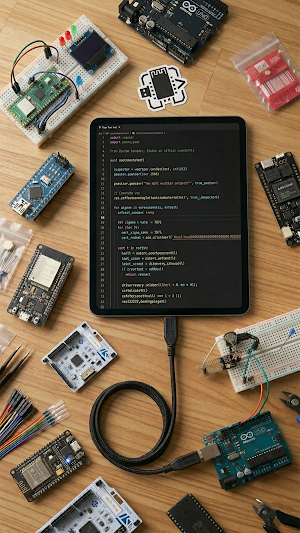
The most powerful mobile IDE ever built for microcontroller development. Code, compile, and flash Arduino, ESP32, STM32, ESP8266, and more — all from the palm of your hand. No PC required. Whether you're in the field, at home, or on the go, develop embedded systems with professional-grade tools.
✨ CORE FEATURES
🖥️ Professional Code Editor
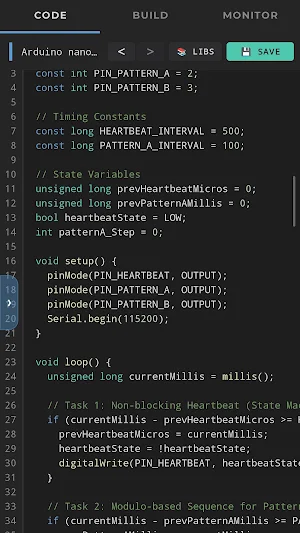
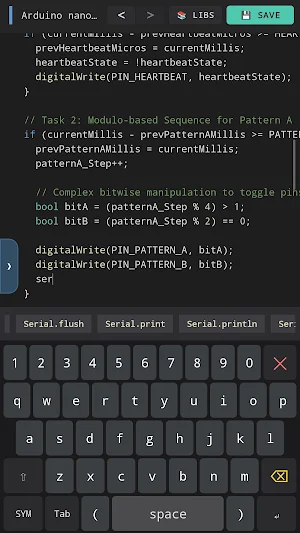
Write clean, optimized code with a VS Code-inspired dark editor designed specifically for embedded development. Features include line numbers, syntax awareness, and intelligent code highlighting for C/C++.
⚙️ Real-Time Compilation
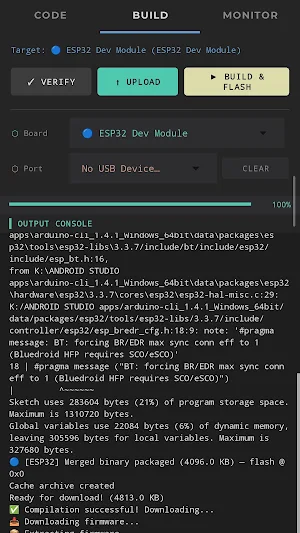
Watch your code compile with live progress tracking. Get instant feedback with smart error highlighting that helps you identify and fix issues immediately. Know exactly what's happening at every step.
📡 One-Tap USB Flashing
Flash firmware directly to your board via USB connection. Automatic bootloader mode detection for ESP32, ESP8266, and other boards — no manual reset buttons needed. Just click and go.
📺 Built-In Serial Monitor
Communicate with your hardware in real time. Debug code, monitor sensor readings, view logs, and interact with your device instantly without external tools.
📚 Advanced Library Manager
Browse, install, and manage Arduino libraries seamlessly. Support for official Arduino libraries, community-contributed packages, and custom libraries. One-tap installation.
⚖️ Smart Multi-Server Compilation
Intelligent load balancing automatically routes your compilation to the fastest available server, ensuring optimal compile times even during peak usage.
💾 Project Management System
Create, organize, and manage unlimited projects. Automatic backup ensures you never lose work. Version history allows you to track changes and revert when needed.
🔧 Board Auto-Detection
The app automatically detects connected boards and suggests optimal compilation settings. No manual configuration needed for most boards.
🎯 SUPPORTED MICROCONTROLLER BOARDS
✅ Arduino Family: Uno, Mega, Nano, Pro Mini, Leonardo, Due, MKR series
✅ ESP32: All variants (ESP32, ESP32-S2, ESP32-S3, ESP32-C3, ESP32-H2)
✅ ESP8266: NodeMCU, Wemos D1, Generic ESP8266 boards
✅ STM32 Series: Blue Pill, Black Pill, Nucleo boards
✅ Raspberry Pi Pico & Pico W
✅ Xtensa Architecture Boards
✅ Arduino Compatible Boards
✅ And many more! Supports any Arduino-compatible board.
👨💻 PERFECT FOR
🎓 Students & Educators - Learn embedded systems without expensive equipment
🔬 Researchers - Prototype IoT and sensor projects on the go
🛠️ Field Engineers - Test and deploy embedded systems anywhere
🏠 Makers & Hobbyists - Build IoT projects from your Android device
💼 Professionals - Quick prototyping and field debugging
🏆 WHY CHOOSE MOBILE IDE?
🔒 No Subscription, No Ads - One-time download, lifetime access. No hidden fees or premium tiers.
⚡ Faster Than a Laptop - No boot-up time. Open the app and start coding immediately.
📱 Complete Development Environment - Everything you need for embedded development built into one app.
🌐 Cloud-Powered Compilation - Compile unlimited projects with no storage constraints on your device.
🔄 Auto-Save Technology - Never lose your work. Changes are saved automatically as you code.
🛡️ Professional Security - Industry-standard HTTPS encryption for all data transmission. Your code stays private.
💡 HOW IT WORKS
Create or Open a project in the intuitive project manager
Write Code using the professional embedded systems editor
Compile with one tap — watch real-time progress
Connect your microcontroller board via USB
Flash the compiled firmware to your board instantly
Monitor serial output and debug in real time
📧 CONTACT & SUPPORT
Have questions? Found a bug? Want to suggest features?
Email: [email protected]
Thank you for choosing Mobile IDE Arduino & esp32.
Mobile Ide Arduino & esp32 details
Mobile Ide Arduino & esp32 is a paid Tools app for Android with 100+ installs on Google Play. It was released on April 23, 2026 and last updated on June 16, 2026. It requires Android 7.0 or later.
- Category
- Tools
- Installs
- 100+
- Price
- $6.49
- In-app purchases
- No
- Ads
- No ads
- Current version
- 2.3
- Requires Android
- 7.0
- Content rating
- Everyone
- Released
- April 23, 2026
- Last updated
- June 16, 2026
Alternatives to Mobile Ide Arduino & esp32
Looking for apps like Mobile Ide Arduino & esp32? Here are 6 similar Android apps on Google Play. The highest rated is GRBL CNC Controller (1.4/5), and 2 of the 6 are free to download.

Photopea: Desktop PSD Editor
Full desktop editor: layers, masks, blending options, stylus & PSD open/export
CAD Studio - 3D Print & CNC
CAD, CAM, CNC & 3D Printing. Design 3D Models and Generate G-code.
Mobile To Pc File Transfer
Manage, upload, and download your Android files from any PC browser
GRBL CNC Controller: PocketCNC
GRBL CNC Controller , G-Code Sender and 3d Toolpath viewer

GRBL CNC Controller
Wireless CNC control: jog, send G-code & probe. GRBL, FluidNC, Marlin & more

GRBL CNC Controller
CNC Mobile Control for GRBL (USB)
| App | Rating | Price | Installs | Last updated |
|---|---|---|---|---|
| Mobile Ide Arduino & esp32 | – | $6.49 | 100+ | Jun 16, 2026 |
| Photopea: Desktop PSD Editor | – | 6.49 USD | 0+ | Sep 20, 2026 |
| CAD Studio - 3D Print & CNC | – | 7.49 USD | 100+ | – |
| Mobile To Pc File Transfer | – | Free | 100+ | May 4, 2026 |
| GRBL CNC Controller: PocketCNC | – | 15.99 USD | 50+ | – |
| GRBL CNC Controller | – | 7.99 USD | 500+ | Jul 31, 2026 |
| GRBL CNC Controller | 1.4 / 5 | Free | 500+ | – |