
Dumpster Rental Tracker
Business In-app purchases Contains ads
Track which roll-off can is out, how many days over, and what it owes you.
- Downloads
- 6+
- on Google Play
- Price
- Free
- In-app purchases
- Updated
- Oct 31
- 2026 · v1.11
Screenshots


About Dumpster Rental Tracker
Dumpster Rental Tracker is the book a small roll-off operator runs on. It answers one question the moment you open it: which can is out too long and costing you money.
A container sitting on a driveway past its included days is the quietest way a roll-off business loses revenue. It does not show up anywhere until you go looking. This app puts it on the first screen.
--- THE ATTENTION BOARD ---
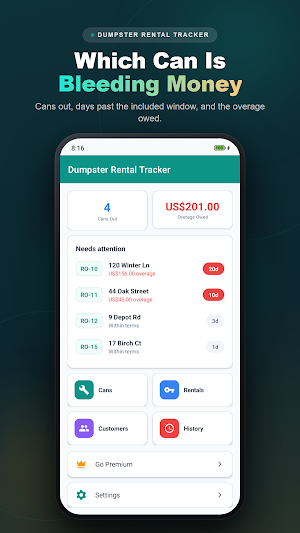
Every can that is currently out, sorted by what it owes you. The worst offender is at the top. Cans Out and Overage Owed sit above it as running totals, and the overage figure turns red the moment it goes past zero.
--- OVERAGE THAT COUNTS ITSELF ---
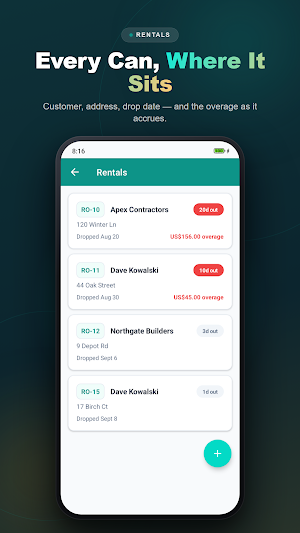
Set the included-days window and the daily rate when you drop the can. From then on the app does the arithmetic: days out, days past the window, and what that comes to at your rate. No spreadsheet, no counting on a calendar, no forgetting to bill it.
A can still inside its window owes nothing. The day it crosses the line, it starts counting.
--- SWAP IN ONE ACTION ---
Full can off, empty can on, same customer, same address. One action closes the finished rental with its final charge recorded and opens the new one at the same moment, linked back to the rental it replaced. The history keeps both, so a long job reads as the chain it actually was.
--- DROP AND PICKUP PHOTOS ---
Photograph the placement when you drop and the site when you pick up. Take it with the camera or pick it from your gallery. It stays on your phone, attached to that rental — the evidence you want when a customer disputes a driveway mark or a blocked-access charge.
--- YOUR FLEET ---
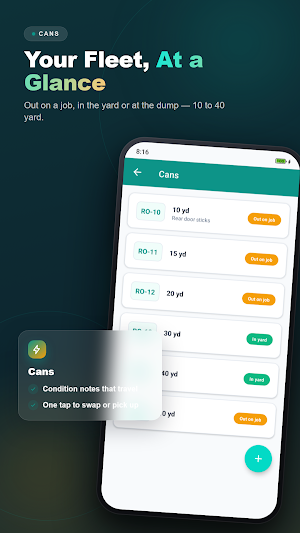
Every can with its number, size from 10 to 40 yards, and whether it is out, in the yard, or at the dump. Give a can a condition photo so you know what it looked like before it went out.
--- CUSTOMERS AND CHARGES ---
Every customer with their phone number and what they have run up: overage, adjustments, whatever you add. Share a customer's charge summary straight out of the app.
--- HISTORY ---
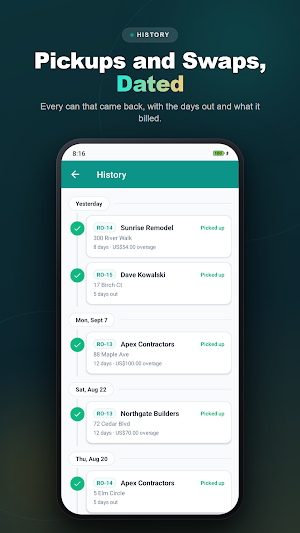
A date-grouped timeline of every pickup and every swap, so you can look back at a month and see exactly what the fleet did.
--- WORKS WITHOUT INTERNET, WITHOUT GPS ---
Everything is stored on your phone. No account, no login, no sign-up. The app never uses GPS or asks for location — a job-site address is text you type, and it never leaves the device.
--- FREE AND PREMIUM ---
Free covers a small fleet so you can run real jobs through it before paying. Premium removes the limits and the ads, and is available as a one-time lifetime purchase as well as monthly and yearly.
A container sitting on a driveway past its included days is the quietest way a roll-off business loses revenue. It does not show up anywhere until you go looking. This app puts it on the first screen.
--- THE ATTENTION BOARD ---
Every can that is currently out, sorted by what it owes you. The worst offender is at the top. Cans Out and Overage Owed sit above it as running totals, and the overage figure turns red the moment it goes past zero.
--- OVERAGE THAT COUNTS ITSELF ---
Set the included-days window and the daily rate when you drop the can. From then on the app does the arithmetic: days out, days past the window, and what that comes to at your rate. No spreadsheet, no counting on a calendar, no forgetting to bill it.
A can still inside its window owes nothing. The day it crosses the line, it starts counting.
--- SWAP IN ONE ACTION ---
Full can off, empty can on, same customer, same address. One action closes the finished rental with its final charge recorded and opens the new one at the same moment, linked back to the rental it replaced. The history keeps both, so a long job reads as the chain it actually was.
--- DROP AND PICKUP PHOTOS ---
Photograph the placement when you drop and the site when you pick up. Take it with the camera or pick it from your gallery. It stays on your phone, attached to that rental — the evidence you want when a customer disputes a driveway mark or a blocked-access charge.
--- YOUR FLEET ---
Every can with its number, size from 10 to 40 yards, and whether it is out, in the yard, or at the dump. Give a can a condition photo so you know what it looked like before it went out.
--- CUSTOMERS AND CHARGES ---
Every customer with their phone number and what they have run up: overage, adjustments, whatever you add. Share a customer's charge summary straight out of the app.
--- HISTORY ---
A date-grouped timeline of every pickup and every swap, so you can look back at a month and see exactly what the fleet did.
--- WORKS WITHOUT INTERNET, WITHOUT GPS ---
Everything is stored on your phone. No account, no login, no sign-up. The app never uses GPS or asks for location — a job-site address is text you type, and it never leaves the device.
--- FREE AND PREMIUM ---
Free covers a small fleet so you can run real jobs through it before paying. Premium removes the limits and the ads, and is available as a one-time lifetime purchase as well as monthly and yearly.
What’s new
Version 1.11 · Updated October 31, 2026
• New: back up all your data and restore it on a new phone — Settings → Backup & Restore
Alternatives to Dumpster Rental Tracker
Looking for apps like Dumpster Rental Tracker? Here are 6 similar Android apps on Google Play. All of them are free to download.
-
CustodyLog: Custody Journal
-
Maid Attendance & Salary Book
-
Loan & EMI Calculator
-
Snow Plow Log: Per Push
-
PMU Client Book: Consent
-
Trophy Shop Order Book
| App | Rating | Price | Installs | Last updated | Compare |
|---|---|---|---|---|---|
| Dumpster Rental Tracker | – | Free | 5+ | Oct 31, 2026 | |
| CustodyLog: Custody Journal | – | Free | 500+ | Nov 2, 2026 | Compare |
| Maid Attendance & Salary Book | – | Free | 50+ | Oct 17, 2026 | Compare |
| Loan & EMI Calculator | – | Free | 10+ | Oct 17, 2026 | Compare |
| Snow Plow Log: Per Push | – | Free | 10+ | Oct 17, 2026 | Compare |
| PMU Client Book: Consent | – | Free | 5+ | Oct 19, 2026 | Compare |
| Trophy Shop Order Book | – | Free | 10+ | Nov 1, 2026 | Compare |