

5G 4G Force LTE Mode
Prank Calling Tools In-app purchases
Change your network and get a stable internet connection
- Downloads
- 1M+
- on Google Play
- Price
- Free
- In-app purchases
- Updated
- Sep 16
- 2026
Screenshots


About 5G 4G Force LTE Mode
This 5G 4G FORCE LTE MODE application allows you to access advanced network settings and switch your smartphone network to 5G (if supported), 4G LTE, or 3G, even if these options aren’t available in your normal settings.
5G LTE MODE can also manage WiFi details, wifi speed test your internet speed, monitor connected devices, and track your data usage — all in one smart tool.
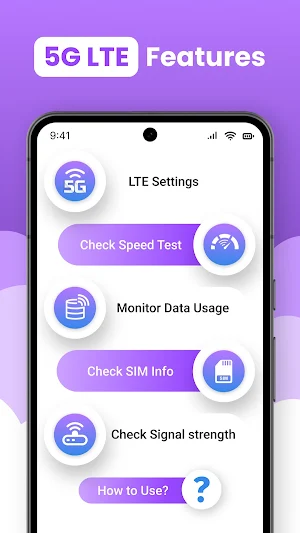
Key Features of 5G LTE network
5g lte switch Network Switching
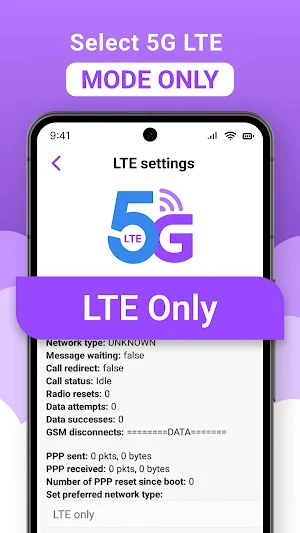
5g lte only quickly open advanced network settings to switch between 5G, 4G, and 3G modes for improved performance with Network Analyzer
5G switcher WiFi Tools
5g network software view complete WiFi information including signal strength, nearby networks, and connected devices on your router or hotspot.
WiFi Usage Details
Easily track how much WiFi data you use daily or monthly and identify which apps consume the most bandwidth with 5G LTE MODE
Nearby WiFi Networks
Force LTE Only scan and view all available WiFi networks around you with detailed signal and security information.
Connected Devices
5G LTE network app Check which devices are currently connected to your WiFi to detect unknown users or unauthorized connections.
nternet Speed Test
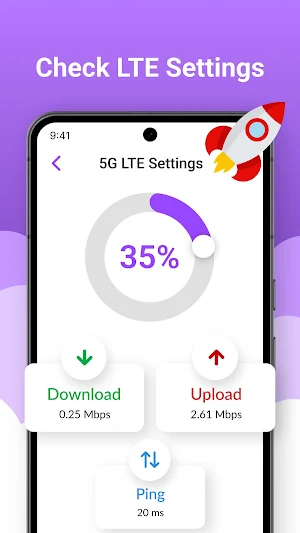
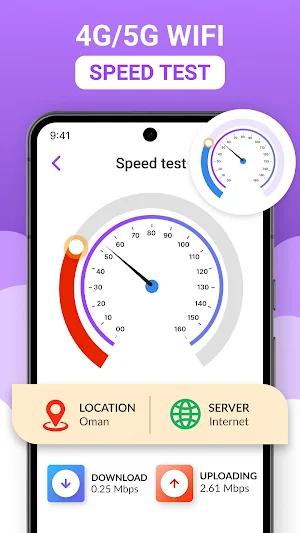
WIFI speed test Instantly test your download and upload speed and save results to analyze your internet performance over time.
Network Signal Strength
Measure your mobile and WiFi signal strength to ensure a stable and reliable connection anywhere with 5g lte only
SIM Card Details
Get complete information about your SIM cards — operator name, network type, signal level, and more with 5g network software.
Data Usage:
Monitor your mobile and WiFi data and see which apps use the most data with 5g lte switch network
How to Use Network Analyzer
✔ Open “5G 4G Force LTE MODE” settings in the app.
✔ Tap “Open Settings” to access network options.
✔ Scroll to “Set preferred network type.”
✔ Choose LTE Only for 4G or LTE/UMTS Auto (PRL) for auto mode.
⭐⭐⭐⭐ Disclaimer of Force LTE Only ⭐⭐⭐⭐
⛔ Some devices may restrict access to certain network options. Functionality depends on your device model and Android version.
5G LTE MODE can also manage WiFi details, wifi speed test your internet speed, monitor connected devices, and track your data usage — all in one smart tool.
Key Features of 5G LTE network
5g lte switch Network Switching
5g lte only quickly open advanced network settings to switch between 5G, 4G, and 3G modes for improved performance with Network Analyzer
5G switcher WiFi Tools
5g network software view complete WiFi information including signal strength, nearby networks, and connected devices on your router or hotspot.
WiFi Usage Details
Easily track how much WiFi data you use daily or monthly and identify which apps consume the most bandwidth with 5G LTE MODE
Nearby WiFi Networks
Force LTE Only scan and view all available WiFi networks around you with detailed signal and security information.
Connected Devices
5G LTE network app Check which devices are currently connected to your WiFi to detect unknown users or unauthorized connections.
nternet Speed Test
WIFI speed test Instantly test your download and upload speed and save results to analyze your internet performance over time.
Network Signal Strength
Measure your mobile and WiFi signal strength to ensure a stable and reliable connection anywhere with 5g lte only
SIM Card Details
Get complete information about your SIM cards — operator name, network type, signal level, and more with 5g network software.
Data Usage:
Monitor your mobile and WiFi data and see which apps use the most data with 5g lte switch network
How to Use Network Analyzer
✔ Open “5G 4G Force LTE MODE” settings in the app.
✔ Tap “Open Settings” to access network options.
✔ Scroll to “Set preferred network type.”
✔ Choose LTE Only for 4G or LTE/UMTS Auto (PRL) for auto mode.
⭐⭐⭐⭐ Disclaimer of Force LTE Only ⭐⭐⭐⭐
⛔ Some devices may restrict access to certain network options. Functionality depends on your device model and Android version.
What’s new
Updated September 16, 2026
lte settings speed test signal strength wifi tools
Alternatives to 5G 4G Force LTE Mode
Looking for apps like 5G 4G Force LTE Mode? Here are 6 similar Android apps on Google Play. The highest rated is My Airtel (4.5/5), and all 6 are free to download.
-
NetSpeed Indicator 4.4
-
GlassWire Data Usage Monitor 4.2
-
Ncell App: Recharge, Buy Packs 2.8
-
One4Wall: 4K Wallpapers & Live 4.4
-
Opensignal - 5G, 4G Speed Test 4.2
-
My Airtel 4.5
| App | Rating | Price | Installs | Last updated | Compare |
|---|---|---|---|---|---|
| 5G 4G Force LTE Mode | – | Free | 1,000,000+ | Sep 16, 2026 | |
| NetSpeed Indicator | 4.4 / 5 | Free | 10,000,000+ | Sep 28, 2025 | Compare |
| GlassWire Data Usage Monitor | 4.2 / 5 | Free | 1,000,000+ | – | Compare |
| Ncell App: Recharge, Buy Packs | 2.8 / 5 | Free | 10,000,000+ | Oct 8, 2026 | Compare |
| One4Wall: 4K Wallpapers & Live | 4.4 / 5 | Free | 1,000,000+ | – | Compare |
| Opensignal - 5G, 4G Speed Test | 4.2 / 5 | Free | 10,000,000+ | – | Compare |
| My Airtel | 4.5 / 5 | Free | 50,000,000+ | Oct 25, 2026 | Compare |
Similar apps on Google Play
- NetSpeed Indicator
- GlassWire Data Usage Monitor
- Ncell App: Recharge, Buy Packs
- One4Wall: 4K Wallpapers & Live
- Opensignal - 5G, 4G Speed Test
- My Airtel
- Battery Charging Animation App
- Tooly All Tools In One Toolbox
- AppLock Master
- NetShare+ Wifi Tether
- realme Community
- Computer Launcher Pro
- AVG Secure VPN Proxy & Privacy
- EDGE Lighting -LED Borderlight
- NetShare - no-root-tethering
- Volume Styles - Custom control
- Strip Hi-tech Launcher 2025
- SuperBattery & Charge Monitor
- Battery Transfer / Receiver
- IEEE
- My Data Manager: Data Usage
- Wifi password all in one
- Eyecon Caller ID & Spam Block
- MTM Tunnel Lite
- WiFiman
- Degoo: 20 GB Cloud Storage
- Computer File Explorer
- WiFi Detector: Who Use My WiFi
- QR Code Scanner - Barcode Scan
- Newlook Launcher - Galaxy Star
- Speedtest by Ookla
- Satellite Director
- TECNO SPOT
- Charge Meter
- GSMArena
- File Manager
- Background Eraser Photo Editor
- Phone Cleaner – Junk Files
- OneUI Widgets
- Alpha Hybrid Launcher 4D theme
- Don't Touch My Phone: Alarm
- HiOS Launcher - Fast
- Hacker: Secret Codes & Ciphers
- Touch Lock Screen Touch Photo
- RDTunnel.Pro- Super fast Net
- Wallpaper For Iphone - Wallway
- IPVanish: VPN Location Changer
- Speedify: Unbreakable VPN
- iCallScreen - Phone Dialer
- Super S9 Launcher for Galaxy S
- Everything Widgets
- HD Camera: Professional Camera
- WiFi Analyzer (open-source)
- Seekly
- CMM Launcher 2.0
- ASUS Router
- Startpage
- Smart Transfer: File Sharing
- Offline Music Mp3 Player- Muso
- Santa: Browse More, Earn More
- Phone Clone Tool: Switch data
- DNA Launcher
- Golden Hour
- Power Browser-Block Ads & Earn
- F-Secure Mobile Security
- OxygenOS 16 Icon pack
- Phoenix - Fast & Safe
- Starlink
- Material You Widgets
- Edge Lighting - Borderlight
- Offline Map Navigation
- Opera Mini: Fast Web Browser
- NETGEAR Orbi – WiFi System App
- XOS Launcher -Cool Stylish
- TTLock
- Super Followers up
- POCO Launcher 2.0 - Customize,
- Spatial Touch™
- Tetra Browser & VPN
- App Lock - Applock Fingerprint
- IronVest - Security & Privacy
- Offline Podcast App: Player FM
- Discovery
- Magazine Lockscreen XOS
- Ipod Music & Bass MP3 Player
- SHAREit Premium: Pure Share
- FAST Speed Test
- HD Camera
- ADW Launcher 2
- App Lock: Fingerprint, Pattern
- P Launcher
- satellite
- Fing - Network Tools
- iTel Mobile Dialer Express
- Intra
- Sesame Search & Shortcuts
- NetGuard - no-root firewall
- CrookCatcher • Anti-Theft
- Avast SecureLine VPN & Privacy
- Restore My Old Deleted Photos
- Right Dialer
- Linksys
- Caller ID, Phone Dialer, Block
- Xiaomi Community
- Ullu
- MobiDrive Cloud Storage & Sync
- Modes and Routines
- HD Camera for Android
- Launcher OS™ Pro
- Weather Forecast
- Gallery - Photo Gallery, Vault
- My Folder : Safe Secure Hidden
- Ultra VPN — Super Secure Proxy
- Sykes Holiday Cottages UK
- FitFusion Workouts
- LagoFast Game Booster: Low Lag
- Swift Backup
- X Live Wallpaper - HD 3D/4D
- G-CPU:Monitor CPU, RAM, Widget
- GRUBL™ 4D Live Wallpapers + AI
- HMA VPN Proxy & WiFi Security
- AppLock - Fingerprint
- Local Weather: Live Forecast
- AppLock
- Weather Forecast: Live Weather
- Cool Mi Launcher - CC Launcher
- DNSChanger for IPv4/IPv6
- Super File Manager Explorer
- CCleaner – Phone Cleaner
- Nedis SmartLife
- Battery Widget % Level Plus
- ProCam X - Lite :HD Camera Pro
- Digital Wellbeing
- Carrier Services
- Google One
- Phone by Google
- Google Fi Wireless