

EX File Explorer: Master Clean
Tools Contains ads
ES File Explorer is the best file manager for easy management & offline sharing
- Downloads
- 10K+
- on Google Play
- Price
- Free
- No in-app purchases
- Updated
- Sep 12
- 2022
Screenshots


About EX File Explorer: Master Clean
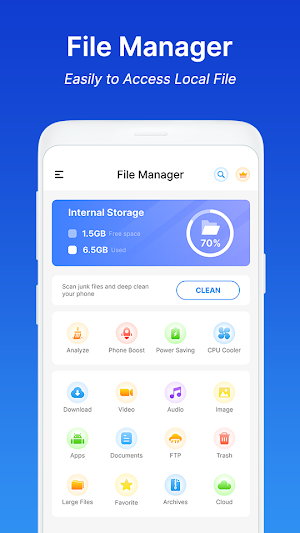
ES File Explorer: Master Clean is a free, secure file manager that helps you find files faster, manage files easily, and share them offline with others for Android devices.
Download ES File Explorer: Master Clean application now.
🔥 Advanced mechanisms such as File Manager, Storage Manager, Event Logger, Media Manager, Storage Analyze, Editor Local Files, Cloud Backup, Phone Booster, Ram Booster, Auto Junk Cleaning Master, Smart Cache Cleaner, CPU Cooler and Device Optimizer.
🔥 With just one tap, you can easily quickly search, move, delete, open, and share files, as well as renaming, unzipping, and copy-paste. ES File Explorer will suggest a safe method of managing files.
Here are some of the key features of smart ES File Explorer app:
📂 Powerful storage analysis/ file analysis:
• ES quickly analyze internal storage, external storage, clean up empty files, empty folders, log files, temporary files, cache files, redundant files, duplicate files, and large files to free up storage space.
• Check the folder size and occupancy ratio, and let you know the storage space occupied.
📂 ES File Explorer: All files are no longer hidden in the mobile system. File manager will help you find files, categorize files and easily access local files.
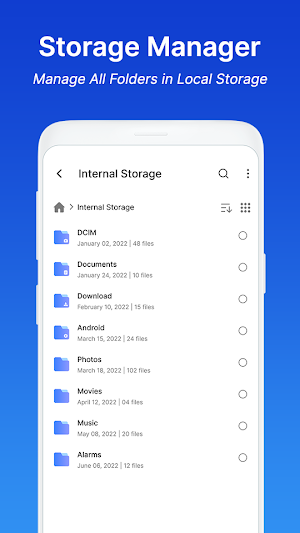
📂 Storage Manager: Manage all folders and files in Local Storage & View all storage status on a single screen. Categories for your Music, Picture, and Video files, along with sections for Archives, Documents, and more with ES File Explorer.
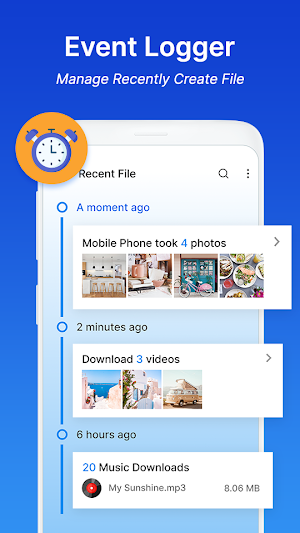
📂 Event Logger: Manage recently created file. Simply create an event/ file/ folder for actions you want to track and tap a button to record a new instance of that event every time you do it again.
📂 Editor Folders: Search, Edit, Move, Open, Rename, Copy-paste... folders and files simply and quickly with ES File Explorer
📂 Es Cloud Backup: Backup files to Drive or any other locations to keep them forever. With ES File manager you can access your cloud storage and also remote/ shared storage. (Cloud storage: Google Drive™, OneDrive, Dropbox, Box, and Yandex)
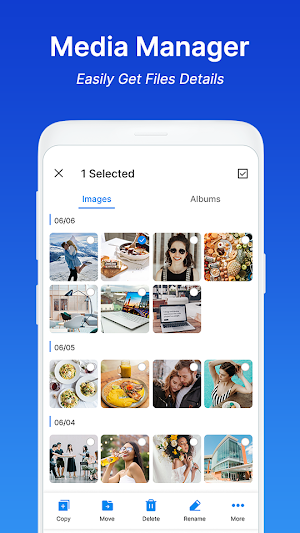
📂 Media Manager: ES File manager easily get file details and solve the problem that you can't find your favorite music, videos or pictures quickly. All media will be automatically classified, you can click on the entry
🚀Es Phone Booster: One Tap Boost frees up RAM usage to release more space. Boosting your phone can improve the device speed faster.
🚀 Clean Phone: Speed cleaner master has powerful cleaning of devices such as deleting cached data from residual and cache files, content copied to clipboard, file manager, downloads, etc.
🚀 CPU Cooler: CPU Cooler can cool and boost your phone with just one tap.
💥 OPTIMIZED PHONE FILES WITH JUST ONE TAP
Manage your files easily and quickly:
✔ ES File Manager 1 tap boost for slow phone – fast clean phone junk & speed up phone with 1 tap
✔ Storage Cleaner – optimizer for phone memory space & effective memory cleaner
✔ Cleaner Boost – advanced phone speed boost that cleans phone junk thoroughly
✔ ES File Manager optimize CPU Cooler for Android that stops overheating apps & settings
✔ Application Manager-classification, uninstall, backup, detailed information
✔ EX File Explorer view files in list and grid view
✔ Compress and decompress files
✔ Search and share files
✔ Thumbnails of photos, videos and apk files
✔ ES File Manager with basic functions (such as cut, copy, delete, compress, extract, etc.) are easy to use
✔ Storage analysis and file analysis
✔ Clean up storage space and release memory
✔ ES File Manager quickly access history, access event logger any file
✔ Multiple languages supported
▶ This ES File Explorer: Master Clean application is fully compatible with file manager, storage analyze, speed booster, quick clean, cpu cooler. Install ES File Explorer now to manage and master your phone files and use your phone easily and quickly.
Therefore, the ES File Explorer: Master Clean app is still under development. Thank you ❤️
Download ES File Explorer: Master Clean application now.
🔥 Advanced mechanisms such as File Manager, Storage Manager, Event Logger, Media Manager, Storage Analyze, Editor Local Files, Cloud Backup, Phone Booster, Ram Booster, Auto Junk Cleaning Master, Smart Cache Cleaner, CPU Cooler and Device Optimizer.
🔥 With just one tap, you can easily quickly search, move, delete, open, and share files, as well as renaming, unzipping, and copy-paste. ES File Explorer will suggest a safe method of managing files.
Here are some of the key features of smart ES File Explorer app:
📂 Powerful storage analysis/ file analysis:
• ES quickly analyze internal storage, external storage, clean up empty files, empty folders, log files, temporary files, cache files, redundant files, duplicate files, and large files to free up storage space.
• Check the folder size and occupancy ratio, and let you know the storage space occupied.
📂 ES File Explorer: All files are no longer hidden in the mobile system. File manager will help you find files, categorize files and easily access local files.
📂 Storage Manager: Manage all folders and files in Local Storage & View all storage status on a single screen. Categories for your Music, Picture, and Video files, along with sections for Archives, Documents, and more with ES File Explorer.
📂 Event Logger: Manage recently created file. Simply create an event/ file/ folder for actions you want to track and tap a button to record a new instance of that event every time you do it again.
📂 Editor Folders: Search, Edit, Move, Open, Rename, Copy-paste... folders and files simply and quickly with ES File Explorer
📂 Es Cloud Backup: Backup files to Drive or any other locations to keep them forever. With ES File manager you can access your cloud storage and also remote/ shared storage. (Cloud storage: Google Drive™, OneDrive, Dropbox, Box, and Yandex)
📂 Media Manager: ES File manager easily get file details and solve the problem that you can't find your favorite music, videos or pictures quickly. All media will be automatically classified, you can click on the entry
🚀Es Phone Booster: One Tap Boost frees up RAM usage to release more space. Boosting your phone can improve the device speed faster.
🚀 Clean Phone: Speed cleaner master has powerful cleaning of devices such as deleting cached data from residual and cache files, content copied to clipboard, file manager, downloads, etc.
🚀 CPU Cooler: CPU Cooler can cool and boost your phone with just one tap.
💥 OPTIMIZED PHONE FILES WITH JUST ONE TAP
Manage your files easily and quickly:
✔ ES File Manager 1 tap boost for slow phone – fast clean phone junk & speed up phone with 1 tap
✔ Storage Cleaner – optimizer for phone memory space & effective memory cleaner
✔ Cleaner Boost – advanced phone speed boost that cleans phone junk thoroughly
✔ ES File Manager optimize CPU Cooler for Android that stops overheating apps & settings
✔ Application Manager-classification, uninstall, backup, detailed information
✔ EX File Explorer view files in list and grid view
✔ Compress and decompress files
✔ Search and share files
✔ Thumbnails of photos, videos and apk files
✔ ES File Manager with basic functions (such as cut, copy, delete, compress, extract, etc.) are easy to use
✔ Storage analysis and file analysis
✔ Clean up storage space and release memory
✔ ES File Manager quickly access history, access event logger any file
✔ Multiple languages supported
▶ This ES File Explorer: Master Clean application is fully compatible with file manager, storage analyze, speed booster, quick clean, cpu cooler. Install ES File Explorer now to manage and master your phone files and use your phone easily and quickly.
Therefore, the ES File Explorer: Master Clean app is still under development. Thank you ❤️
Alternatives to EX File Explorer: Master Clean
Looking for apps like EX File Explorer: Master Clean? Here are 6 similar Android apps on Google Play. The highest rated is File Manager (4.6/5), and all 6 are free to download.
-
EX File Manager :File Explorer 4.0
-
Solid Explorer File Manager 4.2
-
File Manager - File Organizer 4.1
-
File Manager 4.6
-
ASTRO File Manager & Cleaner 4.3
-
DV File Explorer: File Manager 4.3
| App | Rating | Price | Installs | Last updated | Compare |
|---|---|---|---|---|---|
| EX File Explorer: Master Clean | – | Free | 10,000+ | Sep 12, 2022 | |
| EX File Manager :File Explorer | 4.0 / 5 | Free | 10,000,000+ | Oct 15, 2026 | Compare |
| Solid Explorer File Manager | 4.2 / 5 | Free | 10,000,000+ | Sep 22, 2026 | Compare |
| File Manager - File Organizer | 4.1 / 5 | Free | 100+ | Jun 15, 2021 | Compare |
| File Manager | 4.6 / 5 | Free | 100,000,000+ | Aug 6, 2026 | Compare |
| ASTRO File Manager & Cleaner | 4.3 / 5 | Free | 50,000,000+ | Sep 24, 2026 | Compare |
| DV File Explorer: File Manager | 4.3 / 5 | Free | 100,000+ | Dec 29, 2019 | Compare |
Similar apps on Google Play
- EX File Manager :File Explorer
- Solid Explorer File Manager
- File Manager - File Organizer
- File Manager
- ASTRO File Manager & Cleaner
- DV File Explorer: File Manager
- File Manager - File explorer
- Files
- Total Commander - file manager
- File Manager
- MK Explorer (File manager)
- Amaze File Utilities
- Droid Insight 360: Files, Apps
- Dropbox: Secure Cloud Storage
- FolderSync Pro