

Notification Center
EdgePro Tools
Manage notifications effortlessly, enjoy seamless integration with Edge Panels.
- Rating
- 4.2
- 41 ratings
- Downloads
- 1K+
- on Google Play
- Price
- $1.49
- No in-app purchases
- Updated
- Aug 21
- 2024 · v2.0
Screenshots


About Notification Center
Manage your notifications effortlessly with Notification Center, featuring long-term storage and comprehensive actions.
Enjoy seamless integration with Samsung Edge Panels for quick access and control.
**Key Features:
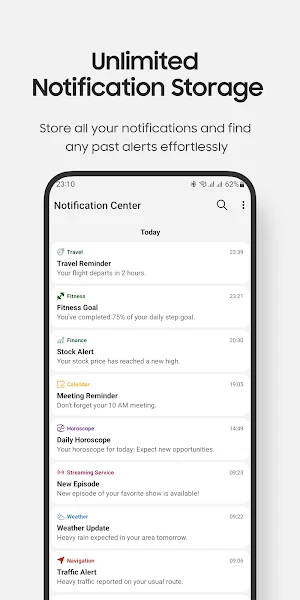
• Long-term Notification Storage: save your notifications for an extended period, ensuring you never miss important information.
• Review and Search: easily review old notifications and search through them to find exactly what you need.
• Copy and Share: copy the content of specific notifications and share it with others effortlessly.
• Filtered Notifications: choose to receive notifications only from a selected list of apps, keeping your notification bar clean and relevant.
• Customizable Settings: tailor the app to your preferences with options for language and theme (dark, light, auto).
**Exclusive Edge Panel Integration for Samsung Devices:
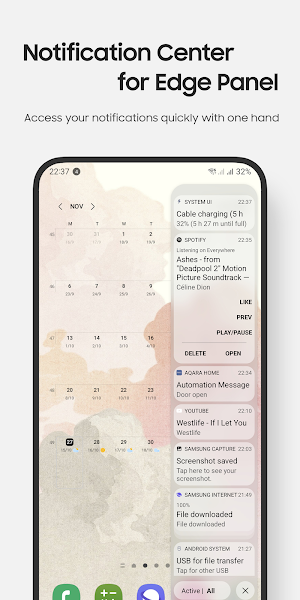
Experience the convenience of our app directly from the Edge Panel on Samsung devices. Quickly check your notifications without opening the app.
Review notifications from your lock screen, with an option in the settings to disable this feature for added security if desired.
• Access your active/history notifications quickly with one hand:
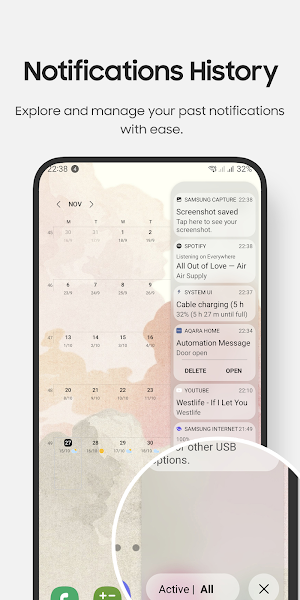
• Explore and manage your past notifications with ease
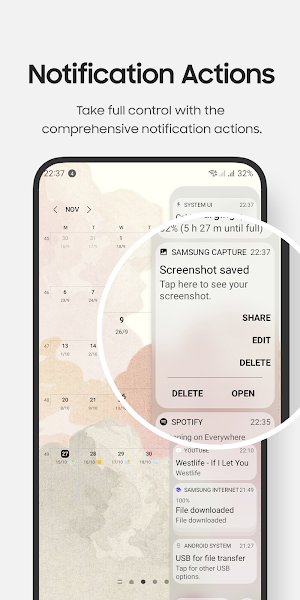
• Take full control with the comprehensive notification actions: open, delete, and interact with notifications just like in the system notification bar.
• Allow to show/hide your notifications on the lock screen
** Notes for Edge Panel features
• Only compatible with Samsung devices featuring Edge Panels, including the Galaxy Note, Galaxy S series, Galaxy A series, and Galaxy Z Flip series...
• Do not function on tablets and foldable devices (except for the Z Flip series) due to Samsung's policy, which prohibits third-party apps from running on these devices.
** How to use Edge Panel features:
• Setting app > Display > Edge panels > check Notification Center panel
• When update a new version: Setting app > Display > Edge panels > uncheck Notification Center panel, then check again.
• In case of any problems, please do 2nd step again (uncheck and check again).
** Permission
• Notification Access permission: to display your notifications within the app and the Edge Panel
** Contact us:
• Let us know your thoughts here: [email protected]
Enjoy seamless integration with Samsung Edge Panels for quick access and control.
**Key Features:
• Long-term Notification Storage: save your notifications for an extended period, ensuring you never miss important information.
• Review and Search: easily review old notifications and search through them to find exactly what you need.
• Copy and Share: copy the content of specific notifications and share it with others effortlessly.
• Filtered Notifications: choose to receive notifications only from a selected list of apps, keeping your notification bar clean and relevant.
• Customizable Settings: tailor the app to your preferences with options for language and theme (dark, light, auto).
**Exclusive Edge Panel Integration for Samsung Devices:
Experience the convenience of our app directly from the Edge Panel on Samsung devices. Quickly check your notifications without opening the app.
Review notifications from your lock screen, with an option in the settings to disable this feature for added security if desired.
• Access your active/history notifications quickly with one hand:
• Explore and manage your past notifications with ease
• Take full control with the comprehensive notification actions: open, delete, and interact with notifications just like in the system notification bar.
• Allow to show/hide your notifications on the lock screen
** Notes for Edge Panel features
• Only compatible with Samsung devices featuring Edge Panels, including the Galaxy Note, Galaxy S series, Galaxy A series, and Galaxy Z Flip series...
• Do not function on tablets and foldable devices (except for the Z Flip series) due to Samsung's policy, which prohibits third-party apps from running on these devices.
** How to use Edge Panel features:
• Setting app > Display > Edge panels > check Notification Center panel
• When update a new version: Setting app > Display > Edge panels > uncheck Notification Center panel, then check again.
• In case of any problems, please do 2nd step again (uncheck and check again).
** Permission
• Notification Access permission: to display your notifications within the app and the Edge Panel
** Contact us:
• Let us know your thoughts here: [email protected]
What’s new
Version 2.0 · Updated August 21, 2024
- Manage unlimited notifications in main app - Easily search notifications - Support Dark/Light theme - Improvements and bug fixes
User reviews

it stopped working after one day, I tried reinstalling but it still won't show any notification

EdgePro are very nice and useful apps. It will be excellent if you make new edge panel apps such as keyboard (including Arabic language, with roll up and down feature to facilitate to use it with one hand) and universal remote control (with edit keys feature, with wifi and Bluetooth).
Alternatives to Notification Center
Looking for apps like Notification Center? Here are 6 similar Android apps on Google Play. The highest rated is Quick Settings (4.1/5), and 3 of the 6 are free to download.
-
Quick Settings Lite 3.1
-
Calendar Widget
-
Edge SmartThings
-
Control Center Z Fold, Tablet
-
Edge People 3.6
-
Quick Settings 4.0
| App | Rating | Price | Installs | Last updated | Compare |
|---|---|---|---|---|---|
| Notification Center | 4.2 / 5 | $1.49 | 1,000+ | Aug 21, 2024 | |
| Quick Settings Lite | 3.1 / 5 | Free | 50,000+ | Sep 6, 2026 | Compare |
| Calendar Widget | – | Free | 5,000+ | – | Compare |
| Edge SmartThings | – | 1.99 USD | 100+ | Oct 7, 2024 | Compare |
| Control Center Z Fold, Tablet | – | 1.99 USD | 1,000+ | May 12, 2026 | Compare |
| Edge People | 3.6 / 5 | Free | 10,000+ | Oct 29, 2024 | Compare |
| Quick Settings | 4.1 / 5 | 1.99 USD | 10,000+ | Sep 2, 2026 | Compare |