
Edge Apps Panel
EdgePro Tools
Manage your favorite/recent apps with many modes in Edge Panel
- Rating
- 3.3
- 85 ratings
- Downloads
- 3K+
- on Google Play
- Price
- $1.99
- No in-app purchases
- Updated
- Oct 4
- 2025 · v2.5.0
Screenshots
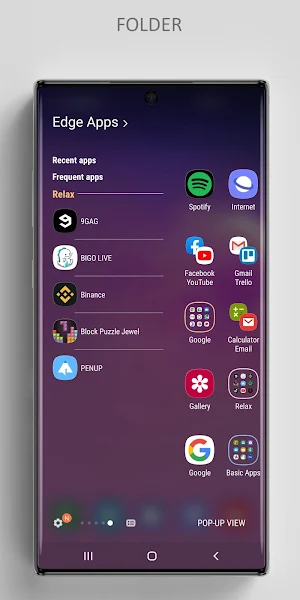
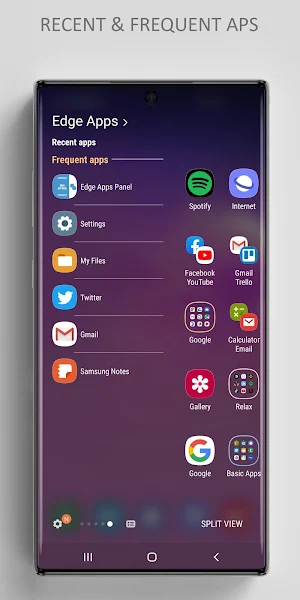
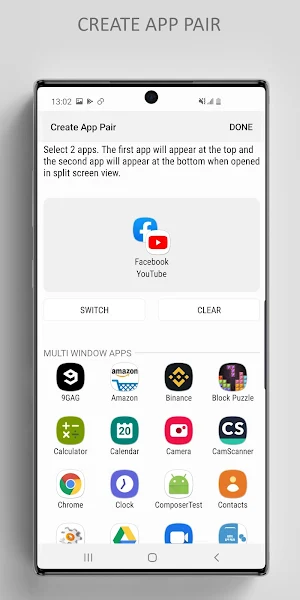


About Edge Apps Panel
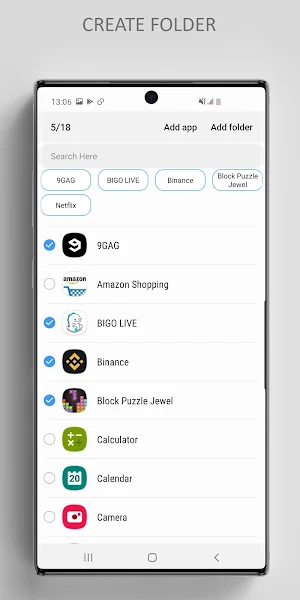
You don't need default app drawer because our app will replace it. Easily to manage your favorite apps (recent/frequent apps) with many modes from Edge Panel.
Specially, it’s great for multi-tasking with Pop-up view (Multi-window mode), Split view, App Pair.
** Features are better than defaul Apps Edge:
• Support 5 modes: Pop-up view, Split view, App Pair, App folder, Full screen
• Easily to access Recent apps or Frequent apps in Edge Panel
• Support the unlimited number of app/folder in Edge Panel
• Many options to customize your panel
• Easily to re-order apps in folder
...
** Supported devices:
• works only on Samsung devices which have Edge Screen such as Note 10, Note 10+, S10+, S10, S10e, Note 9, S9, S9+, Note 8, S8, S8+, Note FE, Note 7, S7 Edge, S6 Edge, S6 Edge Plus...
** How to use:
• Setting app > Edge Screen > Edge Panels > check Edge Apps panel
• When update a new version: Setting app > Edge Screen > Edge Panels > uncheck Edge Apps panel, then check again.
• In case of any problems, please do 2nd step again (uncheck and check again).
** Permissions:
• Have no permissions required
** Contact us:
• Let us know your thoughts here: [email protected]
EdgePro team.
Specially, it’s great for multi-tasking with Pop-up view (Multi-window mode), Split view, App Pair.
** Features are better than defaul Apps Edge:
• Support 5 modes: Pop-up view, Split view, App Pair, App folder, Full screen
• Easily to access Recent apps or Frequent apps in Edge Panel
• Support the unlimited number of app/folder in Edge Panel
• Many options to customize your panel
• Easily to re-order apps in folder
...
** Supported devices:
• works only on Samsung devices which have Edge Screen such as Note 10, Note 10+, S10+, S10, S10e, Note 9, S9, S9+, Note 8, S8, S8+, Note FE, Note 7, S7 Edge, S6 Edge, S6 Edge Plus...
** How to use:
• Setting app > Edge Screen > Edge Panels > check Edge Apps panel
• When update a new version: Setting app > Edge Screen > Edge Panels > uncheck Edge Apps panel, then check again.
• In case of any problems, please do 2nd step again (uncheck and check again).
** Permissions:
• Have no permissions required
** Contact us:
• Let us know your thoughts here: [email protected]
EdgePro team.
What’s new
Version 2.5.0 · Updated October 4, 2025
- Added support for multiple languages - Automatically backs up and restores your app list - Dynamic icons that adapt to your system theme - Improved performance and stability
User reviews

**Edit: update makes display unusable. Not sure what happened. Now edge panel is fixed finally so I just went back to that. May try it on my Tab S4.** WAS better than built in edge panel on my Samsung Galaxy s10. You can add basically an unlimited number of apps and so far, my experience is that they all work. After...
Alternatives to Edge Apps Panel
Looking for apps like Edge Apps Panel? Here are 3 similar Android apps on Google Play. The highest rated is Control Center (3.9/5), and 1 of the 3 are free to download.

| App | Rating | Price | Installs | Last updated | Compare |
|---|---|---|---|---|---|
| Edge Apps Panel | 3.3 / 5 | $1.99 | 1,000+ | Oct 4, 2025 | |
| Edge People | – | Free | 10,000+ | Oct 30, 2024 | Compare |
| Control Center | 3.9 / 5 | 1.99 USD | 10,000+ | Sep 2, 2026 | Compare |
| Calendar for Edge Panel | – | 1.99 USD | 500+ | – | Compare |
Compare Edge Apps Panel with the top alternatives: ratings, updates, ASO score and keyword gaps →