
Control Center Z Fold, Tablet
EdgePro Tools
Quickly access useful apps and control your fold & tablet settings with ease!
- Downloads
- 1K+
- on Google Play
- Price
- $1.99
- No in-app purchases
- Updated
- May 12
- 2026 · v2.7.2
Screenshots


About Control Center Z Fold, Tablet
** Main features
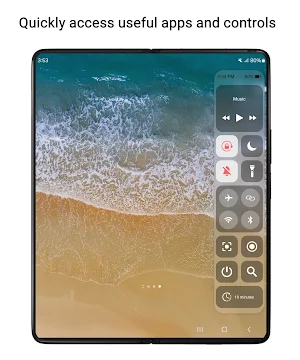
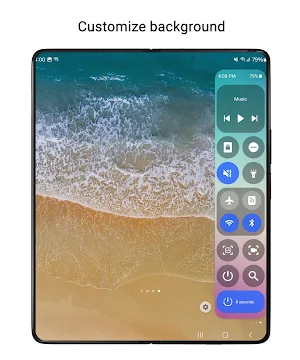
• Toggle settings like Wi-Fi, Bluetooth, Do Not Disturb, Mobile Data, and more.
• Open frequently used apps like Camera, Calculator, and Clock in full-screen or pop-up views.
• Control music playback easily.
• Screen recording with customizable options.
• Take screenshots of specific portions of the screen.
• Adjust sound and brightness levels.
• Lock screen with a single tap.
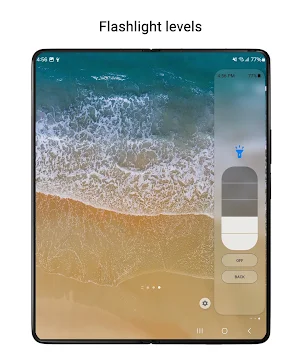
• Access multiple flashlight levels.
• Pull down the notification bar with one hand.
• Multiple screen timeout options.
• Navigation buttons: Home, Back, and Recents.
• QR code scanning.
• Screen mirroring through Smart View.
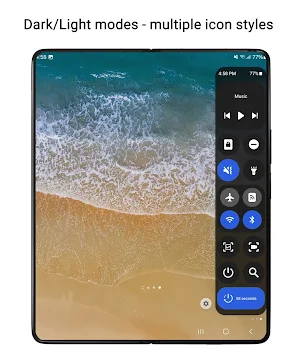
• Customizable control panel design and layout.
• Supports Night Mode.
** Notes:
• Long press on items to bring up control's setting. For example, long press on Lock screen to access the power dialog
• Due to Edge Panel limitations, volume and brightness adjustments are controlled by taps instead of sliders
• Some system-level controls, such as Airplane Mode and Mobile Data,... need to be toggled manually for user protection
• Lock screen feature:
- For devices running operating system 9 (Pie) or later, the Lock screen feature functions normally.
- For devices running versions earlier, a pattern or password will be required, as fingerprint and iris unlock methods are not supported due to system policies.
• The app currently supports phones with Edge Panels and is not designed for tablets or foldable devices (except Z Flip series)
** Supported devices:
• Compatible with Z Fold and Tablet that feature Edge Panels.
** How to use:
• Setting app > Display > Edge panels > enable the Control panel
• After updates, uncheck and recheck the Control panel if needed
** Permission
This app requires permissions for certain features, all of which are clearly explained while using them:
• Accessibility permission: this permission is required for the app to perform some controls. To disable this permission , turn off Quick Settings in Settings app > Accessibility > Installed apps. How this permission is used to handle some controls, please refer to official developer documentation: https://developer.android.com/reference/android/accessibilityservice/AccessibilityService. And using this permission in the app: https://www.youtube.com/watch?v=jfOCPhcmrDQ
- Lock Screen: lock the screen or open the power long-press dialog
- Screenshot: take a screenshot
- Home: go to the Home screen
- Recents: view recent apps
- Back: go back
- Notifications: open the notifications in Notification Bar
- Quick Setting Tiles: open the Quick Settings
- Lock automatically: Auto-lock the screen after a period of time
• android.permission.RECORD_AUDIO: allows Quick Settings to record audio, this permission is for Screen Recording control.
• android.permission.CAMERA: required to be able to access the camera device, this permission is for Scan QR Code, Flash Light controls.
• android.permission.READ_PHONE_STATE: allows read only access to phone state, this permission is for Wi-fi, Mobile Data controls.
...
** Contact us:
• Let us know your thoughts here: [email protected]
** App originality
• This app is independently developed for use on Galaxy devices and is not affiliated with or endorsed by other platforms or brands.
EdgePro team.
What’s new
Version 2.7.2 · Updated May 12, 2026
v2.7.2 - Screen Recording with Internal Audio - Bug fixes v2.6.9 - Added a new option to customize the QR Code application - Fixed an issue where the Back button did not work on V OS or higher - General bug fixes and performance improvements v2.6.6 - Support Russian, Traditional Chinese, Urdu - Bug fixes v2.6.3 - Add new controls: AI app, Translate app - R2L support - Hindi, Thai, Malay, Filipino languages support - Bug fixes and enhancements
User reviews
Works great.

Well designed. I'm glad it was implemented within the edge panel since Samsung has remove the ability to add edge apps for foldable devices. I like the app.. highly recommend it to those who want added functionality. If I could make one suggestion.. Would be nice to add more customizable themes to it instead of only...
Alternatives to Control Center Z Fold, Tablet
Looking for apps like Control Center Z Fold, Tablet? Here are 6 similar Android apps on Google Play. The highest rated is Quick Settings (4.1/5), and 3 of the 6 are free to download.
-
Quick Settings Lite 3.1
-
Calendar Widget
-
Edge People 3.6
-
Notification Center
-
Edge SmartThings
-
Quick Settings 4.0
| App | Rating | Price | Installs | Last updated | Compare |
|---|---|---|---|---|---|
| Control Center Z Fold, Tablet | – | $1.99 | 1,000+ | May 12, 2026 | |
| Quick Settings Lite | 3.1 / 5 | Free | 50,000+ | Sep 6, 2026 | Compare |
| Calendar Widget | – | Free | 5,000+ | – | Compare |
| Edge People | 3.6 / 5 | Free | 10,000+ | Oct 30, 2024 | Compare |
| Notification Center | – | 1.49 USD | 1,000+ | – | Compare |
| Edge SmartThings | – | 1.99 USD | 100+ | Oct 7, 2024 | Compare |
| Quick Settings | 4.1 / 5 | 1.99 USD | 10,000+ | Sep 2, 2026 | Compare |