
Quilt Creator
Crochet Designs Art & Design In-app purchases
Create quilts using over 200 quilt blocks to select from.
- Rating
- 1.2
- 75 ratings
- Downloads
- 5K+
- on Google Play
- Price
- Free
- In-app purchases
- Updated
- Feb 21
- 2019 · v20.2.5
Screenshots


About Quilt Creator
Create quilts using over 200 quilt blocks to select from. You can then change the colors in the blocks to get the look you want.
Comes with 2 free quilts. Download is free. To activate creation is $2.99
Once activated, get started by doing the following:
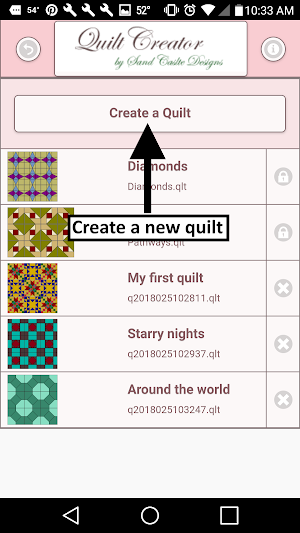
1. Select "Create a Quilt" button.
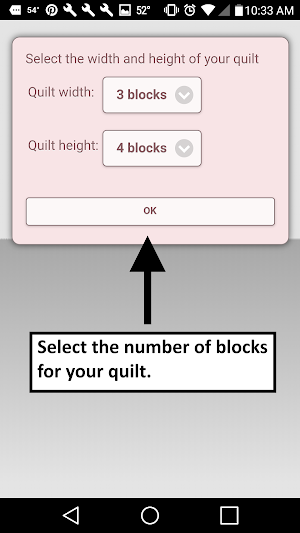
2. Enter the Quilt Width in blocks and Quilt Height in blocks.
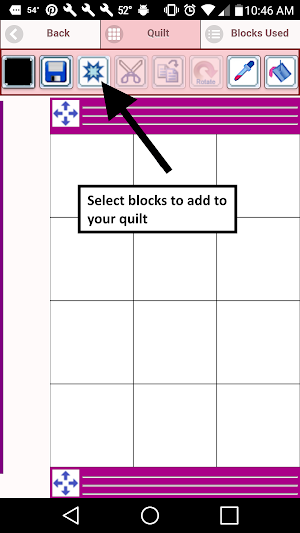
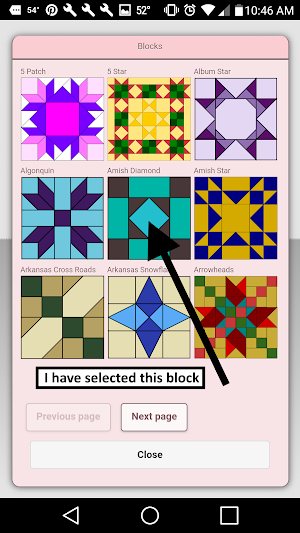
3. Select the Block Icon (forth icon in the tool bar)
4. A huge selection of blocks will appear.
5. Select the blocks you want to place on your quilt.
6. Select the Color Icon (first icon in the tool bar)
7. A huge selection of colors will appear
8. Select a color and select the Fill-All bucket icon with a plus sign (10th icon in the tool bar)
9. Select on the quilt the block color you want to change to the new color.
10. All the same blocks that you chose will change to the new color.
11. Have fun creating quilts.
Icons from left to right in the icon bar:
Color icon - use to select any color
Save icon - use to save your pattern
Sashing icon - use it to add sashing around each block (vertical, horizontal or both).
Quilt blocks icon - use it to select different quilt blocks to your quilt
Cut icon - select a block on your quilt and the cut icon to remove it.
Copy icon - select a block on your quilt and the copy icon to copy it and place it in another another location on your quilt.
Rotate icon - select a quilt block and rotate icon to rotate that block.
Dropper icon - select a color from your quilt to use.
Paint buck icon - use this when you want to change the color of one fabric in a single block.
Paint buck + icon - use this when you want to change the fabric color in all blocks.
Undo button - undo last things you did
Redo button - redo the things you undid
Zoom in button - zoom in on your pattern
Zoom out button - zoom out on your pattern
Share button - share a picture of your pattern using email, text etc.
Comes with 2 free quilts. Download is free. To activate creation is $2.99
Once activated, get started by doing the following:
1. Select "Create a Quilt" button.
2. Enter the Quilt Width in blocks and Quilt Height in blocks.
3. Select the Block Icon (forth icon in the tool bar)
4. A huge selection of blocks will appear.
5. Select the blocks you want to place on your quilt.
6. Select the Color Icon (first icon in the tool bar)
7. A huge selection of colors will appear
8. Select a color and select the Fill-All bucket icon with a plus sign (10th icon in the tool bar)
9. Select on the quilt the block color you want to change to the new color.
10. All the same blocks that you chose will change to the new color.
11. Have fun creating quilts.
Icons from left to right in the icon bar:
Color icon - use to select any color
Save icon - use to save your pattern
Sashing icon - use it to add sashing around each block (vertical, horizontal or both).
Quilt blocks icon - use it to select different quilt blocks to your quilt
Cut icon - select a block on your quilt and the cut icon to remove it.
Copy icon - select a block on your quilt and the copy icon to copy it and place it in another another location on your quilt.
Rotate icon - select a quilt block and rotate icon to rotate that block.
Dropper icon - select a color from your quilt to use.
Paint buck icon - use this when you want to change the color of one fabric in a single block.
Paint buck + icon - use this when you want to change the fabric color in all blocks.
Undo button - undo last things you did
Redo button - redo the things you undid
Zoom in button - zoom in on your pattern
Zoom out button - zoom out on your pattern
Share button - share a picture of your pattern using email, text etc.
What’s new
Version 20.2.5 · Updated February 21, 2019
Quilt Creator - Be able to make your own Quilt Designs from over 200 quilt blocks. We updated our app with new features.
Alternatives to Quilt Creator
Looking for apps like Quilt Creator? Here are 6 similar Android apps on Google Play. The highest rated is Bead Pattern Creator (2.2/5), and all 6 are free to download.
-
Bead Pattern Creator 2.2
-
Crochet Graphghan Creator 1.5
-
Bead Loom Pattern Creator 2.2
-
Filet Crochet Pattern Creator 2.0
-
Cross Stitch Pattern Creator 1.1
-
Diamond Painting Pattern Creat
| App | Rating | Price | Installs | Last updated | Compare |
|---|---|---|---|---|---|
| Quilt Creator | 1.2 / 5 | Free | 5,000+ | Feb 21, 2019 | |
| Bead Pattern Creator | 2.2 / 5 | Free | 100,000+ | Aug 28, 2026 | Compare |
| Crochet Graphghan Creator | 1.5 / 5 | Free | 50,000+ | Aug 30, 2026 | Compare |
| Bead Loom Pattern Creator | 2.2 / 5 | Free | 50,000+ | – | Compare |
| Filet Crochet Pattern Creator | 2.0 / 5 | Free | 100,000+ | Aug 30, 2026 | Compare |
| Cross Stitch Pattern Creator | 1.1 / 5 | Free | 1,000+ | – | Compare |
| Diamond Painting Pattern Creat | – | Free | 10,000+ | – | Compare |
Compare Quilt Creator with the top alternatives: ratings, updates, ASO score and keyword gaps →