About Cross Stitch Pattern Creator
Cross Stitch Pattern Creator
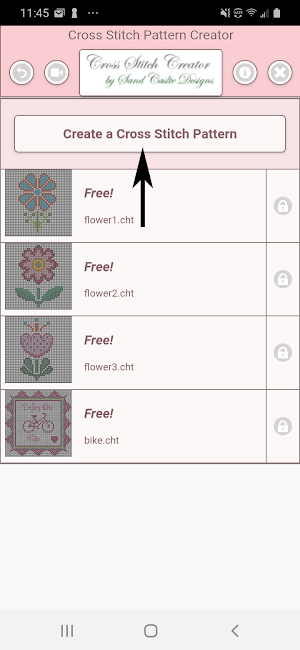
Comes with 4 sample patterns. Download is free. To activate is $2.99.
Highly recommended to use a tablet because of cross stitch pattern size.
Create your own cross stitch patterns.
To create cross stitch patterns, select Create a Cross Stitch Pattern button.
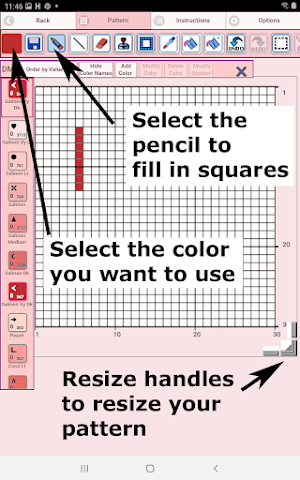
The Cross Stitch Pattern Editor will appear. Fill in the squares with DMS floss colors.
You can even add your own colors if you want.
To get started - Use the pencil to fill in squares to your pattern. Use the Eraser to clear filled squares from your pattern.
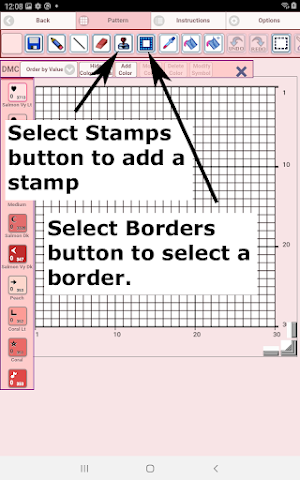
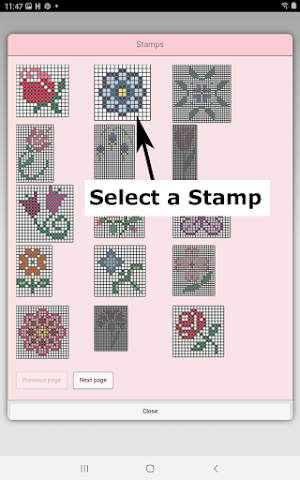
You also can select from over 80 stamps and borders to apply to your crochet pattern. 61 + 27 88
Icons from left to right in the icon bar are:
DMC Floss Color icon - use to select the floss color you want to use
Save icon - use to save your pattern
Pencil icon - use to fill in squares on your patten
Backstitch icon - used to add backstitch lines on your pattern
Eraser icon - use to erase filled squares and backstitch lines from your pattern
Stamps icon - selectable little stamps (little cross stitch designs) to add to your pattern
Borders icon - selectable borders to add to your pattern. Borders automatically wrap around your pattern.
Dropper icon - lets you extract a color from your pattern and add more of that color to your pattern
Bucket icon - use to fill selected area with the current selected color
Bucket+ icon - used to replace a color with the currently selected color
Undo icon - undo each last change you made to the pattern
Redo icon - redo each changes you undid
Cut icon - remove select area of pattern
Copy icon - copy selected area of the pattern
Paste icon - paste copied area to the pattern
Rotate - rotated selection of pattern or whole pattern
Flip right/left - flip selection of pattern
Flip top/bottom - flip selection of pattern
Zoom in icon - magnify the pattern
Zoom out icon - minify the pattern
Symbols icon - display a unique symbol on each color to indicate it's color value
Picture icon - select a picture from your device and convert to a pattern
Social media icon - use social media to share your pattern (email, text etc.)
Resize bars - resize bars are display at the bottom right corner of your pattern. Drag them to resize your pattern
Option settings - change the grid color, change fill style from Solid to X's,
select not to display the row/column counter.
Instruction page - displays the DMC colors used and finished sizes for
different Aida Cloth sizes
Finished Product page - displays what your pattern looks like after cross
stitched
Similar Apps

The World of Cross Stitching
Gift yourself a 99p trial subscription today! Limited time offer.The World of...

Magic Needle: Cross-Stitch
Create unique cross-stitch patterns from your favorite photos using the best mobile...
Embroidery Coterie
Embroidery Coterie is app for cross-stitching that allows you:- access a variety...

Cross Stitch Pattern
For those of you who want to make Cross Stitch Patterns, we...

GemsFlow - Diamond Painting Lo
GemsFlow is about all your diamond paintings in one place. Keep track...

Color Matters Coloring book
Color Matters Coloring book app for Adults is now the new trend...
