About Bead Loom Pattern Creator
Bead Loom Pattern Creator for your mobile device.
Comes with 4 free patterns. Download is free. To activate creation is $2.99
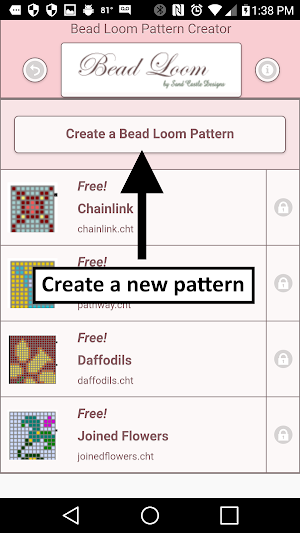
To create Bead Loom patterns, select Create a Bead Loom pattern button.
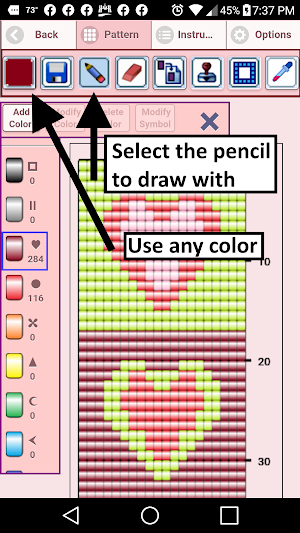
The Bead Loom pattern editor will appear. Fill in the squares with beads of any color.
To get started - Use the pencil to add beads to your pattern. Use the Eraser to remove beads from your pattern.
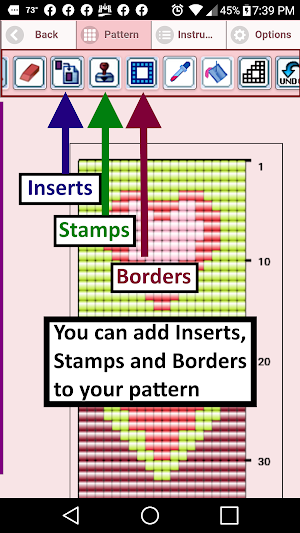
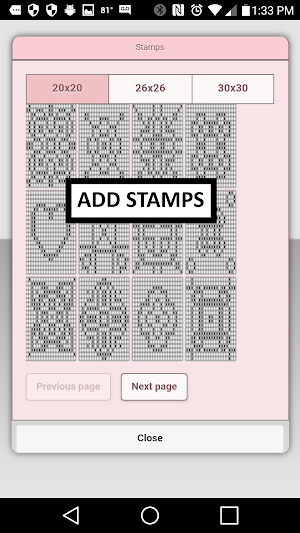
You also can select from over 400 stamps, inserts and borders to apply to your crochet pattern.
Icons from left to right in the icon bar are:
Color icon - use to add new beads with different colors to your bead list.
Save icon - use to save your pattern
Pencil icon - use to add beads to your pattern
Eraser icon - use to remove beads from your pattern
Inserts icon - selectable list of bead patterns to add to your pattern (like roses)
Stamps icon - selectable little stamps (little bead designs) to add to your pattern
Borders icon - selectable borders to add to your pattern. Borders automatically wrap around your pattern.
Dropper icon - lets you extract a bead color from your pattern and add more of that bead to your pattern
Bucket icon - use to fill selected area with beads of the current color
Trim icon - remove squares from your pattern.
Undo icon - undo each last change you made to the pattern.
Redo icon - redo each changes you undid.
Cut icon - remove some beads from the pattern
Copy icon - copy some beads from the pattern
Paste icon - paste copied beads to the pattern
Zoom in icon - magnify the pattern
Zoom out icon - minify the pattern
Symbols icon - display a unique symbol on the bead to indicate it's color value
Picture icon - select a picture from your device and convert to a pattern
Social media icon - email etc your pattern.
Trace icon - select a picture from your device and it displays over your pattern. Now you can trace it.
Resize bars - resize bars are display at the bottom right corner of your pattern. Drag them to resize your pattern
Bead Loom Pattern Creator details
Bead Loom Pattern Creator is a free Art & Design app for Android with 10,000+ installs on Google Play and a 2.2/5 average rating from 64 ratings. It was released on June 9, 2017 and last updated on December 8, 2020. It's developed by Crochet Designs. It requires Android 4.4 or later. The app offers in-app purchases.
- Category
- Art & Design
- Rating
- 2.2 / 5 (64 ratings)
- Installs
- 10,000+
- Price
- Free
- In-app purchases
- Yes
- Ads
- No ads
- Current version
- 4.0.2
- Size
- 26M
- Requires Android
- 4.4 and up
- Content rating
- Everyone
- Released
- June 9, 2017
- Last updated
- December 8, 2020
- Developer
- Crochet Designs
What’s new in Bead Loom Pattern Creator
Bead Loom Creator - Create your own Bead Loom Patterns. Added a trace feature. Now you can trace an image right on your pattern. Just select the trace button. When you are done tracing, just remove the image.
Version 4.0.2 · Updated December 8, 2020
Similar Apps
Bead Pattern Creator
Bead Pattern Creator for your mobile device.Comes with 5 free patterns. Download...
Crochet Graphghan Creator
Crochet Graphghan Pattern Creator for your mobile device.Comes with 4 free Crochet...
Quilt Creator
Create quilts using over 200 quilt blocks to select from. You can...
Filet Crochet Pattern Creator
Filet Crochet Pattern Creator for your mobile device.Comes with 4 free Filet...

Cross Stitch Pattern Creator
Cross Stitch Pattern CreatorComes with 4 sample patterns. Download is free. To...

Diamond Painting Pattern Creat
Diamond Painting Pattern CreatorComes with 4 sample patterns. Download is free. To...
Frequently Asked Questions (FAQ)
How much does it cost to activate pattern creation?
How do I add beads to my pattern?
How do I remove beads from my pattern?
Can I choose from different colors for my beads?
Can I select from pre-designed bead patterns to add to my pattern?
Are there any additional decorative elements I can add to my pattern?
How do I save my pattern?
Can I undo any changes I made to the pattern?
How can I resize my pattern?
Can I convert a picture from my device into a pattern?

