
YAML / YML Viewer & Editor
Tools In-app purchases Contains ads
Edit YAML & YML files offline. Validate, format, convert to JSON or XML.
- Downloads
- 1K+
- on Google Play
- Price
- Free
- In-app purchases
- Updated
- Sep 3
- 2026 · v1.1.1
Screenshots


About YAML / YML Viewer & Editor
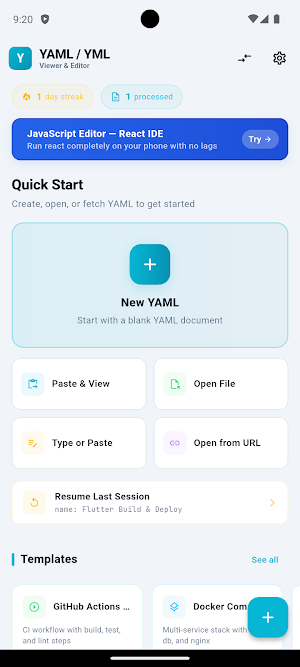
A dedicated YAML and YML editor for Android. View, edit, validate, format, and convert .yaml and .yml files on your phone or tablet — fully offline, on-device.
Most editors on Google Play treat YAML as plain text. This one is built around YAML: real syntax highlighting, real indentation handling, real validation that catches the mistakes that break a build at 2am.
WHAT YOU CAN DO
- Open any .yaml or .yml file from Downloads, Drive, OneDrive, Dropbox, or local storage
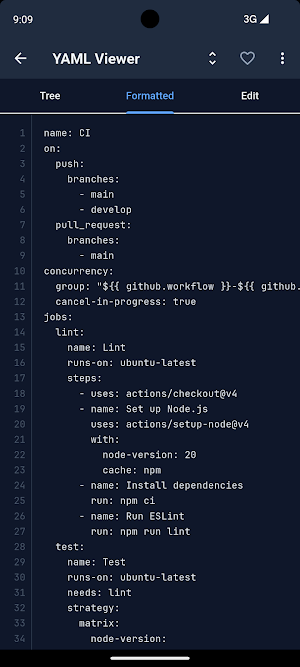
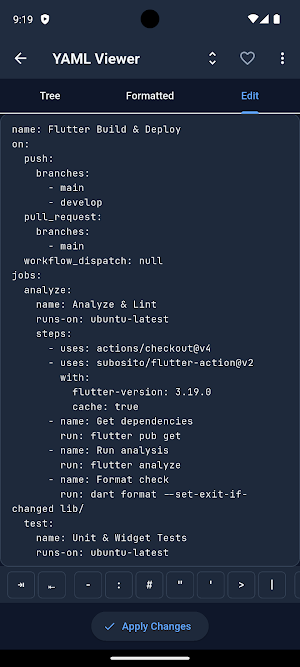
- Edit YAML / YML with syntax highlighting tuned for dark mode
- Validate documents and see exactly which line and column failed
- Auto-format and re-indent messy files with one tap
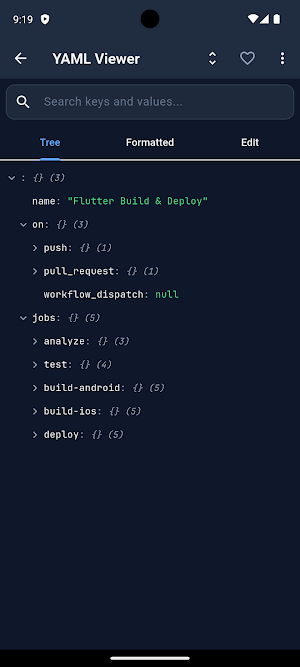
- Browse a tree preview that mirrors the document structure
- Convert YAML / YML to JSON or XML, and back the other way
- Save with the extension you want — choose .yaml or .yml on every export
- Save anywhere through the system SaveAs dialog (Downloads, Drive, OneDrive, etc.)
- Work fully offline. No file ever leaves your device.
REAL USE CASES
- Edit a GitHub Actions workflow on the train and push it from your phone
- Tweak a docker-compose.yml when a service will not come up
- Patch a Kubernetes deployment.yaml from a pager rotation
- Fix an OpenAPI 3.0 spec a teammate sent over Slack
- Open application.yml or config.yaml from a Spring Boot project
- Inspect a .gitlab-ci.yml or .circleci/config.yml on the go
BUNDLED TEMPLATES
- OpenAPI 3.0 starter (.yaml)
- GitHub Actions Flutter CI (.yml)
- AWS CloudFormation skeleton (.yaml)
- Docker Compose multi-service (.yml)
- Kubernetes Deployment, Service, Ingress (.yaml)
Open a template, edit it, export it. A full document round-trip without ever opening a browser.
VALIDATION THAT ACTUALLY HELPS
YAML and YML break on whitespace. A single misplaced space turns a working pipeline into a red build. The validator points to the exact line, the exact column, and explains the error in plain English.
CONVERTERS
- YAML to JSON / YML to JSON
- YAML to XML / YML to XML
- JSON to YAML
- XML to YAML
Useful when a tool wants JSON but your config is YAML, or when you need to paste a Kubernetes object into a tool that only speaks JSON.
15 LANGUAGES
UI available in English, Spanish, Portuguese, French, German, Russian, Hindi, Bengali, Indonesian, Turkish, Urdu, Arabic, Chinese (Simplified), Japanese, and Korean. YAML keys and values are never translated.
OFFLINE AND PRIVATE
Everything happens on the device. No file is uploaded. No keys, secrets, or tokens are sent anywhere. The app uses the network only for ads (free tier) and crash reporting.
FREE WITH OPTIONAL PRO UPGRADE
The app is free to install and use. The free tier shows ads to support development. A one-time Pro upgrade ($4.99) removes ads. No subscription. No recurring charges.
WHO IT IS FOR
- DevOps and SRE engineers editing manifests on call
- Backend developers working on application config
- Cloud engineers writing CloudFormation templates
- Students learning Kubernetes, Docker, and CI/CD
FAQ
Does it work offline? Yes. Open, edit, validate, format, convert, and save without a network.
Does it upload my files? No. Files stay on the device.
What about secrets in my config files? They never leave your device.
What is the difference between .yaml and .yml? They are the same format with two common extensions. .yaml is the official spec name; .yml is widely used in CI/CD configs (docker-compose.yml, .gitlab-ci.yml, application.yml). This editor handles both, and you choose the extension on every save.
Most editors on Google Play treat YAML as plain text. This one is built around YAML: real syntax highlighting, real indentation handling, real validation that catches the mistakes that break a build at 2am.
WHAT YOU CAN DO
- Open any .yaml or .yml file from Downloads, Drive, OneDrive, Dropbox, or local storage
- Edit YAML / YML with syntax highlighting tuned for dark mode
- Validate documents and see exactly which line and column failed
- Auto-format and re-indent messy files with one tap
- Browse a tree preview that mirrors the document structure
- Convert YAML / YML to JSON or XML, and back the other way
- Save with the extension you want — choose .yaml or .yml on every export
- Save anywhere through the system SaveAs dialog (Downloads, Drive, OneDrive, etc.)
- Work fully offline. No file ever leaves your device.
REAL USE CASES
- Edit a GitHub Actions workflow on the train and push it from your phone
- Tweak a docker-compose.yml when a service will not come up
- Patch a Kubernetes deployment.yaml from a pager rotation
- Fix an OpenAPI 3.0 spec a teammate sent over Slack
- Open application.yml or config.yaml from a Spring Boot project
- Inspect a .gitlab-ci.yml or .circleci/config.yml on the go
BUNDLED TEMPLATES
- OpenAPI 3.0 starter (.yaml)
- GitHub Actions Flutter CI (.yml)
- AWS CloudFormation skeleton (.yaml)
- Docker Compose multi-service (.yml)
- Kubernetes Deployment, Service, Ingress (.yaml)
Open a template, edit it, export it. A full document round-trip without ever opening a browser.
VALIDATION THAT ACTUALLY HELPS
YAML and YML break on whitespace. A single misplaced space turns a working pipeline into a red build. The validator points to the exact line, the exact column, and explains the error in plain English.
CONVERTERS
- YAML to JSON / YML to JSON
- YAML to XML / YML to XML
- JSON to YAML
- XML to YAML
Useful when a tool wants JSON but your config is YAML, or when you need to paste a Kubernetes object into a tool that only speaks JSON.
15 LANGUAGES
UI available in English, Spanish, Portuguese, French, German, Russian, Hindi, Bengali, Indonesian, Turkish, Urdu, Arabic, Chinese (Simplified), Japanese, and Korean. YAML keys and values are never translated.
OFFLINE AND PRIVATE
Everything happens on the device. No file is uploaded. No keys, secrets, or tokens are sent anywhere. The app uses the network only for ads (free tier) and crash reporting.
FREE WITH OPTIONAL PRO UPGRADE
The app is free to install and use. The free tier shows ads to support development. A one-time Pro upgrade ($4.99) removes ads. No subscription. No recurring charges.
WHO IT IS FOR
- DevOps and SRE engineers editing manifests on call
- Backend developers working on application config
- Cloud engineers writing CloudFormation templates
- Students learning Kubernetes, Docker, and CI/CD
FAQ
Does it work offline? Yes. Open, edit, validate, format, convert, and save without a network.
Does it upload my files? No. Files stay on the device.
What about secrets in my config files? They never leave your device.
What is the difference between .yaml and .yml? They are the same format with two common extensions. .yaml is the official spec name; .yml is widely used in CI/CD configs (docker-compose.yml, .gitlab-ci.yml, application.yml). This editor handles both, and you choose the extension on every save.
What’s new
Version 1.1.1 · Updated September 3, 2026
Fixed: the app could not open .yml or .yaml files. Android does not recognise YAML as a text type, so the system file picker hid every YAML file on the device, and the app did not appear when you opened one from a file manager. Both paths are fixed — your YAML files are selectable again, and "Open with" works. A file that cannot be read now tells you which file and why, instead of doing nothing.
Alternatives to YAML / YML Viewer & Editor
Looking for apps like YAML / YML Viewer & Editor? Here are 6 similar Android apps on Google Play. All of them are free to download.
-
Markdown Editor & MD Viewer
-
WebEva: Build Websites & Code
-
XML Viewer & Editor
-
JavaScript Editor — React IDE
-
Python Editor & Code Runner
-
SVG Editor — Image to Vector
| App | Rating | Price | Installs | Last updated | Compare |
|---|---|---|---|---|---|
| YAML / YML Viewer & Editor | – | Free | 1,000+ | Sep 3, 2026 | |
| Markdown Editor & MD Viewer | – | Free | 10,000+ | – | Compare |
| WebEva: Build Websites & Code | – | Free | 10,000+ | Oct 14, 2026 | Compare |
| XML Viewer & Editor | – | Free | 10,000+ | Oct 11, 2026 | Compare |
| JavaScript Editor — React IDE | – | Free | 5,000+ | – | Compare |
| Python Editor & Code Runner | – | Free | 10,000+ | Sep 29, 2026 | Compare |
| SVG Editor — Image to Vector | – | Free | 5,000+ | Oct 14, 2026 | Compare |