
Color Pick & Gradient Creator
Absurd_Human Art & Design In-app purchases Contains ads
Extract beautiful color palettes and gradients from your photos and camera.
- Downloads
- 12+
- on Google Play
- Price
- Free
- In-app purchases
- Updated
- Aug 8
- 2026 · v1.2
Screenshots


About Color Pick & Gradient Creator
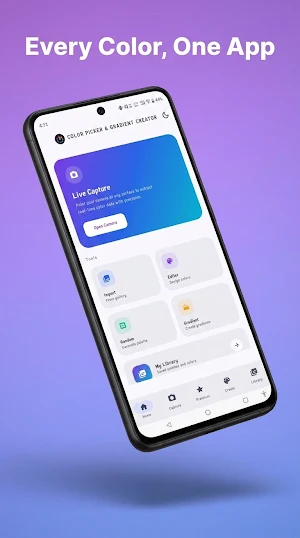
Color Picker is the ultimate design companion for developers, designers, artists, and creators. Easily capture, generate, and organize stunning color palettes and custom gradients directly from the world around you.
Whether you are designing a website, styling an app, painting, or planning home decor, Color Picker gives you the tools to find the perfect color harmony.
Key Features:
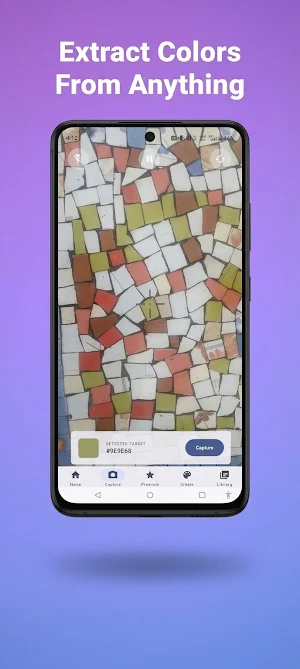
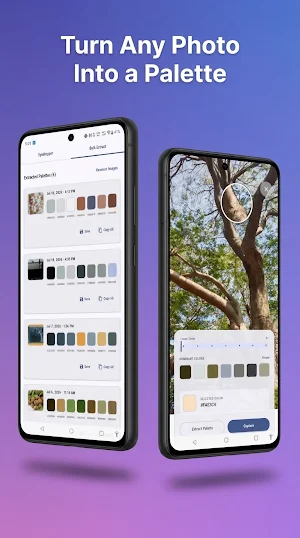
🛑 Live Camera Eyedropper Point your camera at any object or scene to detect and capture colors in real time. Frame your subject and snap the color hex code instantly.
🖼️ Image Color Extractor Load any photo from your gallery to pinpoint specific colors. Use the precision magnifier (loupe) to get the exact pixel shade you need.
⚡ Bulk Palette Extractor Select multiple images from your gallery at once to automatically extract dominant color palettes side by side. Perfect for mood boarding, compiling visual themes, and comparing color trends across photo sets. It now includes image thumbnail previews alongside each palette for easy reference!
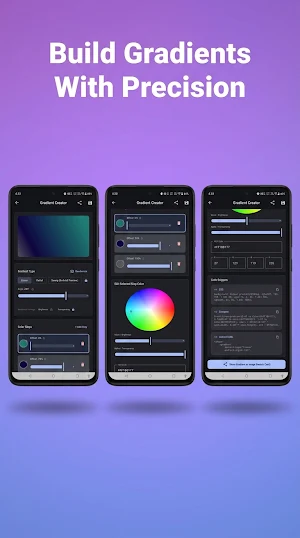
🌈 Interactive Gradient Creator Design smooth multi-stop linear or radial gradients. Fine-tune angles, add or remove color stops, lock selected colors, and randomize blends with a single tap.
🗃️ My Color & Gradient Library Save your custom color palettes and gradients. Organize them with names, view detailed hex codes, copy codes to your clipboard instantly, or delete unused palettes to keep your design workspace clean.
📤 Easy Exporting & Sharing Export your saved palettes as beautifully structured cards or copy clean hex lists to integrate immediately into your Android, CSS, Flutter, or design projects.
🌓 Dark & Light Mode Switch between dark and light themes seamlessly to match your environment and preview how your colors perform in different UI lighting modes.
Who is it for?
UI/UX Designers & Web Developers: Build cohesive themes and grab codes on the go.
Digital Artists & Illustrators: Generate organic color boards from real-life reference photos.
Content Creators: Maintain brand color consistency across photography and marketing graphics.
Whether you are designing a website, styling an app, painting, or planning home decor, Color Picker gives you the tools to find the perfect color harmony.
Key Features:
🛑 Live Camera Eyedropper Point your camera at any object or scene to detect and capture colors in real time. Frame your subject and snap the color hex code instantly.
🖼️ Image Color Extractor Load any photo from your gallery to pinpoint specific colors. Use the precision magnifier (loupe) to get the exact pixel shade you need.
⚡ Bulk Palette Extractor Select multiple images from your gallery at once to automatically extract dominant color palettes side by side. Perfect for mood boarding, compiling visual themes, and comparing color trends across photo sets. It now includes image thumbnail previews alongside each palette for easy reference!
🌈 Interactive Gradient Creator Design smooth multi-stop linear or radial gradients. Fine-tune angles, add or remove color stops, lock selected colors, and randomize blends with a single tap.
🗃️ My Color & Gradient Library Save your custom color palettes and gradients. Organize them with names, view detailed hex codes, copy codes to your clipboard instantly, or delete unused palettes to keep your design workspace clean.
📤 Easy Exporting & Sharing Export your saved palettes as beautifully structured cards or copy clean hex lists to integrate immediately into your Android, CSS, Flutter, or design projects.
🌓 Dark & Light Mode Switch between dark and light themes seamlessly to match your environment and preview how your colors perform in different UI lighting modes.
Who is it for?
UI/UX Designers & Web Developers: Build cohesive themes and grab codes on the go.
Digital Artists & Illustrators: Generate organic color boards from real-life reference photos.
Content Creators: Maintain brand color consistency across photography and marketing graphics.
What’s new
Version 1.2 · Updated August 8, 2026
May CHAOS Take The World !!! 🔥🔥
Alternatives to Color Pick & Gradient Creator
Looking for apps like Color Pick & Gradient Creator? Here are 6 similar Android apps on Google Play. All of them are free to download.
-
PDF Compressor : Reduce Size
-
PDF to Image Converter
-
Volume Booster
-
ipynb Viewer Offline (Jupyter)
-
ScreenLighT
-
FlashLighT
| App | Rating | Price | Installs | Last updated | Compare |
|---|---|---|---|---|---|
| Color Pick & Gradient Creator | – | Free | 10+ | Aug 8, 2026 | |
| PDF Compressor : Reduce Size | – | Free | 100+ | – | Compare |
| PDF to Image Converter | – | Free | 1+ | Aug 3, 2026 | Compare |
| Volume Booster | – | Free | 100+ | – | Compare |
| ipynb Viewer Offline (Jupyter) | – | Free | 1,000+ | Aug 3, 2026 | Compare |
| ScreenLighT | – | Free | 10+ | – | Compare |
| FlashLighT | – | Free | 10+ | May 28, 2026 | Compare |