

FilesCrypt
CDevWorks Tools In-app purchases Contains ads
Encrypt and decrypt Files effortlessly.
- Downloads
- 50+
- on Google Play
- Price
- Free
- In-app purchases
- Updated
- Aug 21
- 2024 · v3.3
Screenshots

About FilesCrypt
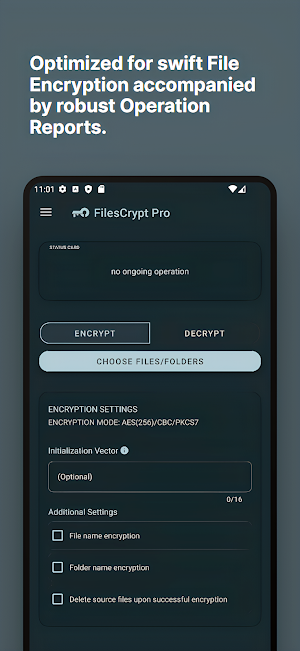
Empowered by the robust AES 256 encryption, you can effortlessly secure your files and folders with just one swift action, your data's security is paramount. In a separate realm, our secure password manager facilitates effortless file decryption via your device's screen lock or fingerprint. Experience the perfect synergy of privacy and simplicity
◽ Robust Encryption with AES 256 Algorithm:
FilesCrypt Pro employs the internationally recognized AES 256 encryption algorithm, fortifying your files against unauthorized access. With FilesCrypt Pro, your confidential data remains under an impenetrable lock, providing you with absolute peace of mind.
◽ Effortless Decryption with Device Lock or Fingerprint facilitated by Integrated Password Manager:
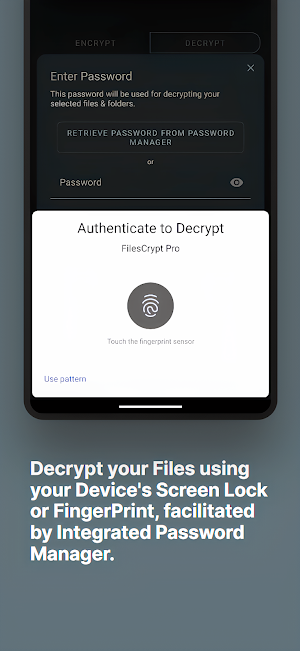
Experience a new realm of decryption convenience with FilesCrypt Pro. Seamlessly decrypt files and folders using device screen lock or fingerprint authentication, alleviating the need to remember complex passwords. Your security remains paramount, while accessibility reaches new heights.
◽ Effortless Encryption for Files and Folders:
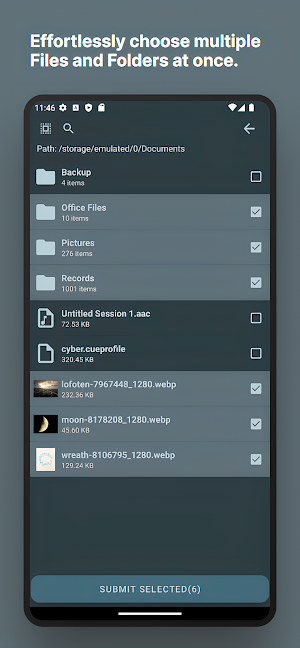
Experience newfound convenience as FilesCrypt Pro empowers you to select and encrypt multiple files and folders with remarkable ease. Bid farewell to the inefficiencies of encrypting items individually. With FilesCrypt Pro, your data is secured in a matter of moments, enhancing your overall workflow efficiency.
◽ Privacy Boost: Encrypt File and Folder Names:
FilesCrypt Pro offers an optional privacy enhancement: encrypting not only file contents but also filenames. Elevate confidentiality by rendering metadata indecipherable, offering heightened privacy for those who opt to enable this feature.
◽ Operation Reports and Intelligent Retry System:
Stay informed with FilesCrypt Pro's meticulous reporting feature, providing insight into the outcomes of encryption and decryption processes. Identify both successful and unsuccessful operations, with the added capability to retry files that faced challenges.
◽ Seamless Password Management Across Devices:
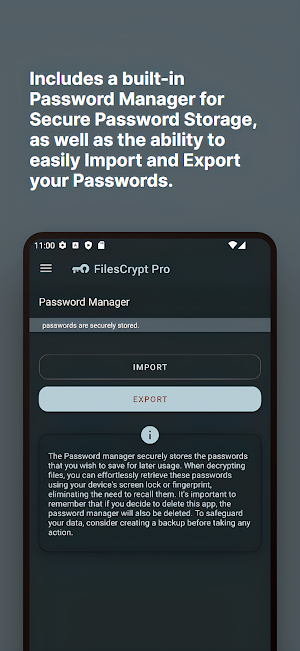
Transition seamlessly between devices with FilesCrypt Pro's effortless password import and export functionality. Transfer passwords seamlessly from one device to another, ensuring both security and accessibility.
◽ Robust Encryption with AES 256 Algorithm:
FilesCrypt Pro employs the internationally recognized AES 256 encryption algorithm, fortifying your files against unauthorized access. With FilesCrypt Pro, your confidential data remains under an impenetrable lock, providing you with absolute peace of mind.
◽ Effortless Decryption with Device Lock or Fingerprint facilitated by Integrated Password Manager:
Experience a new realm of decryption convenience with FilesCrypt Pro. Seamlessly decrypt files and folders using device screen lock or fingerprint authentication, alleviating the need to remember complex passwords. Your security remains paramount, while accessibility reaches new heights.
◽ Effortless Encryption for Files and Folders:
Experience newfound convenience as FilesCrypt Pro empowers you to select and encrypt multiple files and folders with remarkable ease. Bid farewell to the inefficiencies of encrypting items individually. With FilesCrypt Pro, your data is secured in a matter of moments, enhancing your overall workflow efficiency.
◽ Privacy Boost: Encrypt File and Folder Names:
FilesCrypt Pro offers an optional privacy enhancement: encrypting not only file contents but also filenames. Elevate confidentiality by rendering metadata indecipherable, offering heightened privacy for those who opt to enable this feature.
◽ Operation Reports and Intelligent Retry System:
Stay informed with FilesCrypt Pro's meticulous reporting feature, providing insight into the outcomes of encryption and decryption processes. Identify both successful and unsuccessful operations, with the added capability to retry files that faced challenges.
◽ Seamless Password Management Across Devices:
Transition seamlessly between devices with FilesCrypt Pro's effortless password import and export functionality. Transfer passwords seamlessly from one device to another, ensuring both security and accessibility.
Alternatives to FilesCrypt
Looking for apps like FilesCrypt? Here are 6 similar Android apps on Google Play. The highest rated is F-Secure: Total Security & VPN (4.7/5), and 4 of the 6 are free to download.
-
KiWi Vault: Hide Photos, Video
-
LockTrip 4.5
-
Video Downloader & HD Player
-
F-Secure: Total Security & VPN 4.7
-
One Key: password manager 4.4
-
IronVest - Security & Privacy 2.9
| App | Rating | Price | Installs | Last updated | Compare |
|---|---|---|---|---|---|
| FilesCrypt | – | Free | 50+ | Aug 21, 2024 | |
| KiWi Vault: Hide Photos, Video | – | – | 10,000+ | Sep 28, 2026 | Compare |
| LockTrip | 4.5 / 5 | Free | 50,000+ | Aug 12, 2026 | Compare |
| Video Downloader & HD Player | – | – | 10,000+ | Sep 23, 2026 | Compare |
| F-Secure: Total Security & VPN | 4.7 / 5 | Free | 1,000,000+ | Oct 9, 2026 | Compare |
| One Key: password manager | 4.4 / 5 | Free | 100,000+ | May 22, 2026 | Compare |
| IronVest - Security & Privacy | 2.9 / 5 | Free | 100,000+ | Aug 19, 2026 | Compare |
Compare FilesCrypt with the top alternatives: ratings, updates, ASO score and keyword gaps →
Similar apps on Google Play
- KiWi Vault: Hide Photos, Video
- LockTrip
- Video Downloader & HD Player
- F-Secure: Total Security & VPN
- One Key: password manager
- IronVest - Security & Privacy
- Enpass Password Manager
- Status Saver App
- TTLock
- SafeInCloud 1
- Smart Video Downloader
- Applock - lock apps - pin lock
- Pavlok
- Trend Micro ID Protection
- RoboForm Password Manager
- iStatus: Video Saver Reposter
- WaiverForever - Online Waiver
- Privilee