

Draw Mindmaps
Applikationsprogramvara Productivity
Sketch and organize ideas and tasks in a form of a mindmap
- Downloads
- 10K+
- on Google Play
- Price
- Free
- No in-app purchases
- Updated
- Mar 24
- 2019
Screenshots


About Draw Mindmaps
Disclaimer: sketching is heavily used in the application, so it is recommended to use a pressure-sensitive stylus.
Do you write down all your ideas, tasks and just thought? Have you ever tried to organize them without losing something important? Do you like mind maps?
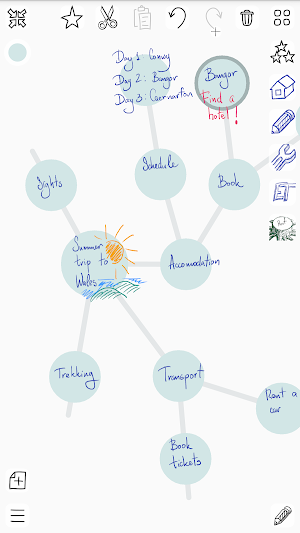
Use the application to write all your thoughts down, the same way you do on sticky notes. Drag them on the screen, create generalized topics, move ideas between them. You have unlimited space to organize your ideas.
The application has been created with productivity, usability and good-looking in mind. You won’t see space-consuming header and footer, bulky tools. Use the full screen you have to overview our notes and minimalistic tools
Here are some use cases:
- Brainstorming:
- note down your ideas as multiple notes directly under the root topic
- create generalized topics and move your initial notes there
- add required details and repeat till the solution is ready
- Organize tasks:
- create tasks categories
- organize your tasks under relevant categories, so you can easily review and find them
- create three topics: now, review, later
- use some methodology like GTD to manage the tasks
Some tips and tricks:
- highlight the topics:
- draw symbols / icons to easily distinguish categories
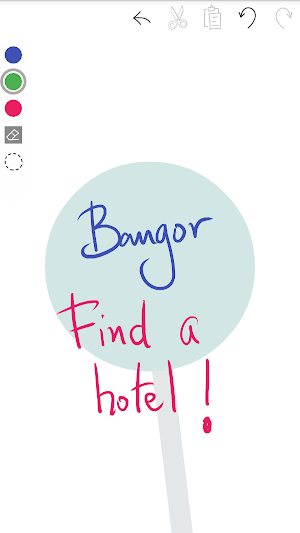
- use different colors to separate title, details and action
- on the mindmap:
- rotate topics by keeping one finger on the topic and moving another around
- in the sketch toolbar:
- long click on pen color to change pen color
- change pen width in setting for simple toolbar. In advanced toolbar pen widths can be set individually by dragging up and down selected pen
A more formalized list of functions:
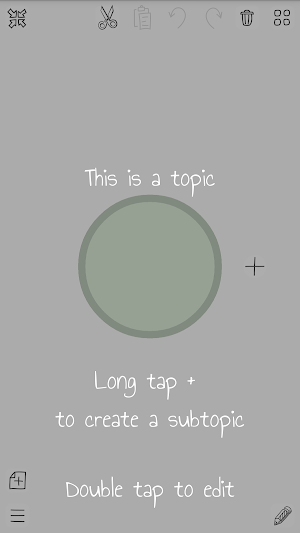
- write down or draw your ideas (double click on the bubble)
- create subtopics (long tap on +)
- drag topics and move subtopics between general ones (drag a topic over another one to re-assign)
- collapse subtopics to free space for new ideas
- drag and zoom the mind map
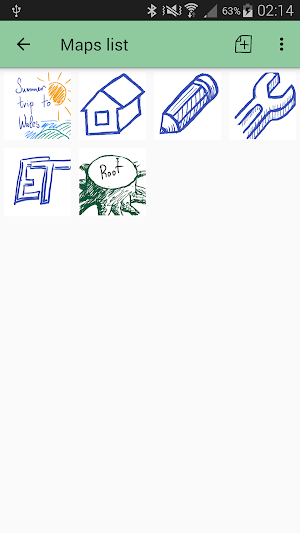
- create multiple mind maps
Extended functions:
- extract a topic with its children to a separate mindmap to keep focused and add more details. Also: merge the back to the parent mind map and link other mind maps with the current. Navigate between the linked mind maps.
- export the mind map to the image gallery as a picture (like a giant screenshot)
- backup mind maps to a file and restore the backup
- board of current tasks: star a topic to move it to a separate board, manage all selected topics without distraction. Also draw anything between topics. Looks like whiteboard with magnets.
- set the individual color for a mind map to better distinguish it
- quick open last mind maps directly from the mind map screen
Do you write down all your ideas, tasks and just thought? Have you ever tried to organize them without losing something important? Do you like mind maps?
Use the application to write all your thoughts down, the same way you do on sticky notes. Drag them on the screen, create generalized topics, move ideas between them. You have unlimited space to organize your ideas.
The application has been created with productivity, usability and good-looking in mind. You won’t see space-consuming header and footer, bulky tools. Use the full screen you have to overview our notes and minimalistic tools
Here are some use cases:
- Brainstorming:
- note down your ideas as multiple notes directly under the root topic
- create generalized topics and move your initial notes there
- add required details and repeat till the solution is ready
- Organize tasks:
- create tasks categories
- organize your tasks under relevant categories, so you can easily review and find them
- create three topics: now, review, later
- use some methodology like GTD to manage the tasks
Some tips and tricks:
- highlight the topics:
- draw symbols / icons to easily distinguish categories
- use different colors to separate title, details and action
- on the mindmap:
- rotate topics by keeping one finger on the topic and moving another around
- in the sketch toolbar:
- long click on pen color to change pen color
- change pen width in setting for simple toolbar. In advanced toolbar pen widths can be set individually by dragging up and down selected pen
A more formalized list of functions:
- write down or draw your ideas (double click on the bubble)
- create subtopics (long tap on +)
- drag topics and move subtopics between general ones (drag a topic over another one to re-assign)
- collapse subtopics to free space for new ideas
- drag and zoom the mind map
- create multiple mind maps
Extended functions:
- extract a topic with its children to a separate mindmap to keep focused and add more details. Also: merge the back to the parent mind map and link other mind maps with the current. Navigate between the linked mind maps.
- export the mind map to the image gallery as a picture (like a giant screenshot)
- backup mind maps to a file and restore the backup
- board of current tasks: star a topic to move it to a separate board, manage all selected topics without distraction. Also draw anything between topics. Looks like whiteboard with magnets.
- set the individual color for a mind map to better distinguish it
- quick open last mind maps directly from the mind map screen
What’s new
Updated March 24, 2019
Size optimization and restoring operation for Android prior to 5
Alternatives to Draw Mindmaps
Looking for apps like Draw Mindmaps? Here are 6 similar Android apps on Google Play. The highest rated is Xmind: Mind Map & Brainstorm (4.7/5), and all 6 are free to download.
-
Mindly (mind mapping) 4.4
-
miMind - Easy Mind Mapping 4.6
-
MindMeister 4.2
-
GitMind: Mind Map & Brainstorm 4.5
-
SimpleMind Lite - Mind Mapping 4.5
-
Xmind: Mind Map & Brainstorm 4.7
| App | Rating | Price | Installs | Last updated | Compare |
|---|---|---|---|---|---|
| Draw Mindmaps | – | Free | 10,000+ | Mar 24, 2019 | |
| Mindly (mind mapping) | 4.4 / 5 | Free | 1,000,000+ | Jun 7, 2019 | Compare |
| miMind - Easy Mind Mapping | 4.6 / 5 | Free | 1,000,000+ | Oct 23, 2026 | Compare |
| MindMeister | 4.2 / 5 | Free | 5,000,000+ | Oct 14, 2026 | Compare |
| GitMind: Mind Map & Brainstorm | 4.5 / 5 | Free | 1,000,000+ | Sep 28, 2026 | Compare |
| SimpleMind Lite - Mind Mapping | 4.5 / 5 | Free | 5,000,000+ | Oct 12, 2026 | Compare |
| Xmind: Mind Map & Brainstorm | 4.7 / 5 | Free | 1,000,000+ | Oct 21, 2026 | Compare |
Compare Draw Mindmaps with the top alternatives: ratings, updates, ASO score and keyword gaps →
Similar apps on Google Play
- Mindly (mind mapping)
- miMind - Easy Mind Mapping
- MindMeister
- GitMind: Mind Map & Brainstorm
- SimpleMind Lite - Mind Mapping
- Xmind: Mind Map & Brainstorm
- Ayoa: ultimate mind mapping
- Miro: Online whiteboard
- Wondershare EdrawMind MindMap
- Flowdia Diagrams Lite
- Explain Everything Whiteboard
- NoteFlow: Note Organizer
- TeamGantt