
ZestSSH
Affluent Labs Tools In-app purchases
Secure SSH client with terminal, SFTP, keys, snippets & encrypted cloud sync.
- Downloads
- 100+
- on Google Play
- Price
- Free
- In-app purchases
- Updated
- Sep 24
- 2026 · v2.2.1
Screenshots


About ZestSSH
ZestSSH is a modern, secure SSH client built for sysadmins, developers, and anyone who manages servers from their phone. Designed as a fresh replacement for outdated terminals with no subscriptions and no per-device fees.
TERMINAL
- Full xterm-256color terminal emulator with UTF-8 and emoji support
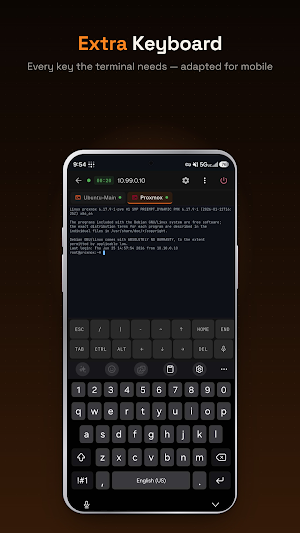
- Custom keyboard row with Esc, Tab, Ctrl, Alt, arrows, and special characters
- Pinch to zoom font size, multiple font options including JetBrains Mono
- Keep screen awake during sessions
- Hardware keyboard support (Bluetooth and USB)
CONNECTIONS
- Save unlimited connections with color-coded groups
- Quick connect bar — type user@host and go
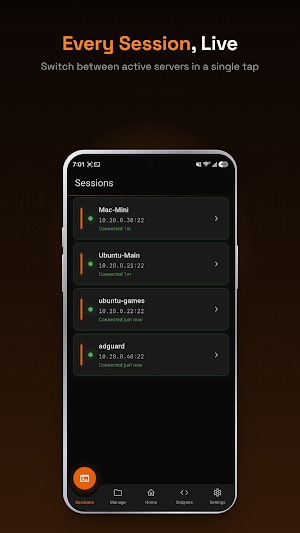
- Connection health status at a glance
- Auto-reconnect on network change
- Jump host support for bastion/proxy setups
IDENTITY & KEY MANAGEMENT
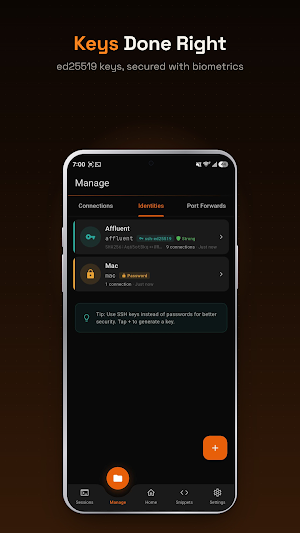
- Generate Ed25519, ECDSA, and RSA keys on device
- Import keys from OpenSSH and PuTTY formats
- Reusable identities across multiple connections
- Secure key storage using device hardware encryption
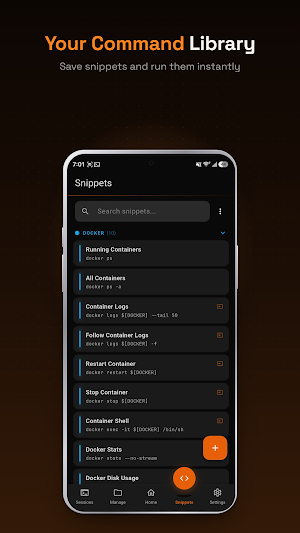
SNIPPETS (Pro)
- Save frequently used commands, execute with one tap
- Variable substitution — fill in values before running
- Categories and grouping for organization
- Run snippets automatically on connect
SFTP FILE BROWSER (Pro)
- Browse, upload, download, and manage remote files
- Create, rename, and delete files and directories
- Transfer progress with resume support
PORT FORWARDING (Pro)
- Local, remote, and dynamic SOCKS5 forwarding
- Saved forwarding rules per connection
- Visual status indicator for active tunnels
SECURITY
- App lock with PIN and biometric authentication
- AES-256 encrypted local database
- Modern cryptography — Ed25519, ChaCha20, AES-256-GCM
- No legacy or weak algorithms supported
CLOUD SYNC (Pro + Sync)
- Zero-knowledge encrypted sync — we cannot see your data
- Sync connections, keys, snippets, and settings across devices
- Encrypted backup and restore
- Sign in with Google or Apple
THEMES
- Dark mode default with orange accent
- Multiple terminal color schemes
- Custom font selection
BUILT FOR SYSADMINS
- Designed by a sysadmin who manages 20+ servers daily
- No subscriptions. No per-device fees. One-time purchases only.
- Actively maintained — not another abandoned SSH app.
Pro: $10 one-time — unlocks snippets, SFTP, port forwarding, themes, and more.
Cloud Sync: $20 one-time — adds encrypted cross-device sync.
From the ashes of JuiceSSH. Just SSH that works.
TERMINAL
- Full xterm-256color terminal emulator with UTF-8 and emoji support
- Custom keyboard row with Esc, Tab, Ctrl, Alt, arrows, and special characters
- Pinch to zoom font size, multiple font options including JetBrains Mono
- Keep screen awake during sessions
- Hardware keyboard support (Bluetooth and USB)
CONNECTIONS
- Save unlimited connections with color-coded groups
- Quick connect bar — type user@host and go
- Connection health status at a glance
- Auto-reconnect on network change
- Jump host support for bastion/proxy setups
IDENTITY & KEY MANAGEMENT
- Generate Ed25519, ECDSA, and RSA keys on device
- Import keys from OpenSSH and PuTTY formats
- Reusable identities across multiple connections
- Secure key storage using device hardware encryption
SNIPPETS (Pro)
- Save frequently used commands, execute with one tap
- Variable substitution — fill in values before running
- Categories and grouping for organization
- Run snippets automatically on connect
SFTP FILE BROWSER (Pro)
- Browse, upload, download, and manage remote files
- Create, rename, and delete files and directories
- Transfer progress with resume support
PORT FORWARDING (Pro)
- Local, remote, and dynamic SOCKS5 forwarding
- Saved forwarding rules per connection
- Visual status indicator for active tunnels
SECURITY
- App lock with PIN and biometric authentication
- AES-256 encrypted local database
- Modern cryptography — Ed25519, ChaCha20, AES-256-GCM
- No legacy or weak algorithms supported
CLOUD SYNC (Pro + Sync)
- Zero-knowledge encrypted sync — we cannot see your data
- Sync connections, keys, snippets, and settings across devices
- Encrypted backup and restore
- Sign in with Google or Apple
THEMES
- Dark mode default with orange accent
- Multiple terminal color schemes
- Custom font selection
BUILT FOR SYSADMINS
- Designed by a sysadmin who manages 20+ servers daily
- No subscriptions. No per-device fees. One-time purchases only.
- Actively maintained — not another abandoned SSH app.
Pro: $10 one-time — unlocks snippets, SFTP, port forwarding, themes, and more.
Cloud Sync: $20 one-time — adds encrypted cross-device sync.
From the ashes of JuiceSSH. Just SSH that works.
User reviews

great replacement for dormant JuiceSSH.
Alternatives to ZestSSH
Looking for apps like ZestSSH? Here are 6 similar Android apps on Google Play. The highest rated is Nextcloud (4.7/5), and all 6 are free to download.
-
Autosync - File Sync & Backup 4.5
-
UserLAnd - Linux on Android 4.6
-
Nextcloud 4.7
-
One Key: password manager 4.4
-
BILT: 3D Instructions 4.4
-
Tooly Toolbox All Tools In One 4.3
| App | Rating | Price | Installs | Last updated | Compare |
|---|---|---|---|---|---|
| ZestSSH | – | Free | 100+ | Sep 24, 2026 | |
| Autosync - File Sync & Backup | 4.5 / 5 | Free | 100,000+ | Oct 14, 2026 | Compare |
| UserLAnd - Linux on Android | 4.6 / 5 | Free | 1,000,000+ | Oct 19, 2026 | Compare |
| Nextcloud | 4.7 / 5 | Free | 1,000,000+ | Oct 5, 2026 | Compare |
| One Key: password manager | 4.4 / 5 | Free | 100,000+ | May 22, 2026 | Compare |
| BILT: 3D Instructions | 4.4 / 5 | Free | 1,000,000+ | Jul 10, 2026 | Compare |
| Tooly Toolbox All Tools In One | 4.3 / 5 | Free | 500,000+ | Sep 24, 2026 | Compare |
Compare ZestSSH with the top alternatives: ratings, updates, ASO score and keyword gaps →
Similar apps on Google Play
- Autosync - File Sync & Backup
- UserLAnd - Linux on Android
- Nextcloud
- One Key: password manager
- BILT: 3D Instructions
- Tooly Toolbox All Tools In One
- Building Tools
- Liner - AI Search and Finance
- ISO Today
- Castro Premium - system info
- IFTTT - Automate work and home
- nzb360 - Media Server Manager
- OnePageCRM - Simple CRM System
- fooView - FV Float Viewer
- AppDash: App Manager & Backup
- Savant
- RepairSolutionsPRO
- Kagi
- Coast: Native Work Order CMMS
- PDK Access by ProdataKey
- Spck Editor / Git Client
- Solid Explorer File Manager
- Macrorify - Image Auto Clicker
- RealVNC Viewer: Remote Desktop
- myReach - AI Assistant
- IronVest - Security & Privacy
- OONI Probe
- Gallup Access
- CyberTrophy
- TAP Kiln Control Mobile
- Airtable
- Orion Intelligence
- 1Password: Password Manager
- Auto Agent
- WiFi Mouse Pro
- Sensi
- Coolina
- Linksys
- Kisi
- Simpro Mobile
- TrebEdit - Mobile HTML Editor
- Automate
- MySudo - Identity Protection
- Content - Workspace ONE
- Termius - Modern SSH Client
- NETGEAR Orbi – WiFi System App