Pultio: Android TV Remote
Control Android TV and Google TV with a remote, keyboard and touchpad.
About Pultio: Android TV Remote
# Pultio — Remote for Android TV and Google TV
Turn your phone into a convenient remote for Android TV and Google TV.
Pultio finds compatible TVs on your local Wi-Fi network and guides you through a simple pairing process. Once connected, you can navigate apps, control playback and volume, enter text using your phone keyboard, and move around the screen with a responsive touchpad.
## Key Features
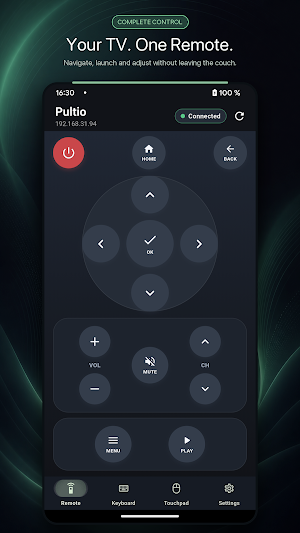
* Familiar remote buttons for everyday control
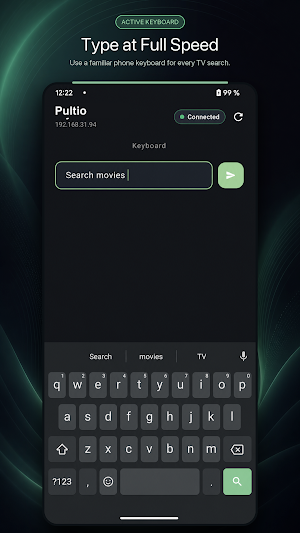
* Phone keyboard for faster searches and text entry
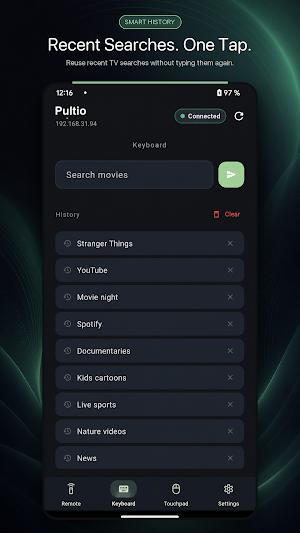
* Keyboard history for reusing recent entries
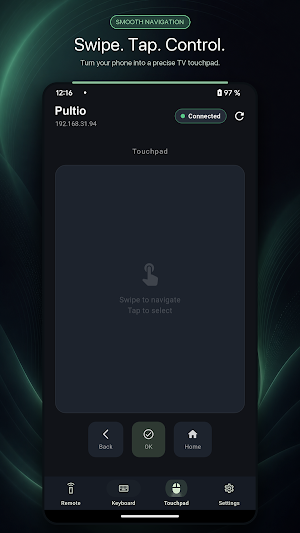
* Touchpad with swipe and tap gestures
* Automatic discovery of compatible devices
* Clear connection status and quick reconnection
* Support for Android TV and Google TV devices
Your phone and TV must be connected to the same Wi-Fi network.
Available commands, text input, and touchpad support may vary depending on the TV model and the active app.
## A Remote Designed for the Way You Watch
Keep the controls you use most within easy reach.
Open the Home screen, go back, confirm a selection, move through menus, adjust the volume, mute the sound, switch channels, and control playback without searching for the physical remote.
The clear layout is designed for quick, comfortable, one-handed use from the sofa.
## Type at Phone Speed
Searching for a movie, entering a web address, or filling in a text field is easier with the keyboard already in your hand.
Send text from your phone whenever the selected TV field supports remote input.
Recent entries are saved in the keyboard history, allowing you to quickly reuse a search phrase, link, or other text. You remain in control and can clear the history from the app at any time.
## Navigate Naturally with the Touchpad
Use a large touch surface for navigation when your TV supports pointer-style control.
Swipe to move and tap to select.
The touchpad provides a convenient alternative to repeatedly pressing directional buttons and is especially useful for interfaces that work better with gestures.
## Simple Setup
1. Connect your phone and TV to the same home Wi-Fi network.
2. Open Pultio and allow it to search for compatible devices.
3. Select your TV and confirm the pairing code displayed on its screen.
4. Start controlling the TV once the connection is established.
If automatic discovery does not find your TV, you can enter its local IP address manually.
Saved pairing information makes future connections more convenient. You can remove it at any time by unpairing the device in Pultio.
## Local Connection
Everyday commands are sent directly between your phone and TV over the local network.
A separate remote-control server is not required for normal use.
Pultio also displays the current connection status:
* Connecting
* Connected
* Disconnected
You can quickly reconnect or search for another device whenever needed.
## Compatibility Notes
Pultio is intended for compatible Android TV and Google TV televisions, streaming devices, and media boxes that provide a supported remote-pairing service.
Compatibility depends on the software and services available on the TV, not only on its brand.
Some manufacturers or device versions may disable particular commands.
Please note:
* The power command may not wake every device.
* Text input works only when a compatible text field is active on the TV.
* Some remote commands may not be supported by certain models or apps.
* No developer mode or manual ADB configuration is required for the normal pairing process.
For reliable device discovery:
* Keep Wi-Fi enabled.
* Make sure the phone and TV are connected to the same network.
* Avoid guest networks with device isolation.
* Allow the phone to communicate with other devices on the local network.
Pultio is an independent application and is not affiliated with, sponsored by, or endorsed by Google or any TV manufacturer.
Similar Apps
IP Camera Viewer
IP camera view and playback, for your WiFi cam or home security cctv system.
Universal Remote for Smart TV
Enhance viewing experience with Universal TV Remote Control for All Smart TVs.
Parental Control - Kroha
Sound around the child, Limit screen time, Kids mode with Parental control app.
spacedesk - USB Display for PC
Multi Monitor Remote Desktop. Screen share, mirror and extend. USB, WiFi and LAN
Yubii Home
The complete smart home management app with brilliant automation control
Speedify: Bond Satellite + 5G
Bond 4G, 5G, Wi-Fi, & Satellite internet into one unbreakable secure connection
