

Bol Kharch: Spend Tracker
Spectordev Finance In-app purchases Contains ads
Voice-first money manager for daily spends, bills, savings and monthly goals
- Downloads
- 302+
- on Google Play
- Price
- Free
- In-app purchases
- Updated
- Aug 26
- 2026 · v1.8.5
Screenshots


About Bol Kharch: Spend Tracker
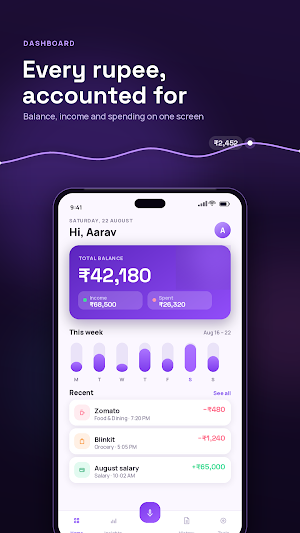
Bol Kharch is an expense tracker and budget planner built for everyday spending in India. Log a purchase in about a second, set a monthly budget, and see exactly where the money went.
No account. No bank login. Everything stays on your phone.
— Speak instead of typing —
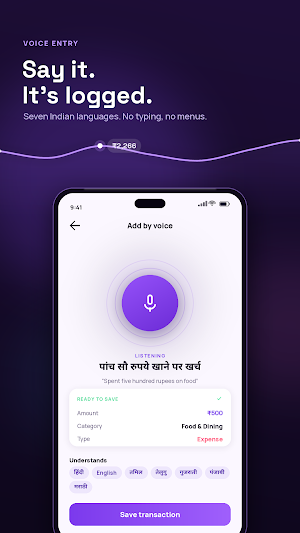
Tap the mic and say the spend the way you would say it out loud. Budget Buddy understands English, Hindi, Tamil, Telugu, Gujarati, Punjabi and Marathi, including mixed sentences.
"Spent 500 on lunch"
"पांच सौ रुपये खाने पर खर्च"
"1200 kirana kharcha"
It pulls out the amount, picks the category and files it. It also knows the shops and services you actually use, so a spend at Zomato lands in Food & Dining and one at Blinkit lands in Grocery.
— See where your money goes —
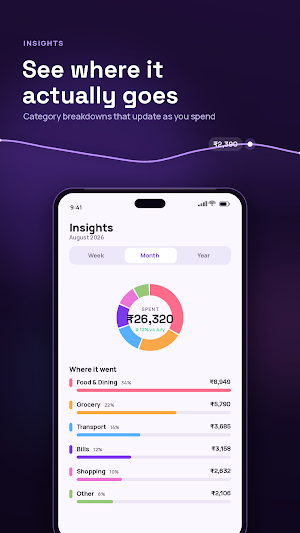
- Weekly, monthly and yearly breakdowns by category
- Charts that update the moment you add a spend
- This month against last month, at a glance
- Income against expenses, and what is actually left
— Built around the rupee —
- Indian number format: 1,00,000 rather than 100,000
- EMI calculator with a full amortisation schedule
- SIP calculator with year-by-year growth
- FD, RD and PPF maturity calculators
- Income tax estimate on current slabs, old regime beside new
- Debt payoff planner using snowball or avalanche order
— Bills and reminders —
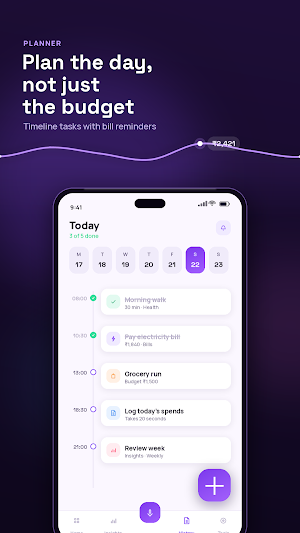
- Recurring entries for rent, EMI, subscriptions and fees
- A reminder before a bill falls due
- A daily nudge so the day never goes unlogged
- Timeline planner for the day's tasks and payments
— Reports you can send —
- Export any date range as a formatted PDF
- CSV export for spreadsheets
- CSV import to bring across older records
— On your home screen —
Add the widget to check what is left to spend without opening the app, and log an expense in a single tap.
— Yours alone —
- Works fully offline, with no connection required
- No sign-up, no email address, no phone number
- Records stay on the device
- Dark mode, and 12 currencies if you travel
— Categories —
Food & Dining, Grocery, Transport, Shopping, Entertainment, Bills, Rent, Health, Education, Personal Care, Gifts, Home and Pets. On the income side: Salary, Freelance, Investment, Family, Bonus, Cashback, Rent Income, Pension and Scholarship. Add your own categories too.
— Getting started —
1. Choose your currency and a monthly budget during setup.
2. Add the first spend by voice, or with the plus button.
3. Open Insights at the end of the week to see the pattern.
— Who it is for —
Students tracking pocket money. Salaried professionals holding a monthly budget. Freelancers keeping work and personal spending apart. Families running a household kitty. Anyone whose notes app has turned into a list of numbers.
Bol Kharch shows ads. A one-time in-app purchase removes them permanently.
— Common questions —
Does it need an internet connection?
No. Adding, editing and viewing entries all work with data switched off. Only voice recognition and ads use the network.
Do I have to connect a bank account?
No. There is no bank linking and no SMS reading. You decide what gets tracked.
Can I use it in Hindi?
Yes. Voice entry works in Hindi, Tamil, Telugu, Gujarati, Punjabi, Marathi and English, and the interface follows your phone language.
Is there a limit on how many entries I can add?
No. Add as many transactions, categories and budgets as you need.
What happens to my records if I uninstall?
They live on the device, so export a PDF or CSV backup before removing the app.
No account. No bank login. Everything stays on your phone.
— Speak instead of typing —
Tap the mic and say the spend the way you would say it out loud. Budget Buddy understands English, Hindi, Tamil, Telugu, Gujarati, Punjabi and Marathi, including mixed sentences.
"Spent 500 on lunch"
"पांच सौ रुपये खाने पर खर्च"
"1200 kirana kharcha"
It pulls out the amount, picks the category and files it. It also knows the shops and services you actually use, so a spend at Zomato lands in Food & Dining and one at Blinkit lands in Grocery.
— See where your money goes —
- Weekly, monthly and yearly breakdowns by category
- Charts that update the moment you add a spend
- This month against last month, at a glance
- Income against expenses, and what is actually left
— Built around the rupee —
- Indian number format: 1,00,000 rather than 100,000
- EMI calculator with a full amortisation schedule
- SIP calculator with year-by-year growth
- FD, RD and PPF maturity calculators
- Income tax estimate on current slabs, old regime beside new
- Debt payoff planner using snowball or avalanche order
— Bills and reminders —
- Recurring entries for rent, EMI, subscriptions and fees
- A reminder before a bill falls due
- A daily nudge so the day never goes unlogged
- Timeline planner for the day's tasks and payments
— Reports you can send —
- Export any date range as a formatted PDF
- CSV export for spreadsheets
- CSV import to bring across older records
— On your home screen —
Add the widget to check what is left to spend without opening the app, and log an expense in a single tap.
— Yours alone —
- Works fully offline, with no connection required
- No sign-up, no email address, no phone number
- Records stay on the device
- Dark mode, and 12 currencies if you travel
— Categories —
Food & Dining, Grocery, Transport, Shopping, Entertainment, Bills, Rent, Health, Education, Personal Care, Gifts, Home and Pets. On the income side: Salary, Freelance, Investment, Family, Bonus, Cashback, Rent Income, Pension and Scholarship. Add your own categories too.
— Getting started —
1. Choose your currency and a monthly budget during setup.
2. Add the first spend by voice, or with the plus button.
3. Open Insights at the end of the week to see the pattern.
— Who it is for —
Students tracking pocket money. Salaried professionals holding a monthly budget. Freelancers keeping work and personal spending apart. Families running a household kitty. Anyone whose notes app has turned into a list of numbers.
Bol Kharch shows ads. A one-time in-app purchase removes them permanently.
— Common questions —
Does it need an internet connection?
No. Adding, editing and viewing entries all work with data switched off. Only voice recognition and ads use the network.
Do I have to connect a bank account?
No. There is no bank linking and no SMS reading. You decide what gets tracked.
Can I use it in Hindi?
Yes. Voice entry works in Hindi, Tamil, Telugu, Gujarati, Punjabi, Marathi and English, and the interface follows your phone language.
Is there a limit on how many entries I can add?
No. Add as many transactions, categories and budgets as you need.
What happens to my records if I uninstall?
They live on the device, so export a PDF or CSV backup before removing the app.
Alternatives to Bol Kharch: Spend Tracker
Looking for apps like Bol Kharch: Spend Tracker? Here are 6 similar Android apps on Google Play. The highest rated is Casherwise: Budget & Expenses (4.9/5), and all 6 are free to download.
-
DigiBudget: Expense Tracker
-
Casherwise: Budget & Expenses 4.9
-
MoneyTool – Budget Tracker
-
Expensify - Travel & Expense 4.4
-
MyMoney—Track Expense & Budget 4.7
-
Beyond Budget - Budget Planner 4.5
| App | Rating | Price | Installs | Last updated | Compare |
|---|---|---|---|---|---|
| Bol Kharch: Spend Tracker | – | Free | 100+ | Aug 26, 2026 | |
| DigiBudget: Expense Tracker | – | Free | 5,000+ | Aug 31, 2023 | Compare |
| Casherwise: Budget & Expenses | 4.9 / 5 | Free | 10,000+ | Jan 18, 2025 | Compare |
| MoneyTool – Budget Tracker | – | Free | 10,000+ | Oct 16, 2026 | Compare |
| Expensify - Travel & Expense | 4.4 / 5 | Free | 1,000,000+ | – | Compare |
| MyMoney—Track Expense & Budget | 4.7 / 5 | Free | 1,000,000+ | Jul 31, 2026 | Compare |
| Beyond Budget - Budget Planner | 4.5 / 5 | Free | 100,000+ | Oct 23, 2026 | Compare |
Similar apps on Google Play
- DigiBudget: Expense Tracker
- Casherwise: Budget & Expenses
- MoneyTool – Budget Tracker
- Expensify - Travel & Expense
- MyMoney—Track Expense & Budget
- Beyond Budget - Budget Planner
- Ivy Wallet: money manager
- BillOut - Bill Organizer
- Money Flow: Finance Tracker
- Budget Planner & App: Spendee
- Income Expense- daily expenses
- Bill Payment Reminder, Budgets
- Money Manager :Bills & Budget
- Monefy: Money & Budget App
- MyMoney Pro - Expense & Budget
- 1Money: expense tracker budget
- Daily Expenses 4
- Finance Pro: Expense control
- Frec: Tax-aware investing
- Dext: Receipt Tracker
- Qapital: The Money Saving App
- Philadelphia Business Journal
- Budgeting App - Spend Tracker
- Wallet: Budget Expense Tracker
- Money Manager: Expense Tracker
- Sumlio: Expense & Budget
- Quicken: Intelligent Money
- Money Lover - Money Manager