
Security Talk EN
Communication
Communication App Specialized in Security
- Downloads
- 10+
- on Google Play
- Price
- Free
- No in-app purchases
- Updated
- Jun 20
- 2024 · v1.0.4
Screenshots


About Security Talk EN
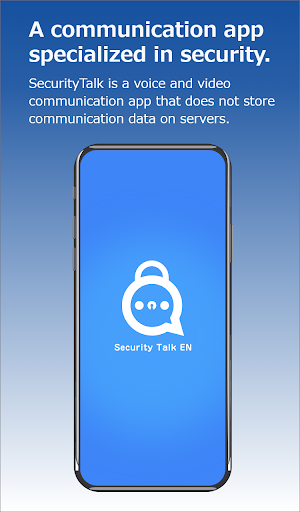
Security Talk is equipped with security measures focused on the protection of personal information. It aims to prevent the leakage of personal data and mitigate information security risks, ensuring smooth communication
【Main Features】
・Authentication Function
・Screenshot Prohibition
・1:1 Communication Function (Voice, Video, Chat)
・Lock Incoming/Outgoing Calls Function (1:1 Communication Only)
・Room Communication Function (Multi-person Communication)
・Room Entry Restriction Function
・Call History Function (Individual and Bulk Deletion)
・Address Book Function
【The Features of Security Talk】
■Exclusive Communication App
The app is dedicated to each contract and can be customized according to individual preferences.
■ Private Network
The network used is separated for each contract, and it cannot be used for communication with other contracted apps. Additionally, calls with external communication apps are not possible. Only users with the same contracted app can communicate with each other.
■ P2P Communication
The communication network is primarily based on a peer-to-peer (P2P) model, where devices communicate directly, leaving no records on the server.
※While there may be instances where communication passes through SFU or utilizes STUN/TURN, even in such cases, no communication content is stored on the server.
■ Encrypted Communication
All communications are encrypted to prevent eavesdroppers from discerning the content of the communication stream.
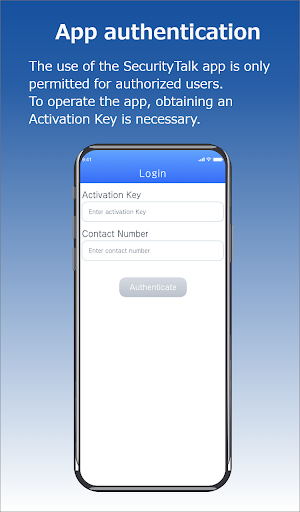
■ App Authentication
App usage is restricted to authorized users only. Authentication processes are conducted regularly during usage, allowing administrators to individually manage app usage and suspension.
■ Information Usage
The information used by the app is limited to authentication data and device tokens. These are solely utilized for app permission and initiating communication with selected contacts. No data, such as registered information or history, is transmitted externally.
■ In-House Management
While it is possible to utilize our in-house servers for authentication, it is also convenient to connect with external services. The authentication server registers only encrypted authentication information, excluding personal data, ensuring measures are in place in case of any potential leaks.
■ Impersonation Prevention
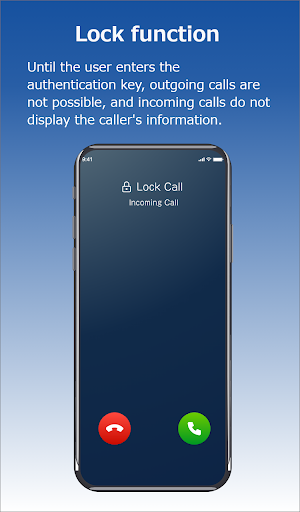
To prevent unauthorized use of your device for calls or answering calls, there is a "Lock Function." It requires the input of a user authentication key (password) during outgoing or incoming calls, ensuring that communication cannot be conducted through the app by anyone other than the authorized user. This prevents third parties from using your device and accessing the app without permission.
■ Brute Force Attack Countermeasures
If the user authentication key is entered incorrectly a certain number of times, a fixed interval is required before re-entry. Furthermore, repeated incorrect entries will result in the app being usable only after a complete reset (reinstallation). In this case, all information will be deleted, and restoration will not be possible.
■ Screenshot Prohibition
On Android devices, taking screenshots during video calls is disabled.
■ Calls
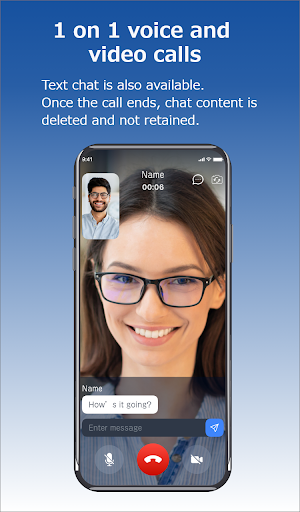
You can engage in one-on-one voice calls, video calls, and text chats.
■ Data Erasure
Upon the conclusion of communication, records of video and chat content are immediately deleted and not stored within the app or elsewhere.
【Required Information】
Security Talk is available for free download. To activate the application and obtain a calling number, an activation key is required. For inquiries regarding the acquisition of the activation key and calling number, please contact Good Create Co., Ltd.
Inquiry Form: https://securitytalk.jp/toi/
【Main Features】
・Authentication Function
・Screenshot Prohibition
・1:1 Communication Function (Voice, Video, Chat)
・Lock Incoming/Outgoing Calls Function (1:1 Communication Only)
・Room Communication Function (Multi-person Communication)
・Room Entry Restriction Function
・Call History Function (Individual and Bulk Deletion)
・Address Book Function
【The Features of Security Talk】
■Exclusive Communication App
The app is dedicated to each contract and can be customized according to individual preferences.
■ Private Network
The network used is separated for each contract, and it cannot be used for communication with other contracted apps. Additionally, calls with external communication apps are not possible. Only users with the same contracted app can communicate with each other.
■ P2P Communication
The communication network is primarily based on a peer-to-peer (P2P) model, where devices communicate directly, leaving no records on the server.
※While there may be instances where communication passes through SFU or utilizes STUN/TURN, even in such cases, no communication content is stored on the server.
■ Encrypted Communication
All communications are encrypted to prevent eavesdroppers from discerning the content of the communication stream.
■ App Authentication
App usage is restricted to authorized users only. Authentication processes are conducted regularly during usage, allowing administrators to individually manage app usage and suspension.
■ Information Usage
The information used by the app is limited to authentication data and device tokens. These are solely utilized for app permission and initiating communication with selected contacts. No data, such as registered information or history, is transmitted externally.
■ In-House Management
While it is possible to utilize our in-house servers for authentication, it is also convenient to connect with external services. The authentication server registers only encrypted authentication information, excluding personal data, ensuring measures are in place in case of any potential leaks.
■ Impersonation Prevention
To prevent unauthorized use of your device for calls or answering calls, there is a "Lock Function." It requires the input of a user authentication key (password) during outgoing or incoming calls, ensuring that communication cannot be conducted through the app by anyone other than the authorized user. This prevents third parties from using your device and accessing the app without permission.
■ Brute Force Attack Countermeasures
If the user authentication key is entered incorrectly a certain number of times, a fixed interval is required before re-entry. Furthermore, repeated incorrect entries will result in the app being usable only after a complete reset (reinstallation). In this case, all information will be deleted, and restoration will not be possible.
■ Screenshot Prohibition
On Android devices, taking screenshots during video calls is disabled.
■ Calls
You can engage in one-on-one voice calls, video calls, and text chats.
■ Data Erasure
Upon the conclusion of communication, records of video and chat content are immediately deleted and not stored within the app or elsewhere.
【Required Information】
Security Talk is available for free download. To activate the application and obtain a calling number, an activation key is required. For inquiries regarding the acquisition of the activation key and calling number, please contact Good Create Co., Ltd.
Inquiry Form: https://securitytalk.jp/toi/
What’s new
Version 1.0.4 · Updated June 20, 2024
Add a messaging feature.
Alternatives to Security Talk EN
Looking for apps like Security Talk EN? Here is 1 similar Android app on Google Play.

| App | Rating | Price | Installs | Last updated | Compare |
|---|---|---|---|---|---|
| Security Talk EN | – | Free | 10+ | Jun 20, 2024 | |
| Security Talk | – | Free | 100+ | Sep 24, 2024 | Compare |
Compare Security Talk EN with the top alternatives: ratings, updates, ASO score and keyword gaps →