

Security Talk
Communication
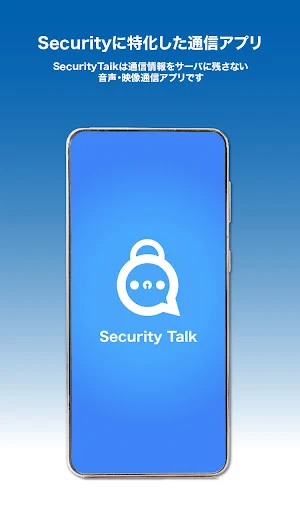
Communication app specialized for security
- Downloads
- 100+
- on Google Play
- Price
- Free
- No in-app purchases
- Updated
- Sep 24
- 2024 · v1.0.3
Screenshots


About Security Talk
Security Talk has security measures focused on protecting personal information. It reduces the risk of leakage of personal information and information security, and realizes smooth communication.
[Main functions]
・Authentication function
・No screenshots allowed
・One-to-one communication function (voice, video, chat)
・Lock incoming/outgoing function (only for one-to-one communication)
・Room communication function
(multiple communication)
・Room entry restriction function
・Call history function (individual deletion/batch deletion)
・Phonebook function
[Features of Security Talk]
■ Dedicated communication app
The app is a dedicated app for each contract and can be customized.
■ Private network
The lines to be used are divided by contract, and cannot be used with other contracted apps. Also, you cannot make calls with external communication apps. Only users with the same contract app can communicate with each other.
■ P2P communication
The communication line is basically P2P type communication, and since terminals communicate directly with each other, no records are left on the server.
*Some communication may be performed via SFU or STUN/TURN, but even in that case, the communication content will not be saved on the server.
■ Encrypted communication
Each communication is encrypted to prevent eavesdroppers from determining the contents of the communication stream.
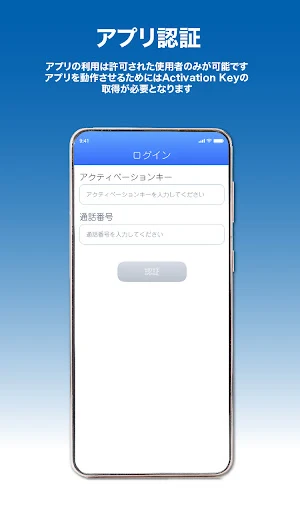
■ App authentication
Only authorized users can use the app. Since the authentication process is performed at any time when using the application, the administrator can also suspend the use of the application individually.
■ Information to be used
The information used by the app is only the authentication information and the device token. This is used only for app usage permission and calling the communication partner. Information such as registered information and history will not be sent to the outside.
■ In-house management
You can use your own server for the authentication server, but you can also use an external service to easily get involved. The authentication server registers only encrypted authentication information that does not contain personal information, and measures against leakage are taken.
■ Spoofing prevention
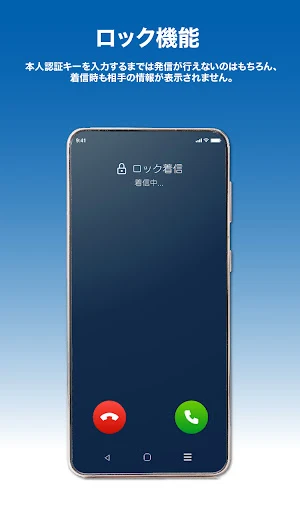
There is a "lock function" that prevents someone from using your device to make or receive calls. By requiring the user to enter a personal authentication key (password) when making or receiving calls, anyone other than the user cannot communicate via the app. This prevents third parties from using your device without permission to use the app.
■ Countermeasures against brute force attacks
If you enter your personal authentication key incorrectly more than the limit, you will need to wait for a certain period of time before re-entering it. If you make a mistake, you can only use the app by resetting (reinstalling) the app. In this case, all information will be deleted and cannot be restored.
■ Prohibition of screenshots
For Android devices, screenshots cannot be taken during video calls.
■ Call
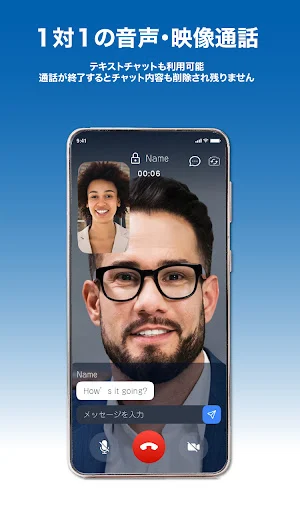
You can make one-to-one voice calls, video calls, and text chats.
■ Lock function
Of course, you cannot make a call until you enter the personal authentication key, and the other party's information will not be displayed when you receive a call. If you do not enter within the specified time, the communication will be disconnected. Also, if you make a call using the lock function, the call will be disconnected in the same way if the other party does not use the lock function.
■ Call history
The call history of the app will remain in the call history of the device if it is the app and smartphone, but if you delete the call history with the Security Talk app, the call history of the device will be deleted at the same time.
■Room
You can create a room like a web conference room and make video calls and chats with multiple people.
■ Erasing records
When the communication ends, all video and chat content records will be deleted. It is not saved in the app either.
■ Restrictions on entry
In companies, etc., it is possible to set departments such as "departments, departments, and teams," and limit entry to each department.
■ Screen layout by position
By registering job titles, the screen is automatically rearranged so that the seniors are displayed at the top.
[Necessary items]
Security Talk is a free download. In order to operate the application, it is necessary to obtain an activation key and a call number. Please contact Good Create Co., Ltd. for activation key and phone number acquisition.
Inquiry form: https://securitytalk.jp/toi/
[Main functions]
・Authentication function
・No screenshots allowed
・One-to-one communication function (voice, video, chat)
・Lock incoming/outgoing function (only for one-to-one communication)
・Room communication function
(multiple communication)
・Room entry restriction function
・Call history function (individual deletion/batch deletion)
・Phonebook function
[Features of Security Talk]
■ Dedicated communication app
The app is a dedicated app for each contract and can be customized.
■ Private network
The lines to be used are divided by contract, and cannot be used with other contracted apps. Also, you cannot make calls with external communication apps. Only users with the same contract app can communicate with each other.
■ P2P communication
The communication line is basically P2P type communication, and since terminals communicate directly with each other, no records are left on the server.
*Some communication may be performed via SFU or STUN/TURN, but even in that case, the communication content will not be saved on the server.
■ Encrypted communication
Each communication is encrypted to prevent eavesdroppers from determining the contents of the communication stream.
■ App authentication
Only authorized users can use the app. Since the authentication process is performed at any time when using the application, the administrator can also suspend the use of the application individually.
■ Information to be used
The information used by the app is only the authentication information and the device token. This is used only for app usage permission and calling the communication partner. Information such as registered information and history will not be sent to the outside.
■ In-house management
You can use your own server for the authentication server, but you can also use an external service to easily get involved. The authentication server registers only encrypted authentication information that does not contain personal information, and measures against leakage are taken.
■ Spoofing prevention
There is a "lock function" that prevents someone from using your device to make or receive calls. By requiring the user to enter a personal authentication key (password) when making or receiving calls, anyone other than the user cannot communicate via the app. This prevents third parties from using your device without permission to use the app.
■ Countermeasures against brute force attacks
If you enter your personal authentication key incorrectly more than the limit, you will need to wait for a certain period of time before re-entering it. If you make a mistake, you can only use the app by resetting (reinstalling) the app. In this case, all information will be deleted and cannot be restored.
■ Prohibition of screenshots
For Android devices, screenshots cannot be taken during video calls.
■ Call
You can make one-to-one voice calls, video calls, and text chats.
■ Lock function
Of course, you cannot make a call until you enter the personal authentication key, and the other party's information will not be displayed when you receive a call. If you do not enter within the specified time, the communication will be disconnected. Also, if you make a call using the lock function, the call will be disconnected in the same way if the other party does not use the lock function.
■ Call history
The call history of the app will remain in the call history of the device if it is the app and smartphone, but if you delete the call history with the Security Talk app, the call history of the device will be deleted at the same time.
■Room
You can create a room like a web conference room and make video calls and chats with multiple people.
■ Erasing records
When the communication ends, all video and chat content records will be deleted. It is not saved in the app either.
■ Restrictions on entry
In companies, etc., it is possible to set departments such as "departments, departments, and teams," and limit entry to each department.
■ Screen layout by position
By registering job titles, the screen is automatically rearranged so that the seniors are displayed at the top.
[Necessary items]
Security Talk is a free download. In order to operate the application, it is necessary to obtain an activation key and a call number. Please contact Good Create Co., Ltd. for activation key and phone number acquisition.
Inquiry form: https://securitytalk.jp/toi/
What’s new
Version 1.0.3 · Updated September 24, 2024
機能改善及び軽微な不具合の修正
Alternatives to Security Talk
Looking for apps like Security Talk? Here is 1 similar Android app on Google Play.
| App | Rating | Price | Installs | Last updated | Compare |
|---|---|---|---|---|---|
| Security Talk | – | Free | 100+ | Sep 24, 2024 | |
| Security Talk EN | – | Free | 10+ | Jun 20, 2024 | Compare |
Compare Security Talk with the top alternatives: ratings, updates, ASO score and keyword gaps →