

MyClock-Weather and Alarm
志军 王 Utilities iPhoneiPadiPod touch
MyClock-Weather and Alarm is a free Utilities app for iPhone and iPad by 志军 王. Rated 4.5/5 from 2 ratings. Requires iOS 15.0. Updated October 19, 2026.
- Rating
- 4.5
- 2 ratings
- Price
- Free
- on the App Store
- Size
- 15 MB
- Age 4+
- Updated
- Oct 19
- 2026 · v2.1
Screenshots


About MyClock-Weather and Alarm
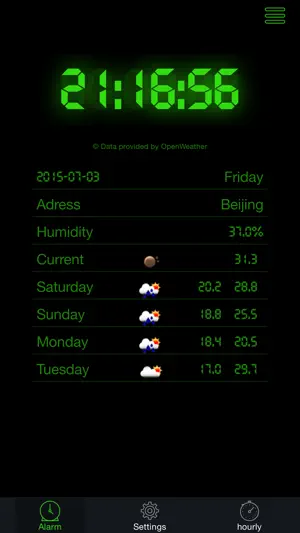
MyClock - A full-screen clock with weather, alarms and world time Turn your iPhone or iPad into a display you actually want to look at. MyClock fills the screen with a beautifully drawn clock face, your local forecast and everything you need to start the day - with nothing else in the way. A CLOCK WORTH LOOKING AT Choose from eight original faces: Digital, Analog, Flip, LCD, Dot matrix, Rings, Word clock and Minimal. Every face is drawn from scratch for this app, sized to fill the screen edge to edge and readable from across the room. Tap once to bring up the tabs; tap the Clock tab and the display takes the whole screen back. WEATHER WHERE YOU ARE See the current temperature, what it feels like, humidity and wind at a glance, followed by today and the next ten days. Tap any day for an hour-by-hour breakdown with the chance of rain and the sunrise and sunset times. Switch between Celsius and Fahrenheit in Settings. ALARMS ON A 24-HOUR DIAL The alarm tab shows a ring of all 24 hours, and the hours you have an alarm on are drawn thick. Tap an hour to add one. Each alarm can repeat on any combination of days, use one of ten tones, snooze for 5 to 30 minutes and carry its own label. A WORLD CLOCK THAT KEEPS UP Swipe between cities to see the time anywhere, with the day shown relative to yours - yesterday, today or tomorrow. New York, Beijing, Geneva and London are there to start with, and you can add any of 267 cities across 116 countries. MADE TO BE LEFT ON MyClock uses a dark interface that is easy on the eyes at night, hides the status bar when the display is full screen, and keeps the screen awake while the clock is showing. It runs on iPhone and iPad, in portrait and landscape. PRIVATE BY DESIGN There is no account and no sign-in. Your alarms, cities and preferences stay on your device. Your location is used only to fetch the local forecast and is never stored on a server. MyClock is free to download and supported by ads. If you would rather not see them, a one-time in-app purchase removes every ad for good — it is not a subscription. Weather data by Open-Meteo.com.
What’s new
Version 2.1 · Updated October 19, 2026
fix bugs.
App privacy
The developer, 志军 王, reported these privacy practices to Apple.
Data Used to Track You
The following data may be used to track you across apps and websites owned by other companies:
- Identifiers: Device ID
- Usage Data: Advertising Data
Data Linked to You
The following data, which may be collected and linked to your identity, may be used for the following purposes:
- Identifiers: Device ID
- Usage Data: Advertising Data
Used for: Third-Party Advertising
Alternatives to MyClock-Weather and Alarm
Looking for apps like MyClock-Weather and Alarm? Here are 6 similar apps on the App Store. The highest rated is Desket -Weather Calendar Clock (4.9/5), and all 6 are free to download.
-
 Desket -Weather Calendar Clock
4.9
Desket -Weather Calendar Clock
4.9
-
 Room Screen: Clock & Weather
4.5
Room Screen: Clock & Weather
4.5
-
 Best Clock Radio-Podcast
3.8
Best Clock Radio-Podcast
3.8
-
 Nightstand – Bedside Clock PRO
4.5
Nightstand – Bedside Clock PRO
4.5
-
 Digital Clock: Night Stand-by
4.6
Digital Clock: Night Stand-by
4.6
-
 Alarm Clock - Wake Up Easily!
4.3
Alarm Clock - Wake Up Easily!
4.3
| App | Rating | Price | Last updated | Compare |
|---|---|---|---|---|
| MyClock-Weather and Alarm | 4.5 / 5 (2 ratings) | Free | October 19, 2026 | |
| Desket -Weather Calendar Clock | 4.9 / 5 (7) | Free | Feb 5, 2026 | Compare |
| Room Screen: Clock & Weather | 4.5 / 5 (35) | Free | Oct 19, 2026 | Compare |
| Best Clock Radio-Podcast | 3.8 / 5 (25) | Free | Oct 20, 2026 | Compare |
| Nightstand – Bedside Clock PRO | 4.5 / 5 (126) | Free | Oct 13, 2026 | Compare |
| Digital Clock: Night Stand-by | 4.6 / 5 (384) | Free | Jun 9, 2026 | Compare |
| Alarm Clock - Wake Up Easily! | 4.3 / 5 (187) | Free | Jan 16, 2025 | Compare |