

Room Screen: Clock & Weather
enoiu Utilities iPhoneiPadiPod touch
Room Screen: Clock & Weather is a free Utilities app for iPhone and iPad by enoiu. Rated 4.5/5 from 35 ratings. Requires iOS 15.0. Updated October 19, 2026.
- Rating
- 4.5
- 35 ratings
- Price
- Free
- on the App Store
- Size
- 42 MB
- Age 4+
- Updated
- Oct 19
- 2026 · v4.2.0
Screenshots

About Room Screen: Clock & Weather
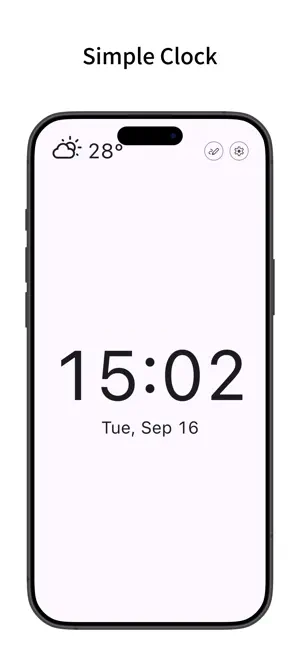
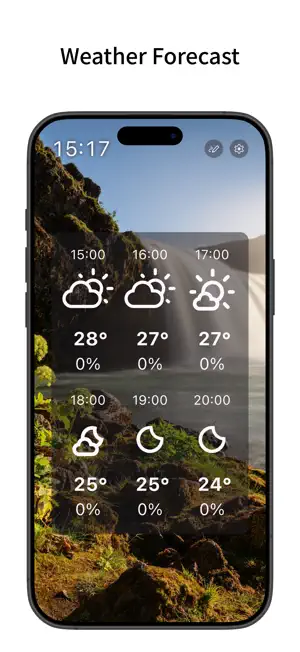
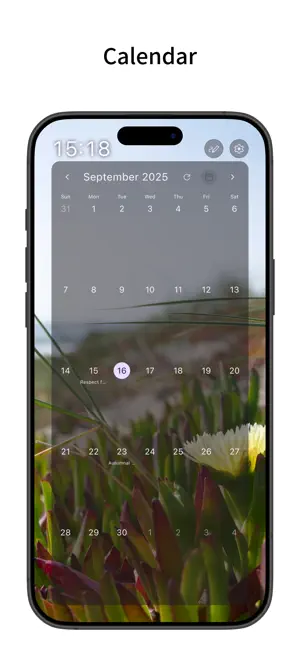
A simple clock app with a smart display feel. It also supports weather forecasts, calendars, and background images and videos. You can also use it as a digital photo frame. Simple Clock - Displays the time and date. - You can change the 12/24-hour display, seconds display, and text size from the settings. - Can display an analog clock. - Can display the time in the top bar. - Auto-scrolls like a smart display. - You can change the interval for automatic screen switching. - Supports changing screen transition animations and swiping up, down, left, and right to switch screens. Photo Frame - You can display images and videos saved on your device as the background. - You can select an album and display media from it randomly. - You can change the background display mode (fit whole, crop fill, etc.) and alignment position. - You can sync background media switching with screen switching. - You can change the automatic switching interval. - By displaying only the time or weather on the top bar, you can use it like a digital photo frame with images and videos as the main focus. Weather Forecast - Can display the current weather and temperature in the top bar. - Can display hourly and daily weather forecasts. - You can specify the forecast location by getting your current location or directly entering the latitude and longitude. - You can change the units for temperature, wind speed, and precipitation. - Weather forecast data is retrieved from Open-Meteo.com. Calendar - Can display a calendar. - Can display calendar events from your device. - You can select which device calendars to display events from. Whiteboard - You can draw on the whiteboard by pressing the pen button on the top bar. - Once you draw on the whiteboard, it will be displayed on the screen. - You can change color options and toggle pinch-to-zoom from the settings. - You can hide the pen button on the top bar by removing the whiteboard from the display content. Edit Display Content - You can add, remove, and reorder the content displayed on the screen from the settings. - Supports split view. You can select the content to display on the top, bottom, left, or right. Customization - Supports Dark Mode. - You can change the theme color. - You can change the text and icon colors. - You can toggle the display of shadows. - Features a simple design compliant with Material Design. Sleep Mode - A mode that displays only the time and date without updating the weather or displaying images. - By setting a schedule, you can automatically enter Sleep Mode during specified times. - The screen is black by default, but you can change it to a white screen by turning on "White screen in Sleep Mode". This is recommended when using the app as a room light. - The time and date sizes in this mode are linked to the clock settings. Pro Version - By purchasing the Pro version (in-app purchase), you can use all features, including removing ads, detailed weather displays, shorter weather update intervals (every 3 or 6 hours), screen transition animation changes, and video background settings. - The Pro version is a one-time purchase (not a subscription). - When you turn on Detailed Weather in the settings, you can display Today's Weather, Tomorrow's Weather, and various graphs in the display content. - For Today's Weather and Tomorrow's Weather, you can view the detailed weather for that day all at once. Tapping each item will show the graph for that day. - For detailed weather graphs (Temperature, Feels Like, Pressure, Precipitation, Humidity, Wind Speed, UV Index), you can view a detailed line graph that allows multi-day comparison. For Temperature, Feels Like, and Pressure graphs, the difference between the current value and the graph from 24 hours ago is displayed.
Ratings & reviews
4.5
35 ratings
What’s new
Version 4.2.0 · Updated October 19, 2026
- Fixed an issue where the rain icon would appear even when the chance of precipitation was low. - Added support for 11 new languages. - Fixed translation errors across multiple languages.
App privacy
The developer, enoiu, reported these privacy practices to Apple.
Data Used to Track You
The following data may be used to track you across apps and websites owned by other companies:
- Location: Coarse Location
- Identifiers: Device ID
- Usage Data: Product Interaction, Advertising Data
- Diagnostics: Crash Data, Performance Data
Data Linked to You
The following data, which may be collected and linked to your identity, may be used for the following purposes:
- Location: Coarse Location
- Identifiers: Device ID
- Usage Data: Product Interaction, Advertising Data
- Diagnostics: Performance Data
Used for: Third-Party Advertising
Data Not Linked to You
The following data, which may be collected but is not linked to your identity, may be used for the following purposes:
- Diagnostics: Crash Data
Used for: Third-Party Advertising
Alternatives to Room Screen: Clock & Weather
Looking for apps like Room Screen: Clock & Weather? Here are 6 similar apps on the App Store. The highest rated is Smart Digital & Analog Clock (5.0/5), and all 6 are free to download.
-
 Desket -Weather Calendar Clock
4.9
-
 SClock - Big Digital Clock
4.2
-
 Smart Digital & Analog Clock
5.0
-
 Desktop Flip Clock
4.6
-
 Dashkit - Personal Dashboards
4.0
-
 MyClock-Weather and Alarm
4.5
| App | Rating | Price | Last updated | Compare |
|---|---|---|---|---|
| Room Screen: Clock & Weather | 4.5 / 5 (35 ratings) | Free | October 19, 2026 | |
| Desket -Weather Calendar Clock | 4.9 / 5 (7) | Free | Feb 5, 2026 | Compare |
| SClock - Big Digital Clock | 4.3 / 5 (24) | Free | Aug 29, 2026 | Compare |
| Smart Digital & Analog Clock | 5.0 / 5 (2) | Free | Nov 3, 2025 | Compare |
| Desktop Flip Clock | 4.6 / 5 (191) | Free | Oct 12, 2026 | Compare |
| Dashkit - Personal Dashboards | 4.0 / 5 (31) | Free | Apr 29, 2026 | Compare |
| MyClock-Weather and Alarm | 4.5 / 5 (2) | Free | Oct 19, 2026 | Compare |