

Best Clock Radio-Podcast
Mark Linthicum Utilities iPhoneiPadiPod touch
Best Clock Radio-Podcast is a free Utilities app for iPhone and iPad by Mark Linthicum. Rated 3.8/5 from 25 ratings. Requires iOS 15.
- Rating
- 3.8
- 25 ratings
- Price
- Free
- on the App Store
- Size
- 200 MB
- Age 4+
- Updated
- Oct 20
- 2026 · v9.2.7
Screenshots



About Best Clock Radio-Podcast
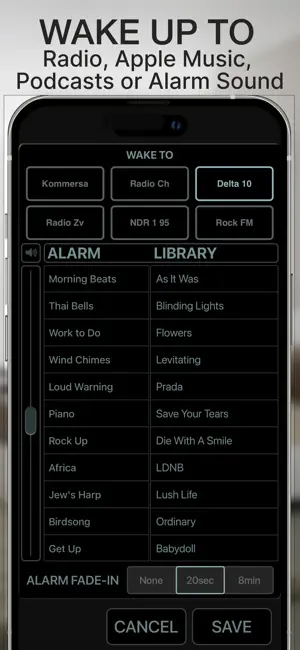
NEW IN VERSION 9.2.4 — Apple CarPlay Your radio buttons now come along for the drive! Access your favorite radio stations, podcasts, and Apple Music playlists on your car’s compatible Apple CarPlay display. Tap a radio button to play, then tap the same button again to stop. Podcast skip and jump controls make it easy to move through longer episodes. FROM YOUR BEDSIDE TO YOUR DASHBOARD Best Clock Radio combines a bedside clock, five customizable alarms, and a radio and podcast player for iPhone and iPad. Keep your favorite listening choices on familiar radio buttons. One button starts playback and stops it again, with fewer steps between you and the audio you enjoy. RADIO BUTTONS MADE SIMPLE Touch and hold a radio button on your iPhone or iPad to choose a radio station, podcast, Apple Music playlist, music from your library, or soothing sound. • Nine radio buttons on iPhone and eight on iPad • Radio stations from around the world • Support for compatible radio stream URLs, station websites, and podcast feeds • Tap to play; tap the same radio button again to stop • Program your buttons on iPhone, then use them through Apple CarPlay PODCASTS AND MUSIC Enjoy your favorite podcasts with controls to skip back 15 seconds, skip forward 30 seconds, or jump by longer intervals. Listen to Apple Music playlists and music from your library, or choose soothing sounds for relaxing, meditation, and sleep. FIVE CUSTOMIZABLE ALARMS Set up to five alarms, each with its own time, repeat days, and sound. Wake to a radio station, podcast, music, or one of 45 included alarm sounds. You can also set an alarm to start your favorite radio show. A CLOCK THAT FITS YOUR ROUTINE • AutoDim dims the display at night and brightens it again in the morning • Auto Sleep stops playback when you fall asleep listening • Choose a 12-hour or 24-hour clock • Customize interface colors • View current weather conditions and a five-day forecast with subscription access STATION UPDATES AND SUPPORT For supported stations in the US Radio and World categories, the app can report playback problems and check for updated stream links. When an updated link becomes available, the app can apply it automatically. Update availability and timing depend on the station. Questions, a missing station, or a stream that needs attention? Contact support directly from the app. FREE FEATURES AND SUBSCRIPTION ACCESS The free version lets you program the first three radio buttons. Subscription access unlocks programming for the remaining buttons and provides weather information. Stations and podcasts already assigned to locked buttons remain playable. Automatic station updates include an initial six-month access period. Continued access requires a subscription. Apple Music catalog playback requires an Apple Music subscription and permission to access Apple Music. IMPORTANT ALARM INFORMATION Enable notifications and notification sounds for Best Clock Radio. To wake to radio, podcasts, or music, leave Best Clock Radio open on screen. When the app is not open, the backup alarm uses a notification sound instead of starting your chosen stream. Backup notifications depend on your device’s notification and sound settings. Internet radio and other streamed audio require an internet connection. VIDEOS AND SUPPORT Visit www.BeautifulClockRadio.com for demonstration videos and support, or use the support link inside the app.
Ratings & reviews
3.8
25 ratings
What’s new
Version 9.2.7 · Updated October 20, 2026
• Better organization of European radio listings. • Podcast improvements • For questions or requests, use the Contact Support links in the Best Clock Radio Settings menu.
App privacy
The developer, Mark Linthicum, reported these privacy practices to Apple.
Data Not Collected
The developer does not collect any data from this app.
Alternatives to Best Clock Radio-Podcast
Looking for apps like Best Clock Radio-Podcast? Here are 6 similar apps on the App Store. The highest rated is Digital Clock: Night Stand-by (4.6/5), and all 6 are free to download.
-
 Digital Clock: Night Stand-by
4.6
Digital Clock: Night Stand-by
4.6
-
 Gesture Alarm Clock
4.3
Gesture Alarm Clock
4.3
-
 Alarm Clock - Wake Up Easily!
4.3
Alarm Clock - Wake Up Easily!
4.3
-
 Nightstand Digital Clock Timer
4.3
Nightstand Digital Clock Timer
4.3
-
 Big Clock: Digital Display
3.5
Big Clock: Digital Display
3.5
-
 TalkingAlarm: Alarm Clock
4.6
TalkingAlarm: Alarm Clock
4.6
| App | Rating | Price | Last updated | Compare |
|---|---|---|---|---|
| Best Clock Radio-Podcast | 3.8 / 5 (25 ratings) | Free | October 20, 2026 | |
| Digital Clock: Night Stand-by | 4.6 / 5 (384) | Free | Jun 9, 2026 | Compare |
| Gesture Alarm Clock | 4.3 / 5 (192) | Free | Feb 1, 2024 | Compare |
| Alarm Clock - Wake Up Easily! | 4.3 / 5 (187) | Free | Jan 16, 2025 | Compare |
| Nightstand Digital Clock Timer | 4.3 / 5 (20) | Free | Oct 21, 2025 | Compare |
| Big Clock: Digital Display | 3.5 / 5 (4) | Free | Aug 12, 2026 | Compare |
| TalkingAlarm: Alarm Clock | 4.6 / 5 (2,101) | Free | Oct 22, 2026 | Compare |