

Timestamp Camera Basic
玉彬 陈 Photo & Video iPhoneiPadiPod touch
Timestamp Camera Basic is a free Photo & Video app for iPhone and iPad by 玉彬 陈. Rated 4.8/5 from 33,587 ratings. Requires iOS 13.0. Updated August 27, 2026.
- Rating
- 4.8
- 33.5K ratings
- Price
- Free
- on the App Store
- Size
- 24 MB
- Age 4+
- Updated
- Aug 27
- 2026 · v1.158
Screenshots
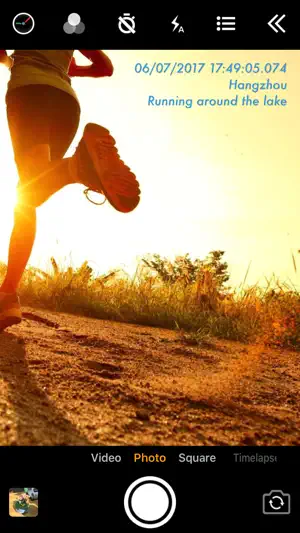
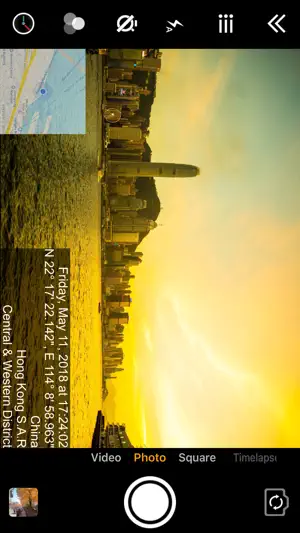

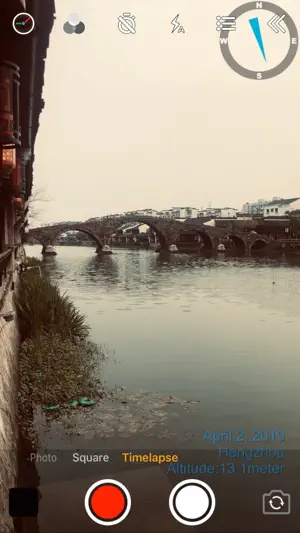
About Timestamp Camera Basic
Add timestamp watermark to camera in real time. • Automatically insert current time and address when taking photo or video in real time, you can change time format or select the address around easily. Timestamp Camera is the only App that can record video with the time watermark accurate to millisecond(0.001 second). - Support 81 timestamp formats. - Support change font, font color, font size. - Support set timestamp in 6 positions: top left, top center, top right, bottom left, bottom center, bottom right. - Support auto add address and GPS. - Support input and display custom text on camera. - Support input and display tag on camera and insert to the Exif. - Support change opacity of text and text background. - Support four text margin modes: no margin, one line margin, half line margin, suitable for printing • Support display altitude and speed. • Support display map on the camera. • Support display compass on the camera. • Support import watermark logo image to display on the camera. • Support change photo resolution, support the maximum resolution supported by the camera. • Support change video resolution(540P, 720P, 1080P, 4K) and fps(30fps, 60fps). • Support record video without audio. • Support pause and continue record fragments to one video. • Support timer to take picture (3, 5, 10 seconds with count down). • Has 4 modes. "Video", "Square", "Timelapse" support record video and capture photo. "Photo" mode only support capture photo with special optimization. • All the effects are real-time and can be used when taking photo or video. • Support change effect, toggle camera when recording. • Support "Battery saver mode", the brightness of screen can be changed when turn it on. • Support show 3x3 grid. • Support import photo as a virtual camera. • Support portrait and landscape. • Support both iPad and iPhone. • Photo and Video will be saved to Camera roll. Please mail us [email protected] if you have any problem or suggestions. Thank you.
Ratings & reviews
4.8
33.5K ratings
What’s new
Version 1.158 · Updated August 27, 2026
1.158 ‑ Fixed the 3303 error that occurred when saving images in version 1.157 1.157 ‑ Fixed an issue where image metadata was missing on iOS 26.6.1 ‑ Fixed black thumbnail issue when sharing videos ‑ Support placing logo at top‑center and bottom‑center positions
App privacy
The developer, 玉彬 陈, reported these privacy practices to Apple.
Data Used to Track You
The following data may be used to track you across apps and websites owned by other companies:
- Location: Coarse Location
- Identifiers: Device ID
- Usage Data: Product Interaction, Advertising Data
- Diagnostics: Crash Data
Data Linked to You
The following data, which may be collected and linked to your identity, may be used for the following purposes:
- Identifiers: Device ID
- Usage Data: Product Interaction, Advertising Data
Used for: Third-Party Advertising
Data Not Linked to You
The following data, which may be collected but is not linked to your identity, may be used for the following purposes:
- Location: Coarse Location
- Diagnostics: Crash Data
Used for: Third-Party Advertising
Alternatives to Timestamp Camera Basic
Looking for apps like Timestamp Camera Basic? Here are 6 similar apps on the App Store. The highest rated is Timemark: Photo Proof for Work (4.8/5), and all 6 are free to download.
-
 Timestamp Camera: Time stamp
4.6
Timestamp Camera: Time stamp
4.6
-
 Timestamp Camera: Photo GPS
4.7
Timestamp Camera: Photo GPS
4.7
-
 Timestamp Camera -AI Timestamp
4.6
Timestamp Camera -AI Timestamp
4.6
-
 Timestamp Camera - GPS & Time
4.6
Timestamp Camera - GPS & Time
4.6
-
 Timestamp Camera - Time & GPS
4.5
Timestamp Camera - Time & GPS
4.5
-
 Timemark: Photo Proof for Work
4.8
Timemark: Photo Proof for Work
4.8
| App | Rating | Price | Last updated | Compare |
|---|---|---|---|---|
| Timestamp Camera Basic | 4.8 / 5 (33,587 ratings) | Free | August 27, 2026 | |
| Timestamp Camera: Time stamp | 4.6 / 5 (2,215) | Free | Apr 28, 2026 | Compare |
| Timestamp Camera: Photo GPS | 4.7 / 5 (6,401) | Free | Aug 16, 2026 | Compare |
| Timestamp Camera -AI Timestamp | 4.6 / 5 (780) | Free | Aug 29, 2026 | Compare |
| Timestamp Camera - GPS & Time | 4.6 / 5 (274) | Free | Sep 15, 2026 | Compare |
| Timestamp Camera - Time & GPS | 4.5 / 5 (2) | Free | Sep 4, 2026 | Compare |
| Timemark: Photo Proof for Work | 4.8 / 5 (15,338) | Free | Sep 25, 2026 | Compare |