

Timestamp Camera - Time & GPS
Shaanxi Ruidebao Technology Co.,Ltd Photo & Video iPhoneiPadiPod touch
Timestamp Camera - Time & GPS is a free Photo & Video app for iPhone and iPad by Shaanxi Ruidebao Technology Co.,Ltd. Rated 4.5/5 from 2 ratings.
- Rating
- 4.5
- 2 ratings
- Price
- Free
- on the App Store
- Size
- 135 MB
- Age 4+
- Updated
- Sep 4
- 2026 · v2.0.6
Screenshots

About Timestamp Camera - Time & GPS
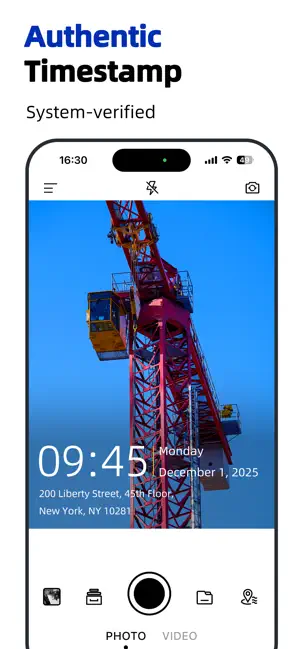
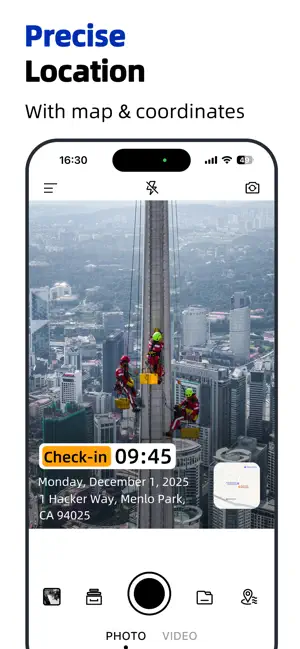
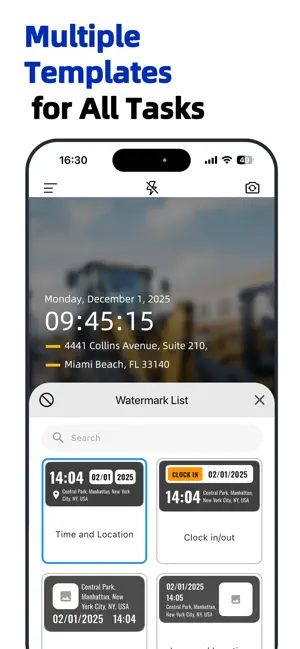
Timestamp Camera GPS Map Camera is the ultimate Timestamp Camera app for adding personalized timestamps and custom watermarks to your photos and videos. Whether you are a content creator, traveler, or casual photographer, Timestamp Camera GPS Map Camera provides the perfect tools to enhance every moment. Key Features: • Add Custom Watermarks: Personalize your photos and videos with custom text, logos, or graphics using Timestamp Camera GPS Map Camera. Effortlessly adjust size, position, opacity, and style to create unique watermarks that protect and brand your content. Add custom video watermarks to protect your videos as well. • Automatic Timestamps & Date Stamps: Effortlessly add precise timestamps or date stamps to your photos and videos with Timestamp Camera. Customize styles, formats, and placements to align with your theme or branding. Add valuable metadata like timestamps for documentation purposes. • Geolocation Tags: Automatically tag your photos and videos with accurate GPS coordinates, addresses, or even map overlays. Perfect for travelers and adventurers documenting their journeys with Timestamp Camera and precise location data. Capture important metadata, including location info, for full contextualization. • Customizable Watermark Styles: Choose from a variety of watermark templates, including timestamps, location stamps, and more. Personalize each to match your content’s style and theme using Timestamp Camera. • Dynamic Watermark Positioning: Adjust watermark placement on your photos or videos in real-time with Timestamp Camera, ensuring it never obstructs important elements of your shots. • Filters & Effects: Enhance your photos and videos with a wide selection of professional filters. Whether you're going for a vintage look or a modern aesthetic, find the perfect filter for every occasion in Timestamp Camera. • Grid & Guides for Perfect Shots: Enable grids or shooting guides in Timestamp Camera to align your subjects perfectly. Ideal for landscapes, portraits, and close-ups. • User-Friendly Interface: Navigate easily with an intuitive and clean interface in Timestamp Camera. Customize your camera settings effortlessly to get the perfect shot. • High-Quality Photos & Videos: Capture high-resolution photos and videos with full clarity using Timestamp Camera. Share your creations in stunning detail. • Export Engineering Photos to PDF Reports: Export construction site photos, inspection photos, and work records into professional PDF reports with one tap. • Export Inspection Photos to Excel: Export inspection photos, construction images, and engineering records to Excel spreadsheets. Why Choose Timestamp Camera GPS Map Camera? Timestamp Camera GPS Map Camera goes beyond basic photo editing – it’s a comprehensive photo and video editor designed to add context, meaning, and personalization to your visual content. Use Cases: • Social Media Creators: Make your content stand out with personalized watermarks from Timestamp Camera. • Travel & Adventure: Tag photos and videos with accurate location data using Timestamp Camera to capture the essence of your journey. • Events & Milestones: Add timestamps and personalized messages to commemorate birthdays, anniversaries, or special moments with Timestamp Camera. • Business & Branding: Protect and promote your brand by overlaying custom watermarks with logos or text in Timestamp Camera. Safeguard your images and videos with branded content protection. Subscription Details: Unlock premium features in Timestamp Camera Pro, including advanced customization options, higher resolution support, and more professional tools. Subscriptions are managed through your App Store account and can be canceled anytime up to 24 hours before renewal. Privacy Policy: https://www.ruidebao.cc/privacy.html Terms of Use: https://www.ruidebao.cc/service.html
What’s new
Version 2.0.6 · Updated September 4, 2026
Fixed some known issues.
App privacy
The developer, Shaanxi Ruidebao Technology Co.,Ltd, reported these privacy practices to Apple.
Data Used to Track You
The following data may be used to track you across apps and websites owned by other companies:
- Identifiers: Device ID
- Usage Data: Product Interaction
Data Not Linked to You
The following data, which may be collected but is not linked to your identity, may be used for the following purposes:
- Identifiers: Device ID, User ID
- Usage Data: Product Interaction
- Location: Coarse Location
- Diagnostics: Crash Data
Used for: Third-Party Advertising, Developer’s Advertising or Marketing, Analytics
Alternatives to Timestamp Camera - Time & GPS
Looking for apps like Timestamp Camera - Time & GPS? Here are 6 similar apps on the App Store. The highest rated is Timestamp Camera Enterprise (4.8/5), and all 6 are free to download.
-
 Timestamp Camera -AI Timestamp
4.6
Timestamp Camera -AI Timestamp
4.6
-
 Timestamp Camera - GPS & Time
4.5
Timestamp Camera - GPS & Time
4.5
-
 Timestamp Camera Basic.
4.6
Timestamp Camera Basic.
4.6
-
 Timestamp Camera Enterprise
4.8
Timestamp Camera Enterprise
4.8
-
 Timestamp Camera: Photo GPS
4.7
Timestamp Camera: Photo GPS
4.7
-
 Timestamp Camera: Time stamp
4.6
Timestamp Camera: Time stamp
4.6
| App | Rating | Price | Last updated | Compare |
|---|---|---|---|---|
| Timestamp Camera - Time & GPS | 4.5 / 5 (2 ratings) | Free | September 4, 2026 | |
| Timestamp Camera -AI Timestamp | 4.6 / 5 (780) | Free | Aug 29, 2026 | Compare |
| Timestamp Camera - GPS & Time | 4.5 / 5 (273) | Free | Sep 15, 2026 | Compare |
| Timestamp Camera Basic. | 4.6 / 5 (47) | Free | Sep 11, 2026 | Compare |
| Timestamp Camera Enterprise | 4.8 / 5 (3,301) | Free | Sep 3, 2026 | Compare |
| Timestamp Camera: Photo GPS | 4.7 / 5 (6,396) | Free | Aug 16, 2026 | Compare |
| Timestamp Camera: Time stamp | 4.6 / 5 (2,215) | Free | Apr 28, 2026 | Compare |