

Timestamp Camera -AI Timestamp
Shanghai Zongchong Information Technology Co., Ltd Photo & Video iPhoneiPadiPod touch
Timestamp Camera -AI Timestamp is a free Photo & Video app for iPhone and iPad by Shanghai Zongchong Information Technology Co., Ltd.
- Rating
- 4.6
- 780 ratings
- Price
- Free
- on the App Store
- Size
- 185 MB
- Age 4+
- Updated
- Aug 29
- 2026 · v1.2.7
Screenshots


About Timestamp Camera -AI Timestamp
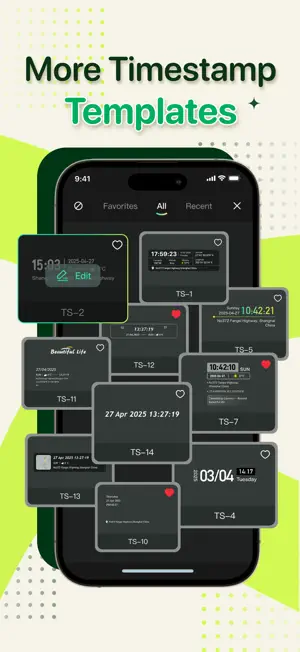
Timestamp Camera -AI Timestamp — live timestamps & smart timestamp templates Timestamp Camera turns every photo and video into verifiable, beautiful evidence. This timestamp camera app adds live, customizable timestamps so you can stamp Date, Time, Location, GPS, Weather, Weekday and Altitude directly on your shots. Use Timestamp Camera to create clean, readable timestamps for travel, work, investigation, or social sharing. Why Timestamp Camera? Real-time timestamp overlays — See timestamps live on the viewfinder as you frame each shot. No guessing, no edits. AI-driven timestamp template recommendation — On-device AI analyzes scene lighting, color and subject to suggest the best timestamp template so your timestamp is always readable and stylish. Fully customizable timestamp elements — Choose any combination: Date, Time, Day, Location name, GPS coordinates, Altitude, Compass heading, Weather, and custom text. Mix, match and reorder to build the exact proof you need. Timestamp styling — Control font, size, color, opacity, stroke, shadow and position. Make your timestamp subtle or bold — it’s your timestamp camera. Live preview & instant apply — Swipe through template choices and see the timestamp applied instantly in the camera preview. Adjustable focal control & focus — Smooth focal control from ultra-wide to telephoto and precision tap-to-focus or slider focus for creative depth. Capture sweeping landscapes or tight details with a timestamp that fits. Artistic filters that respect timestamp — Preview filters like Vintage Fade, Crisp Monochrome and Sunlit Glow with your timestamp overlay so style and proof work together. Smart media organization — Auto-sort albums by embedded metadata (scene type, date, place) and search your library by timestamp data: find every “beach sunset” or “city night” in seconds. Professional-grade export & sharing — Save and share photos and videos with embedded timestamp (MP4, MOV, JPG). Ideal for documentation, reports, social posts and archival use. How people use Timestamp Camera Field documentation and evidence capture — trusted timestamp for inspections, site logs and reports. Travel & adventure — stylish timestamp templates for landscapes, hikes and city scenes. Content creators — clear timestamp for vlogs, tutorials, and product demos. Everyday memories — stamp birthdays, events and trips with beautiful time and place. Subscription & trial Subscribe to unlock the full template library, premium filters, priority updates and cloud features. Weekly and yearly plans available; trial options shown in-app. All subscription details and pricing appear in the In-App Purchase section. Privacy & Contact We process AI timestamp template selection on-device to respect your privacy. See our Terms and Privacy Policy for details: Terms of Service — https://zonghong-chronomark-pro-termsofuse.pages.dev/ Privacy Policy — https://zonghong-chronomark-pro-privacypolicy.pages.dev/ Support — [email protected] Download Timestamp Camera now — the timestamp camera that makes every frame a clear, beautiful proof.
Ratings & reviews
4.6
780 ratings
What’s new
Version 1.2.7 · Updated August 29, 2026
Timestamp Camera is now smarter and faster. • New Siri and system shortcuts Open the camera, record a timestamp video, add a timestamp to a photo, or find saved works from Siri, Shortcuts, Spotlight, and Widgets. • Smarter AI Timestamp recommendations Get multiple suggestions based on your scene, see why each style fits, preview it before applying, and correct the scene when needed. • Reliability improvements Faster AI scanning, smoother camera routing, and more reliable capture.
App privacy
The developer, Shanghai Zongchong Information Technology Co., Ltd, reported these privacy practices to Apple.
Data Used to Track You
The following data may be used to track you across apps and websites owned by other companies:
- Identifiers: Device ID
Data Not Linked to You
The following data, which may be collected but is not linked to your identity, may be used for the following purposes:
- Identifiers: Device ID
- Usage Data: Product Interaction, Other Usage Data
- Diagnostics: Crash Data, Performance Data
- Location: Precise Location
Used for: Analytics, App Functionality
Alternatives to Timestamp Camera -AI Timestamp
Looking for apps like Timestamp Camera -AI Timestamp? Here are 6 similar apps on the App Store. The highest rated is Timestamp Camera Enterprise (4.8/5), and all 6 are free to download.
-
 Timestamp Camera - Time & GPS
4.5
Timestamp Camera - Time & GPS
4.5
-
 Timestamp Camera - GPS & Time
4.6
Timestamp Camera - GPS & Time
4.6
-
 Timestamp Camera Basic.
4.6
Timestamp Camera Basic.
4.6
-
 Timestamp Camera Enterprise
4.8
Timestamp Camera Enterprise
4.8
-
 Timestamp Camera: Photo GPS
4.7
Timestamp Camera: Photo GPS
4.7
-
 Timestamp Camera: Time stamp
4.6
Timestamp Camera: Time stamp
4.6
| App | Rating | Price | Last updated | Compare |
|---|---|---|---|---|
| Timestamp Camera -AI Timestamp | 4.6 / 5 (780 ratings) | Free | August 29, 2026 | |
| Timestamp Camera - Time & GPS | 4.5 / 5 (2) | Free | Sep 4, 2026 | Compare |
| Timestamp Camera - GPS & Time | 4.6 / 5 (274) | Free | Sep 15, 2026 | Compare |
| Timestamp Camera Basic. | 4.6 / 5 (47) | Free | Sep 11, 2026 | Compare |
| Timestamp Camera Enterprise | 4.8 / 5 (3,299) | Free | Sep 3, 2026 | Compare |
| Timestamp Camera: Photo GPS | 4.7 / 5 (6,401) | Free | Aug 16, 2026 | Compare |
| Timestamp Camera: Time stamp | 4.6 / 5 (2,215) | Free | Apr 28, 2026 | Compare |