

Simple Controller
Ron Kort Utilities iPhoneiPadiPod touch
Simple Controller is a free Utilities app for iPhone and iPad by Ron Kort. Requires iOS 17.0. Updated November 22, 2026.
- Price
- Free
- on the App Store
- Size
- 8 MB
- Age 4+
- Updated
- Nov 22
- 2026 · v1.0.3
Screenshots
Save to Pinterest


About Simple Controller
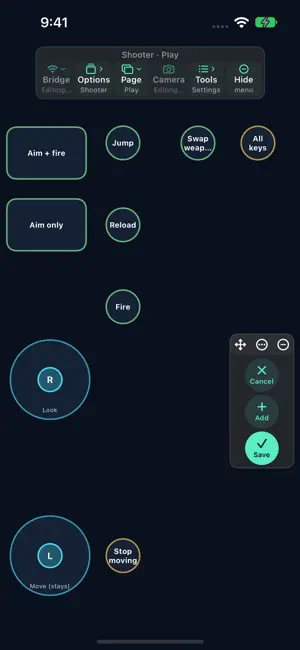
Arrange game controls around your reach. Simple Controller lets you create and customize buttons, sticks and touch controls on your iPhone. Start with an illustrated quick guide and an editable Shooter, Racing, Sports, Open World or Palworld layout, or build your own. Move and resize controls, organize them into pages, and keep navigation controls within the same profile. Support has Learn, PC and Console tabs with setup instructions and project links. Explore controls in offline Practice. Hold Toggle can keep a button pressed, sticks can stay where you leave them, and Stick+ can add actions as you move farther. Combine aiming with firing or steering with acceleration. Use slide-to-activate buttons, timed macros, touch aiming, floating controls and an in-game auto-center toggle. Stop / Release all clears phone inputs. WINDOWS AND MAC CONNECTIONS NEED FREE RECEIVER SOFTWARE. Install the project receiver on your computer, enter its IP address and port in the app, and connect over your trusted home network. No Pico, adaptive controller or extra bridge hardware is needed for these computer routes. Windows: the receiver provides a virtual Xbox controller with adjustable triggers, plus keyboard and mouse actions, touchpad movement and Camera Follow. It requires an Intel/AMD 64-bit Windows PC and the free ViGEmBus driver. That driver is archived; setup instructions link its official final release. Windows ARM is not supported. Mac: the receiver sends keyboard and mouse input. Your existing controls map left-stick movement to WASD, right-stick aiming to mouse movement, and LT/RT to mouse clicks. Buttons and D-pad directions map to editable keys. The Mac route requires macOS 13 or later, Python and Accessibility permission. It does not create a native Xbox gamepad or reproduce analog steering/partial trigger pressure. Use games that accept keyboard and mouse and match their key bindings. CONSOLE CONNECTION REQUIRES ADDITIONAL HARDWARE. The verified Xbox connection uses a Raspberry Pi Pico W running compatible project firmware and an Xbox Adaptive Controller. The phone and Wi-Fi bridge share a local network. The iPhone does not connect directly to Xbox on its own. USB button mode sends full LT/RT presses; adjustable pressure needs a matching additional hardware route. PlayStation adapter combinations remain experimental and are not a verified plug-and-play setup. Profiles, settings and guide progress stay on your device. Export profiles to keep a backup or share a layout. No app account is required. Updates preserve existing saved layouts. This is an independent controller utility. Game assignments and input compatibility vary with the game and its settings. Starter layouts are examples you can customize.
What’s new
Version 1.0.3 · Updated November 22, 2026
Get started with an eight-page illustrated guide and Support tabs for learning controls, connecting to Windows or Mac, and finding console bridge instructions. Replay the guide without replacing your layouts. Adds free receiver connections for computers: - Windows: virtual Xbox controller, adjustable triggers, keyboard, mouse and Camera Follow. - Mac: keyboard/mouse output with configurable mappings for your existing buttons and sticks. Mac controls are digital keys/clicks, not an analog Xbox gamepad. Python and Accessibility permission are required. No additional bridge hardware is needed for these computer routes. Setup instructions and downloads are in Support. Add an Auto-center toggle button to change stick centering while playing. Existing profiles, positions, payloads, compact menus and console bridge options are preserved. Includes updated beginner videos and connection documentation.
App privacy
The developer, Ron Kort, reported these privacy practices to Apple.
Data Not Collected
The developer does not collect any data from this app.
Alternatives to Simple Controller
Looking for apps like Simple Controller? Here are 6 similar apps on the App Store. The highest rated is PhonePad - Game Controller (5.0/5), and 5 of the 6 are free to download.
-
 PhonePad - Game Controller
5.0
-
 PX Controller - Remote Play
-
 Console Controller - Customize
-
 GyroBridge
-
 Phone Controller
5.0
-
 PadLink Remote
1.0
| App | Rating | Price | Last updated | Compare |
|---|---|---|---|---|
| Simple Controller | – | Free | November 22, 2026 | |
| PhonePad - Game Controller | 5.0 / 5 (1) | Free | Nov 20, 2026 | Compare |
| PX Controller - Remote Play | – | Free | Nov 10, 2026 | Compare |
| Console Controller - Customize | – | 1.95 USD | Nov 24, 2026 | Compare |
| GyroBridge | – | Free | Jan 23, 2026 | Compare |
| Phone Controller | 5.0 / 5 (2) | Free | Sep 15, 2026 | Compare |
| PadLink Remote | 1.0 / 5 (1) | Free | Sep 22, 2026 | Compare |
Compare Simple Controller with the top alternatives: ratings, updates, ASO score and keyword gaps →