

Blur Video: Face & Mosaic
Usuf Ali Photo & Video iPhoneiPadiPod touch
Blur Video: Face & Mosaic is a free Photo & Video app for iPhone and iPad by Usuf Ali. Requires iOS 17.0. Updated November 9, 2026.
- Price
- Free
- on the App Store
- Size
- 70 MB
- Age 4+
- Updated
- Nov 9
- 2026 · v1.0.0
Screenshots
Save to Pinterest


About Blur Video: Face & Mosaic
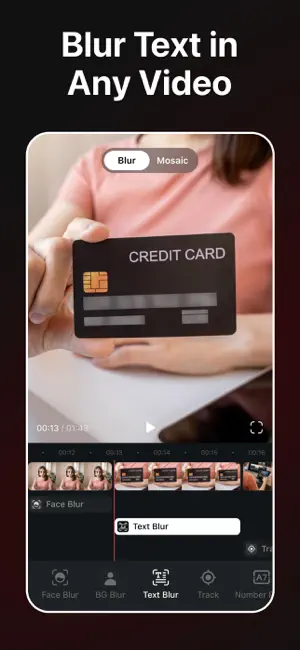
Blur faces, license plates and text in any video. Add mosaic, pixelate or censor blur in a few taps, and let Blur Video follow what you hide from the first frame to the last. Made for anyone who shares video: street and travel clips, vlogs, dashcam footage, school and family videos, real estate tours, news and social posts. Anonymize people, redact private details and keep only what you want seen. FACE BLUR • Find every face in your video and blur it in one tap • Each face stays covered as people move • Cover faces with mosaic, blur or fun emoji stickers LICENSE PLATE AND TEXT BLUR • Detect car license plates and number plates and pixelate them • Hide names, addresses, phone screens, documents and signs • Street Safe: blur faces, plates and text together in one pass MOSAIC, PIXELATE AND CENSOR • Mosaic (pixelate), Gaussian and motion blur styles • Censor bars, circles and rectangles you can move and resize • Adjustable strength on every blur TRACK AND HIDE ANYTHING • Track: place a blur on any object and it follows it through the shot • Brush: paint a blur exactly where you need it • Keyframes: set a blur at different moments and it moves smoothly between them • Invert: blur everything except the area you choose BACKGROUND BLUR • Keep people sharp and blur everything behind them • Choose a soft blur, mosaic or motion background A FULL VIDEO EDITOR • Trim, split, speed, rotate and crop • Filters, color adjustments and cinematic looks • Text, stickers, transitions, music, voiceover and auto captions • Remove background, slow motion, and enhance and resize HANDY VIDEO TOOLS • Compress large videos to send or share • Convert formats, including MKV, AVI and CCTV recordings • Fix videos that look squashed or stretched EXPORT YOUR WAY • Up to 4K and 60 fps • MP4, MOV, GIF or audio only • Export the whole video or just part of it • Remove location and device details before sharing PRIVATE BY DESIGN Your videos never leave your iPhone. Detection, blurring and editing all happen on your device. No account, no sign-up, no uploads. BLUR VIDEO PRO Blur Video is free to download and use. Upgrade to Blur Video PRO to unlock: • Export in 720p, 1080p and 4K • 50 and 60 fps, high quality and HEVC • MP4, GIF and audio export • No watermark • Remove location and device details • Export part of the timeline • Enhance and resize Subscription options: • Weekly • Yearly Payment will be charged to your Apple ID account at confirmation of purchase. The subscription automatically renews unless it is canceled at least 24 hours before the end of the current period. Your account will be charged for renewal within 24 hours before the end of the current period. You can manage and cancel your subscriptions in your App Store account settings after purchase. Any unused portion of a free trial, if offered, is forfeited when you purchase a subscription. Privacy Policy: https://videoblur.vidjar.net/privacy Terms of Use: https://videoblur.vidjar.net/terms Questions or feedback? Contact us at [email protected]
App privacy
The developer, Usuf Ali, reported these privacy practices to Apple.
Data Not Linked to You
The following data, which may be collected but is not linked to your identity, may be used for the following purposes:
- Identifiers: User ID, Device ID
Used for: Analytics
Alternatives to Blur Video: Face & Mosaic
Looking for apps like Blur Video: Face & Mosaic? Here are 6 similar apps on the App Store. The highest rated is Swipely: Carousel & Photo Dump (5.0/5), and all 6 are free to download.
-
 Swipely: Carousel & Photo Dump
5.0
-
 Sfumato Blur Videos and Photos
-
 BlurFold: Blur Photos & Video
-
 Blurish: AI Blur Video & Faces
-
 BlurClip - Blur Video
-
 BlurPOV - Hide Faces in Video
5.0
| App | Rating | Price | Last updated | Compare |
|---|---|---|---|---|
| Blur Video: Face & Mosaic | – | Free | November 9, 2026 | |
| Swipely: Carousel & Photo Dump | 5.0 / 5 (1) | Free | Nov 21, 2026 | Compare |
| Sfumato Blur Videos and Photos | – | Free | Sep 3, 2026 | Compare |
| BlurFold: Blur Photos & Video | – | Free | Nov 25, 2026 | Compare |
| Blurish: AI Blur Video & Faces | – | Free | Nov 23, 2026 | Compare |
| BlurClip - Blur Video | – | Free | Sep 29, 2026 | Compare |
| BlurPOV - Hide Faces in Video | 5.0 / 5 (1) | Free | May 6, 2026 | Compare |