

Sfumato Blur Videos and Photos
Zakaria Hadj Chikh Photo & Video iPhoneiPadiPod touch
Sfumato Blur Videos and Photos is a free Photo & Video app for iPhone and iPad by Zakaria Hadj Chikh. Requires iOS 18.0. Updated September 3, 2026.
- Price
- Free
- on the App Store
- Size
- 3 MB
- Age 12+
- Updated
- Sep 3
- 2026 · v1.6
Screenshots

About Sfumato Blur Videos and Photos
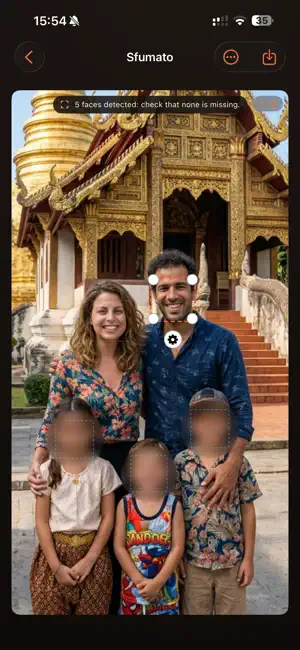
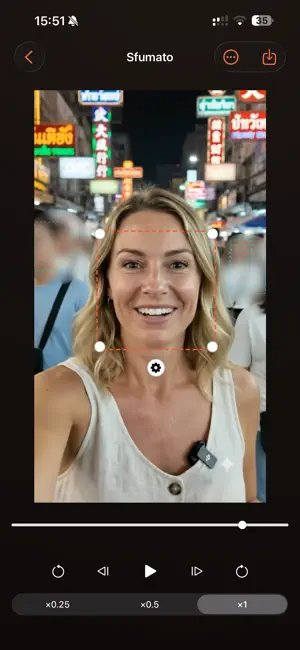
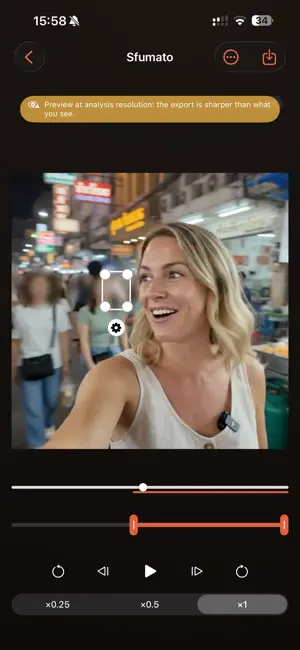
Sfumato blurs the faces in your videos and photos, right on your device. Nothing is uploaded, nothing is analyzed on a server, and everything works in airplane mode. WHO IT IS FOR • Post or send a photo of yourself without giving away your face, and without uploading it to anyone's server first. • Share family pictures with the children's faces hidden and the adults' left visible. You decide, face by face. • Film in a public place and let everyone who happens to be in frame stay unidentified. WHY IT EXISTS Most blur apps process your footage in a single forward pass. When a face turns away or moves quickly, the blur lags behind, and for a few frames the face becomes recognizable again. A few frames is all it takes to identify someone. Sfumato reads the whole clip before it decides anything. Because it can look both forward and backward in time, it closes gaps a one-pass app leaves open. When a face stops being detected, the blur does not stop with it: it falls back to visual tracking, then to interpolation between the two nearest measured positions, widening its margin as certainty drops. PRIVACY BY DESIGN • No network access at all. No analytics, no crash reporting, no telemetry, no account. • Works in airplane mode. • Your original is never modified. Every export creates a new file. • Exported photos carry no date, no location, no device and no software tag. Only the color profile and the orientation are kept. WHAT YOU CAN DO • Import a video or a photo from your library. • Every detected face is blurred and followed automatically. • Tune each face on its own: blur strength, margin, edge feather, shape. • Correct a box when the automatic one does not sit right. The correction carries through the rest of the clip. • Remove the blur from one face to keep your subject visible while everyone behind them stays hidden. • Draw manual zones to blur anything else: a badge, a screen, a license plate, a tattoo. • Extend the blur before a face appears and after it leaves. • Zoom in to check your work. Photos preview at full resolution, so what you see is what you export. • Export straight back to your library. Sfumato shows you where it actually measured a face and where it had to extrapolate, so you always know which moments are worth a second look. Available in English, Spanish, French, Hindi, Italian, Japanese, Portuguese, Russian and Simplified Chinese.
What’s new
Version 1.6 · Updated September 3, 2026
Sfumato can now change the voices in a video, on the device like everything else. VOICE • Choose one of six voices — three lower, three higher — or set pitch and voice size yourself. • Leave it on Untouched and the audio track is copied across exactly as it was, with no re-encoding at all. • Applying a voice re-encodes the audio in mono at 128 kbit/s. Sfumato now runs on iPad. Face settings open in a panel beside your video instead of a sheet over it, so playback keeps going while you adjust. When the frame is too narrow for a side panel, the panel moves under the image rather than shrinking it. SHARING • Share a photo to Sfumato from Photos or Files and it opens straight into the editor. • Share a video and Sfumato receives the original file instead of a reduced copy: full resolution, full frame rate. Open Sfumato afterwards to pick it up. BLUR • Blur only the upper part of a face — brow, eyes and nose — and leave the mouth visible. • A blur you resize by hand now keeps that size for the rest of the clip, instead of returning to its own within a second. • The blur no longer grows while a face is untracked, or as a face leaves the edge of the frame, so the size you set stays right. MANUAL ZONES • Press and hold on the image to place a zone exactly where you are looking, already at a usable size. • A new zone never lands on top of a face or another zone. • Tap anywhere off a box to clear the selection.
App privacy
The developer, Zakaria Hadj Chikh, reported these privacy practices to Apple.
Data Not Collected
The developer does not collect any data from this app.
Alternatives to Sfumato Blur Videos and Photos
Looking for apps like Sfumato Blur Videos and Photos? Here are 6 similar apps on the App Store.
-
 CENSORED: Blur Videos
-
 Blur & Redact Photos: Pixero
-
 Blur Photos Videos
-
 Privio Face Blur
-
 FaceRedact Video
-
 Blur Photo Face & Background
| App | Rating | Price | Last updated | Compare |
|---|---|---|---|---|
| Sfumato Blur Videos and Photos | – | Free | September 3, 2026 | |
| CENSORED: Blur Videos | – | Free | Aug 18, 2026 | Compare |
| Blur & Redact Photos: Pixero | – | Free | Oct 28, 2026 | Compare |
| Blur Photos Videos | – | Free | Jul 23, 2026 | Compare |
| Privio Face Blur | – | Free | Oct 29, 2026 | Compare |
| FaceRedact Video | – | Free | Oct 28, 2026 | Compare |
| Blur Photo Face & Background | – | Free | Oct 3, 2026 | Compare |