

BlurPOV - Hide Faces in Video
Eric Larson Photo & Video iPhoneiPadiPod touch
BlurPOV - Hide Faces in Video is a free Photo & Video app for iPhone and iPad by Eric Larson. Rated 5.0/5 from 1 ratings. Requires iOS 17.6.
- Rating
- 5.0
- 1 ratings
- Price
- Free
- on the App Store
- Size
- 10 MB
- Age 4+
- Updated
- May 6
- 2026 · v2.1
Screenshots
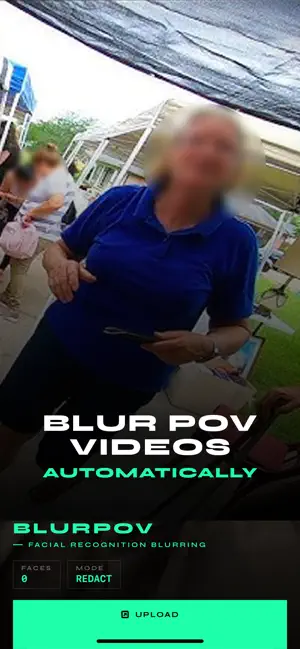
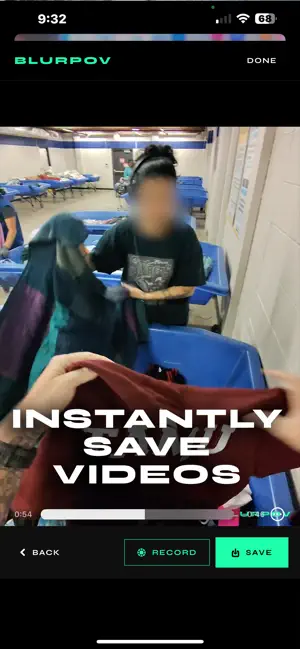


About BlurPOV - Hide Faces in Video
Redact what the camera sees. BlurPOV detects every face in a video, clusters appearances by identity, and lets you choose — face by face — who to blur and who to reveal. Use it live from your camera, or apply it to clips already in your library. Two modes. One purpose. LIVE: Camera Redaction Point your iPhone at a scene and BlurPOV blurs every face it finds in real time. Tap a face to flip its state, or set a global default: redact everyone, reveal everyone, with exceptions per subject. UPLOAD: Video Review & Render Pick a clip from Photos or Files. BlurPOV scans every frame, clusters faces into people, and shows you a gallery. Tap who to blur, render, and save the redacted video back to your library. How it works Detect: Vision-based face detection runs on every frame, generating bounding boxes and feature embeddings. Identify: Appearances are tracked within shots and clustered across the video, so each person becomes one tile in a review gallery. Decide: Tap thumbnails to mark redact or reveal. Drag-record manual blurs over moments the auto-detector missed. Render: BlurPOV bakes your decisions into a new video file and saves it to your Photos library. Privacy by design Your video never leaves your device. Face detection, clustering, and rendering all happen locally on your iPhone using on-device machine learning. BlurPOV does not upload your videos, does not store your faces, and does not run analytics on your usage. The clip stays yours. Built for moments when faces shouldn't be public Journalism & documentary: Protect bystanders and sources before publishing footage from sensitive scenes. Family & social: Share clips of your kids without sharing every other kid in the frame. Education & research: Use real-world video material in teaching and analysis without exposing identities. Legal & compliance: Redact incidental faces from evidence or training material before it changes hands. On-device. No cloud. No accounts required to start. Privacy Policy: https://blurpov.com/privacy.html Terms of Use: https://blurpov.com/terms.html
What’s new
Version 2.1 · Updated May 6, 2026
- Ads and updated privacy policy
App privacy
The developer, Eric Larson, reported these privacy practices to Apple.
Data Used to Track You
The following data may be used to track you across apps and websites owned by other companies:
- Location: Coarse Location
- Identifiers: Device ID
- Usage Data: Product Interaction, Advertising Data
- Diagnostics: Crash Data, Performance Data
Data Linked to You
The following data, which may be collected and linked to your identity, may be used for the following purposes:
- Location: Coarse Location
- Identifiers: Device ID
- Usage Data: Product Interaction, Advertising Data
- Diagnostics: Performance Data
Used for: Third-Party Advertising, Analytics
Data Not Linked to You
The following data, which may be collected but is not linked to your identity, may be used for the following purposes:
- Diagnostics: Crash Data
- Location: Coarse Location
Used for: Third-Party Advertising, Analytics
Alternatives to BlurPOV - Hide Faces in Video
Looking for apps like BlurPOV - Hide Faces in Video? Here are 6 similar apps on the App Store.
-
 Privio Face Blur
-
 Private BlurCam
-
 Poof Auto Blur Faces in Video
-
 mosaic-mask-free
-
 FaceRedact Video
-
 Face Guard Video
| App | Rating | Price | Last updated | Compare |
|---|---|---|---|---|
| BlurPOV - Hide Faces in Video | 5.0 / 5 (1 rating) | Free | May 6, 2026 | |
| Privio Face Blur | – | Free | Sep 9, 2026 | Compare |
| Private BlurCam | – | Free | May 7, 2026 | Compare |
| Poof Auto Blur Faces in Video | – | Free | Jun 16, 2026 | Compare |
| mosaic-mask-free | – | Free | Aug 7, 2026 | Compare |
| FaceRedact Video | – | Free | Oct 28, 2026 | Compare |
| Face Guard Video | – | Free | Jul 29, 2026 | Compare |