

Ondia: Speech to Text Offline
NORVANI HOLDINGS LLC Productivity iPhoneiPadiPod touchApple Watch
Ondia: Speech to Text Offline is a free Productivity app for iPhone and iPad by NORVANI HOLDINGS LLC. Requires iOS 18.0. Updated November 10, 2026.
- Price
- Free
- on the App Store
- Size
- 14 MB
- Age 4+
- Updated
- Nov 10
- 2026 · v1.0
Screenshots
Save to Pinterest
About Ondia: Speech to Text Offline
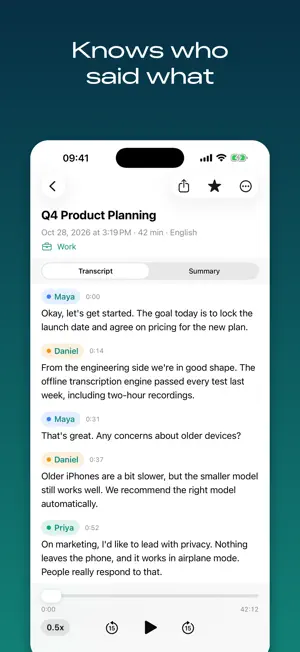
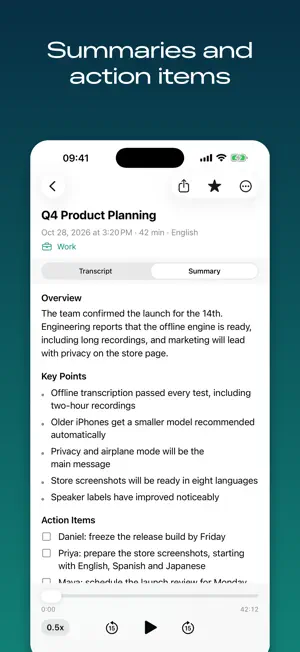
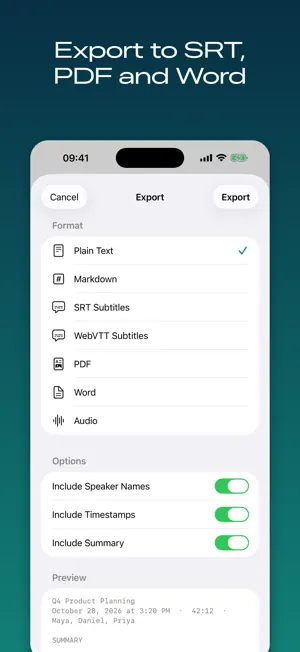
Turn speech into text on your iPhone without sending a single word to the cloud. Ondia is a private, offline voice recorder and transcriber for meetings, lectures, interviews and voice notes, in about 100 languages. No account, no uploads. The first 3 minutes of every recording are free. Record or import audio and video, even from the share menu of other apps, and Ondia transcribes it on your device with Whisper Large V3 Turbo in about 100 languages. After a one-time model download it works fully offline. No account, no uploads. What you can do • Record audio or import audio and video files, including from the share menu of other apps • Accurate on-device transcription in about 100 languages • Speaker identification: see who said what, with names you can edit • Summaries, key points and action items with Apple Intelligence on supported devices • Playback with the text highlighted word by word • Edit the text, and find and replace across all your notes • Custom vocabulary for names, brands and jargon • Folders and a calendar view to keep notes organized • Export to TXT, SRT and VTT subtitles, Markdown, PDF, Word and audio (M4A, WAV), one note or many at once • Apple Watch app to record from your wrist • Widgets for the Home Screen, Lock Screen and Control Center, plus a Live Activity while recording • Made for iPhone and iPad Free and Ondia Pro • Free: the first 3 minutes of every recording are transcribed, with as many recordings as you like. • Ondia Pro: unlimited length, every export format, batch export and summaries. Choose monthly, yearly or a one-time lifetime purchase. Your privacy Transcription runs on your device. Your audio and text are never uploaded, and you do not need an account. Once the model is downloaded, you can use Ondia on a plane, in a basement or anywhere without a signal. Made for • Meetings and minutes • Lectures and classes • Interviews and journalism • Podcasts and video subtitles • Voice notes and ideas Terms of Use (Apple standard EULA): https://www.apple.com/legal/internet-services/itunes/dev/stdeula/ Privacy Policy: https://getondia.com/privacy
App privacy
The developer, NORVANI HOLDINGS LLC, reported these privacy practices to Apple.
Data Not Collected
The developer does not collect any data from this app.
Alternatives to Ondia: Speech to Text Offline
Looking for apps like Ondia: Speech to Text Offline? Here are 6 similar apps on the App Store. The highest rated is Tapcorder: AI Voice Recorder (5.0/5), and 5 of the 6 are free to download.
-
 TalkRecorder - Voice Recorder
-
 Inkdot: AI Note Taker
-
 Read Aloud For Me PRO
-
 KeepScribe: Transcribe Audio
-
 Tapcorder: AI Voice Recorder
5.0
-
 VocaClip
| App | Rating | Price | Last updated | Compare |
|---|---|---|---|---|
| Ondia: Speech to Text Offline | – | Free | November 10, 2026 | |
| TalkRecorder - Voice Recorder | – | Free | Nov 13, 2026 | Compare |
| Inkdot: AI Note Taker | – | Free | Nov 9, 2026 | Compare |
| Read Aloud For Me PRO | – | 9.99 USD | Nov 15, 2026 | Compare |
| KeepScribe: Transcribe Audio | – | Free | Nov 21, 2026 | Compare |
| Tapcorder: AI Voice Recorder | 5.0 / 5 (1) | Free | Nov 20, 2026 | Compare |
| VocaClip | – | Free | Aug 26, 2026 | Compare |