

Inkdot: AI Note Taker
Huseyin Iris Productivity iPhoneiPadiPod touchApple Watch
Inkdot: AI Note Taker is a free Productivity app for iPhone and iPad by Huseyin Iris. Requires iOS 26.0. Updated November 9, 2026.
- Price
- Free
- on the App Store
- Size
- 29 MB
- Age 4+
- Updated
- Nov 9
- 2026 · v1.0
Screenshots
Save to Pinterest


About Inkdot: AI Note Taker
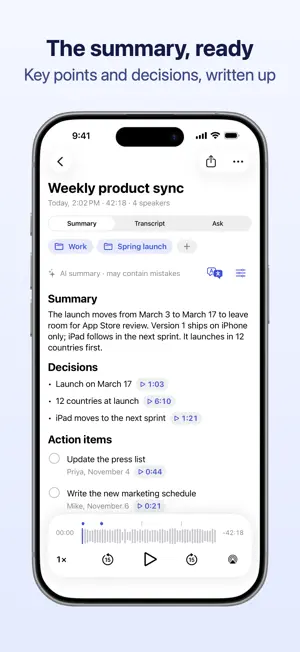
Inkdot turns what you record into notes you can use. Tap record, and get a transcript, a clear summary and your open tasks. Then ask your recordings anything. • Record with one tap, from the app, a widget, Siri or your Apple Watch • Transcribe on your iPhone, with timestamps • Summaries with key points, decisions, next steps and chapters • Ask: get answers from one recording or all of them, with the moment it was said • Templates for meetings, lectures and interviews • Translate summaries into your language • Tell speakers apart and name them • Open tasks board: send to-dos to Reminders and Calendar • Study mode: flashcards and quizzes made from your recordings • Add photos while you record, like a slide or a whiteboard • Skip silence and enhance voices when you play back • Find any recording with Spotlight and Shortcuts • Lock Inkdot with Face ID • Export as PDF, Word or text No account needed. Your audio is never sent to us: it stays on your iPhone, and if you turn on iCloud sync it goes to your own iCloud with your photos and transcripts. Summaries and answers are made on your iPhone with Apple Intelligence on supported devices and languages. On other iPhones, with Inkdot Pro, only text (the transcript and your question) is sent for cloud summaries and answers, never the audio, and only after you allow it. If the app or your phone shuts down mid-recording, the recording is recovered. Inkdot is free to use with 300 minutes of transcription every month. Inkdot Pro unlocks unlimited transcription, every AI feature and iCloud sync, monthly or yearly; the yearly plan starts with a 7-day free trial. We remind you two days before the trial ends. Payment is charged to your Apple Account. Subscriptions renew automatically unless canceled at least 24 hours before the end of the period; manage them in Settings. Any unused part of a free trial ends when you buy a subscription. Terms of Use: https://www.apple.com/legal/internet-services/itunes/dev/stdeula/
App privacy
The developer, Huseyin Iris, reported these privacy practices to Apple.
Data Not Linked to You
The following data, which may be collected but is not linked to your identity, may be used for the following purposes:
- Purchases: Purchase History
- User Content: Other User Content
- Identifiers: User ID
Used for: Analytics, App Functionality
Alternatives to Inkdot: AI Note Taker
Looking for apps like Inkdot: AI Note Taker? Here are 6 similar apps on the App Store.
-
 FlowWay: Expense&Budget
-
 Ondia: Speech to Text Offline
-
 NoteOwl: Private AI Note Taker
-
 Ayıkla: Galerini klasörle
-
 CV Fixer: ATS Resume Checker
-
 Doc Scan Pro 2024
| App | Rating | Price | Last updated | Compare |
|---|---|---|---|---|
| Inkdot: AI Note Taker | – | Free | November 9, 2026 | |
| FlowWay: Expense&Budget | – | Free | Mar 22, 2026 | Compare |
| Ondia: Speech to Text Offline | – | Free | Nov 10, 2026 | Compare |
| NoteOwl: Private AI Note Taker | – | Free | Nov 21, 2026 | Compare |
| Ayıkla: Galerini klasörle | – | Free | Sep 21, 2026 | Compare |
| CV Fixer: ATS Resume Checker | – | Free | Aug 18, 2026 | Compare |
| Doc Scan Pro 2024 | – | Free | Aug 17, 2024 | Compare |