

TalkRecorder - Voice Recorder
INOBASIC, K.K. Productivity iPhoneiPadiPod touchApple Watch
TalkRecorder - Voice Recorder is a free Productivity app for iPhone and iPad by INOBASIC, K.K. Requires iOS 17.0. Updated November 13, 2026.
- Price
- Free
- on the App Store
- Size
- 8 MB
- Age 4+
- Updated
- Nov 13
- 2026 · v1.0
Screenshots
Save to Pinterest


About TalkRecorder - Voice Recorder
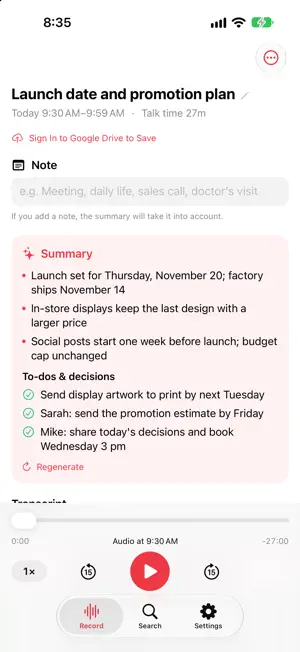
Record your day with one button on Apple Watch, or with just your iPhone. Transcripts and summaries are created automatically on iPhone—no separate AI recorder needed. • Requires iOS 17 or later on iPhone. With an Apple Watch running watchOS 10 or later, you can record right from your wrist • On-device summaries need an iPhone that supports Apple Intelligence (on other models, add your own API key to get summaries) • Please let the people around you know when you're recording • Free to start. Go unlimited with a monthly plan (3-day free trial) or a one-time purchase if you prefer not to subscribe • Your recordings, transcripts and summaries never leave your devices. Only if you use your own API key or Google Drive Auto-Save are they sent, and only to the destination you choose GREAT FOR • Keeping a record of meetings and client calls without taking notes • Listening again, calmly, to a doctor's explanation or a briefing • Keeping a spoken diary of your day ONE TAP ON YOUR APPLE WATCH • Start recording with the big red button, a watch face complication, or a double tap • Recording continues when you lower your wrist. You can pause it, and stopping requires a press and hold to prevent accidents • While recording, the watch shows a calm wallpaper of your choice (night sky, moon, a clock and more). Tap it to see elapsed time and estimated battery RECORD WITH JUST YOUR IPHONE • No Apple Watch needed: start with the record button on your iPhone • Recording continues with the screen locked and your iPhone in your pocket • Recording resumes on its own after a call or Siri — and you get a notification if it ever stops READ, SEARCH AND LISTEN AGAIN ON IPHONE • Conversations are organized by day, with a timeline showing when you talked • Transcripts are created automatically on your iPhone. Tap any line to play from that moment • Key points and "to-dos & decisions" are summarized for you • Search by word or name and jump straight to that moment • Turn on Skip Silence in Settings to save battery and storage • Export and share text and audio, including several conversations at once 13 LANGUAGES English, Japanese, German, French, Spanish, Korean, Chinese (Traditional), Italian, Portuguese (Brazil), Dutch, Swedish, Danish and Norwegian. Choose the spoken language in Settings (it follows your device language by default). GOOGLE DRIVE AUTO-SAVE, YOUR CHOICE OF AI • Auto-Save conversation text (and audio if you choose) to the “TalkRecorder” folder in your Google Drive (with a monthly plan or one-time purchase) • Optionally add your own OpenAI, Google Gemini or Anthropic Claude API key to transcribe and summarize with that provider (billed to you by the provider) PRIVACY Audio, transcripts and summaries are processed and stored on your iPhone and Apple Watch. There is no developer server and no account to create. No analytics, no ads. With a monthly plan or one-time purchase, App Lock (Face ID, Touch ID, passcode or an app-only PIN) keeps your conversations private. PRICING Free to start, with a few limits: • Up to 10 minutes of recording a day across Apple Watch and iPhone (only speech counts) • 3 summaries in total • Only your 5 most recent conversations can be opened (older ones are kept, never deleted, and open again when you upgrade) • No export, sharing, Google Drive Auto-Save or App Lock You can use your own API key on the free plan, too (summaries made with it count toward the 3). Remove every limit with a monthly plan, which starts with a 3-day free trial, or with a one-time purchase: pay once, unlimited forever, no further charges. PLEASE NOTE • On-device transcription works in languages supported by iPhone speech recognition • Get consent from the people around you before recording Terms of Use: https://www.apple.com/legal/internet-services/itunes/dev/stdeula/ Privacy Policy: https://mainichi-apps.vercel.app/talkrecorder/privacy.html
App privacy
The developer, INOBASIC, K.K., reported these privacy practices to Apple.
Data Not Collected
The developer does not collect any data from this app.
Alternatives to TalkRecorder - Voice Recorder
Looking for apps like TalkRecorder - Voice Recorder? Here are 6 similar apps on the App Store. The highest rated is AI Keyboard, In-APP Translator (4.8/5), and 5 of the 6 are free to download.
-
 Ondia: Speech to Text Offline
-
 Habi: Simple Habit Tracker
-
 Reminder - Beep Me Pro
4.6
-
 Reminders Max
3.7
-
 Transcribe - Voice to Text App
4.5
-
 AI Keyboard, In-APP Translator
4.8
| App | Rating | Price | Last updated | Compare |
|---|---|---|---|---|
| TalkRecorder - Voice Recorder | – | Free | November 13, 2026 | |
| Ondia: Speech to Text Offline | – | Free | Nov 10, 2026 | Compare |
| Habi: Simple Habit Tracker | – | Free | Apr 8, 2026 | Compare |
| Reminder - Beep Me Pro | 4.6 / 5 (366) | 9.99 USD | Nov 17, 2026 | Compare |
| Reminders Max | 3.7 / 5 (3) | Free | Nov 27, 2023 | Compare |
| Transcribe - Voice to Text App | 4.5 / 5 (14) | Free | Oct 22, 2026 | Compare |
| AI Keyboard, In-APP Translator | 4.8 / 5 (46) | Free | Jan 16, 2025 | Compare |