

VideoRedactor - Blur and Hide
Procrasty Photo & Video iPhoneiPadiPod touchMac
VideoRedactor - Blur and Hide is a free Photo & Video app for iPhone and iPad by Procrasty. Requires iOS 18.0. Updated November 1, 2026.
- Price
- Free
- on the App Store
- Size
- 2 MB
- Age 4+
- Updated
- Nov 1
- 2026 · v1.1
Screenshots



About VideoRedactor - Blur and Hide
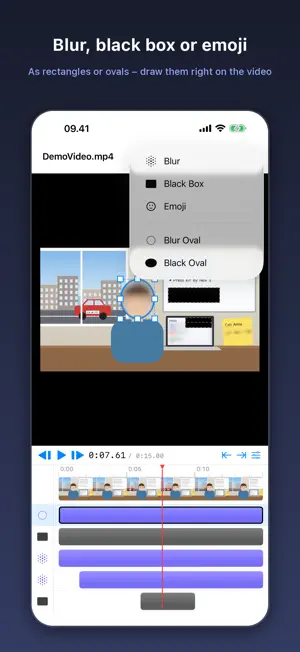
VideoRedactor hides the parts of a video that shouldn’t be seen. Draw a box over a face, a password on a whiteboard, an email on a screen or a phone number on a sticky note, and it disappears from the video – blurred beyond recognition, covered with solid black or hidden behind an emoji. Every redaction has its own time range, so a notification that pops up for four seconds is covered for exactly those four seconds, while a face stays hidden for the whole clip. DRAW IT RIGHT ON THE VIDEO • Drag on the video to add a redaction, then move and resize it • Heavy blur, solid black box or emoji • Rectangles or ovals – on Mac, hold Shift for squares and circles • Adjustable blur strength, from light to heavy PRECISE TIMING • A timeline with a track for every redaction • Drag a bar to move it in time, or drag its ends to trim • Set start and end to the playhead with one tap • Step frame by frame to line things up FINE-TUNE IN THE INSPECTOR • Change style, shape, blur strength and emoji at any time • Undo and redo for every change BURNED IN FOR GOOD • Export a new .mov or .mp4 with every redaction burned into the pixels – nothing can be peeled off afterwards • HEVC videos stay HEVC, so quality and file size are kept • Your original video is never changed • On iPhone and iPad, share the result straight to Photos, Files, Mail or Messages PICKS UP WHERE YOU LEFT OFF There are no project files to manage. VideoRedactor remembers the redactions for each video on your device, so opening the same video again brings them back. PRIVATE BY DESIGN Everything happens on your device. Your videos are never uploaded, and the app collects no data at all. ON EVERY DEVICE VideoRedactor runs on iPhone, iPad and Mac. On iPad and Mac, keyboard shortcuts make editing fast: Space to play, arrow keys to step frames, I and O to set a redaction’s start and end, and Option-arrows to nudge it into place. Great for screen recordings, tutorials, bodycam and dashcam clips, real-estate walkthroughs, interviews, school and family videos, bug reports and anything you share with people who shouldn’t see everything.
What’s new
Version 1.1 · Updated November 1, 2026
Cover faces and anything else with an emoji: pick Emoji as the style and choose from the suggestions or type your own.
App privacy
The developer, Procrasty, reported these privacy practices to Apple.
Data Not Collected
The developer does not collect any data from this app.
Alternatives to VideoRedactor - Blur and Hide
Looking for apps like VideoRedactor - Blur and Hide? Here are 6 similar apps on the App Store. The highest rated is FaceVeil-Blur in Photo & Video (5.0/5), and 5 of the 6 are free to download.
-
 Movie Editor
-
 VideoDownsizer
-
 Duovid
-
 CleanCopy: Metadata Cleaner
-
 Verify Camera: Timestamp GPS
-
 FaceVeil-Blur in Photo & Video
5.0
| App | Rating | Price | Last updated | Compare |
|---|---|---|---|---|
| VideoRedactor - Blur and Hide | – | Free | November 1, 2026 | |
| Movie Editor | – | 6.99 USD | Oct 20, 2026 | Compare |
| VideoDownsizer | – | Free | Nov 8, 2026 | Compare |
| Duovid | – | Free | Nov 15, 2026 | Compare |
| CleanCopy: Metadata Cleaner | – | Free | Nov 12, 2026 | Compare |
| Verify Camera: Timestamp GPS | – | Free | Nov 8, 2026 | Compare |
| FaceVeil-Blur in Photo & Video | 5.0 / 5 (1) | Free | Nov 10, 2026 | Compare |