

Duovid
marsel preci Photo & Video iPhoneiPadiPod touch
Duovid is a free Photo & Video app for iPhone and iPad by marsel preci. Requires iOS 17.0. Updated November 15, 2026.
- Price
- Free
- on the App Store
- Size
- 37 MB
- Age 4+
- Updated
- Nov 15
- 2026 · v2
Screenshots



About Duovid
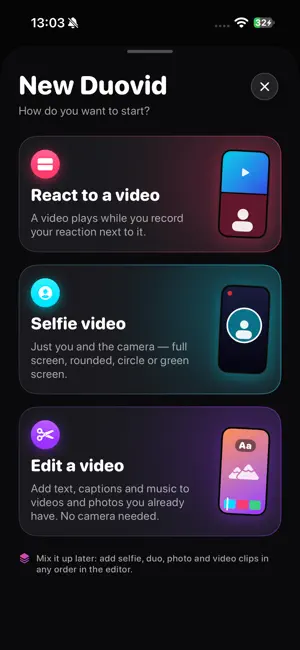
React, film and edit — one vertical video, ready to post anywhere. Duovid plays a video while you record your reaction next to it. Or film just yourself, or edit the clips you already have. Add captions, text and music, then export without a watermark. Free, no account needed. THREE WAYS TO START • React to a video – a video plays while you record your reaction next to it. Pause, resume and retake whenever you want; the sound stays in sync. • Selfie video – just you and the camera: full screen, rounded, circle or green screen. • Edit a video – no camera needed. Add text, captions and music to videos and photos you already have. Mix it up later: selfie, duo, photo and video clips can go into the same project in any order. 6 REACTION LAYOUTS Top / Bottom, Side by Side, Bubble, Circle, Reverse Bubble and Green Screen. Switch layouts while recording or afterwards, drag and resize the bubble, and mirror your selfie. BUILT-IN TELEPROMPTER The prompter sits right under the front camera, so you keep eye contact while you read. • Write or paste scripts and keep a library of them • Adjust speed, text size and colours, with a reading line and mirror mode • Move, resize or hide the window • Countdown before the text starts scrolling EVERY CLIP, ONE TIMELINE • Line up selfie, reaction, photo and video clips and rearrange them • Trim clips, change the layout after recording and undo anything • What you see in the preview is exactly what you export • Drafts are saved automatically AUTO CAPTIONS IN 100 LANGUAGES Duovid listens to your voice and writes the captions for you, right on your iPhone. Your voice is never uploaded, and once a language is ready it works without internet. Fix any word or timing line by line, then pick a style. Includes a dedicated Albanian speech model for accurate captions in Shqip. TITLES THAT POP • Add titles, captions and credits • Drag, pinch and rotate text right on the video, and choose when each one appears • Rounded, Classic, Serif, Mono and Condensed fonts • Plain, outline, box or neon styles, in any colour and size • Stack, duplicate and layer as many texts as you like MUSIC, SOUNDS AND VOICE-OVER • Add background music from your Files • Use the soundtrack of another video • Record a voice-over while the video plays back • Set the volume of every track separately, balance the original video against your voice and fine-tune their sync EXPORT AND SHARE Export in 720p, 1080p or 4K. Save to Photos or share straight to your favourite apps. You can also send a video to Duovid from the share sheet of another app and start reacting right away. PRIVATE BY DESIGN Your videos stay on your phone. No account, no sign-up, no watermark.
What’s new
Version 2 · Updated November 15, 2026
bug fix
App privacy
The developer, marsel preci, reported these privacy practices to Apple.
Data Not Collected
The developer does not collect any data from this app.
Alternatives to Duovid
Looking for apps like Duovid? Here are 6 similar apps on the App Store. The highest rated is Unpinned: Photo Privacy (5.0/5), and all 6 are free to download.
-
 ClipUnder: Video Compressor
-
 VideoDownsizer
-
 Verso: Dual Film Camera
-
 Verify Camera: Timestamp GPS
-
 Unpinned: Photo Privacy
5.0
-
 Montavo: Video Editor
| App | Rating | Price | Last updated | Compare |
|---|---|---|---|---|
| Duovid | – | Free | November 15, 2026 | |
| ClipUnder: Video Compressor | – | Free | Nov 13, 2026 | Compare |
| VideoDownsizer | – | Free | Nov 8, 2026 | Compare |
| Verso: Dual Film Camera | – | Free | Nov 13, 2026 | Compare |
| Verify Camera: Timestamp GPS | – | Free | Nov 8, 2026 | Compare |
| Unpinned: Photo Privacy | 5.0 / 5 (6) | Free | Nov 10, 2026 | Compare |
| Montavo: Video Editor | – | Free | Nov 16, 2026 | Compare |
Compare Duovid with the top alternatives: ratings, updates, ASO score and keyword gaps →