

VideoDownsizer
北京猫猫可能科技有限公司 Photo & Video iPhoneiPadiPod touch
VideoDownsizer is a free Photo & Video app for iPhone and iPad by 北京猫猫可能科技有限公司. Requires iOS 16.0. Updated November 8, 2026.
- Price
- Free
- on the App Store
- Size
- 6 MB
- Age 4+
- Updated
- Nov 8
- 2026 · v1.0
Screenshots



About VideoDownsizer
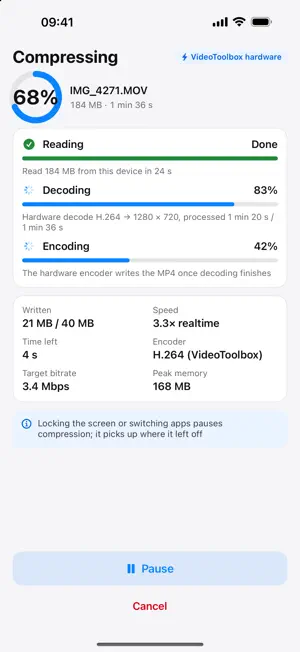
Shrink videos to a fraction of their size — right on your iPhone and iPad. VideoDownsizer re-encodes your videos with the hardware encoder built into your device, so a clip that was too big to send becomes easy to share. Everything happens on-device: nothing is uploaded, nothing is queued, and no data plan is used. WHY YOU WILL LIKE IT • Files 60–80% smaller, with the same frame rate and orientation as the original • Four compression levels and four resolutions — from "keep it sharp" to "make it tiny" • Hardware H.264 encoding, or HEVC when you need the smallest possible file • Audio is passed through untouched and never re-encoded • See the estimate before you commit: the confirm screen puts the original next to the expected result • Three-stage progress (read / decode / encode), pausable and cancellable at any time • Lock the screen and it pauses; come back and it continues where it left off • Universal app for iPhone and iPad, in English, Simplified Chinese and Spanish PRIVACY No account, no analytics, no ads and no servers. The app makes no network requests at all. Your original video is never modified — a new file is always written. FORMATS Input: MOV, MP4, M4V and other common video files, including HEVC. Output: MP4. HOW TO USE 1. Tap "Choose from Photos" or "Choose from Files". 2. Check the confirm screen: resolution, settings and the estimated file size. 3. Tap "Start compressing" and wait for the three stages to finish. 4. Save the result to Photos, or use "Save to Files".
App privacy
The developer, 北京猫猫可能科技有限公司, reported these privacy practices to Apple.
Data Not Collected
The developer does not collect any data from this app.
Alternatives to VideoDownsizer
Looking for apps like VideoDownsizer? Here are 6 similar apps on the App Store. The highest rated is Unpinned: Photo Privacy (5.0/5), and all 6 are free to download.
-
 Verso: Dual Film Camera
-
 Crudics IPTV Smart Player
-
 Verify Camera: Timestamp GPS
-
 Promvio: Teleprompter Video
-
 Unpinned: Photo Privacy
5.0
-
 Duovid
| App | Rating | Price | Last updated | Compare |
|---|---|---|---|---|
| VideoDownsizer | – | Free | November 8, 2026 | |
| Verso: Dual Film Camera | – | Free | Nov 13, 2026 | Compare |
| Crudics IPTV Smart Player | – | Free | Nov 8, 2026 | Compare |
| Verify Camera: Timestamp GPS | – | Free | Nov 8, 2026 | Compare |
| Promvio: Teleprompter Video | – | Free | Nov 10, 2026 | Compare |
| Unpinned: Photo Privacy | 5.0 / 5 (6) | Free | Nov 10, 2026 | Compare |
| Duovid | – | Free | Nov 15, 2026 | Compare |
Compare VideoDownsizer with the top alternatives: ratings, updates, ASO score and keyword gaps →