

Photo Layers & Cut Out: PixWiz
Amal Antony Photo & Video iPhoneiPadiPod touch
Photo Layers & Cut Out: PixWiz is a free Photo & Video app for iPhone and iPad by Amal Antony. Rated 4.6/5 from 5 ratings. Requires iOS 15.1.
- Rating
- 4.6
- 5 ratings
- Price
- Free
- on the App Store
- Size
- 102 MB
- Age 4+
- Updated
- Nov 24
- 2026 · v1.0.1
Screenshots
Save to Pinterest


About Photo Layers & Cut Out: PixWiz
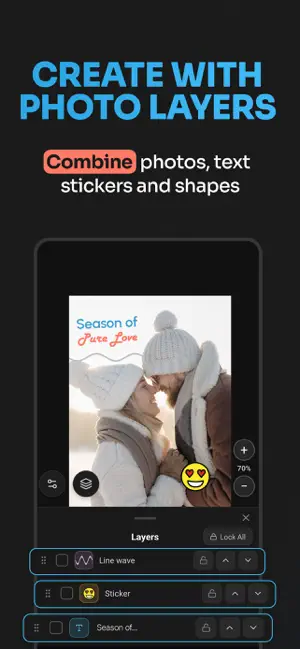
Save time, make professional photos or designs, and impress your social followers with PixWiz, the free photo editor for iPhone. Simple and fast, yet powered by advanced photo editing tools, PixWiz helps you edit photos, create collages, and design photos with layers on a blank canvas. ■ EDIT PHOTOS Make use of 17 powerful photo editing tools that give you the ability to: · crop, cut out, rotate, or resize images (1:1, 4:5, 9:16, 3:4, 4:3 and more) · remove, change, or blur the background · add borders or other images to the image (useful to put two photos together) · add text, emojis, stickers, shapes, symbols, and more · draw on the image and pick between pen, pencil, color, and thickness · add image overlays and filters · adjust brightness, contrast, saturation, and other parameters · heal brush to remove minor photo imperfections · add mask, shadow, flare, or backdrop to your photos to make them even more professional · all edits are kept locally on your iPhone ■ MAKE COLLAGES Select at least 2 photos and start creating a collage with the available options: • Pick the ratio 4:5, 1:1, 9:16, 3:4, and 16:9 depending your needs • Hold or drag photos to replace positioning • Edit any photo in the collage with the available editing tools such as photo replacement, filters, adjustments, rotation, flipping, and resetting the collage. • Export the collage as a photo to the gallery or directly share it on your desired social or messaging app ■ CREATE FROM A BLANK CANVAS Start from a blank canvas when you want to create a photo for a specific social platform: - Choose from Facebook post, YouTube thumbnail, Facebook/Instagram Square, WhatsApp Post, Story, Status, Sticker, and more. - Then simply add and edit photos within the canvas with layers. - Make use of the powerful editing tools to edit and design your photo, while adding text, shapes, paper tear, emojis, symbols, and custom stickers. - Possibility to add shadwos and flip objects or text - Add stock photos and create graphic design banners, ads, announcements, invites, and more. PixWiz is designed to make your photos better and to empower your creativity. ► Try now for free and unlock premium for the full experience. ___________ UNLOCK PIXWIZ PREMIUM All core editing features are free. Unlock PixWiz Premium and get: + Premium ad-free experience + Backup photos to iCloud or Google Drive + Organize your edits into collections + Premium Sticker Collection + Use your own fonts Subscriptions renew automatically unless canceled before renewal. Manage or cancel subscriptions in your Apple Account settings. Privacy Policy: https://pixwizapp.com/privacy Terms of Use: https://pixwizapp.com/terms
Ratings & reviews
4.6
5 ratings
What’s new
Version 1.0.1 · Updated November 24, 2026
• New Warp tool: skew & tilt in one gesture • Smoother, flicker-free pinch-zoom on canvas • Heal Brush: pinch-zoom & pan while healing • Backgrounds redesigned: simpler Solid & Gradient pickers • Repair Cutout tab highlights once a cutout exists • Bug fixes & performance improvements
App privacy
The developer, Amal Antony, reported these privacy practices to Apple.
Data Used to Track You
The following data may be used to track you across apps and websites owned by other companies:
- Location: Coarse Location
- Identifiers: Device ID
- Usage Data: Advertising Data
Data Linked to You
The following data, which may be collected and linked to your identity, may be used for the following purposes:
- Location: Coarse Location
- Identifiers: Device ID
- Usage Data: Advertising Data
Used for: Third-Party Advertising, Analytics
Data Not Linked to You
The following data, which may be collected but is not linked to your identity, may be used for the following purposes:
- Purchases: Purchase History
- Usage Data: Product Interaction
- Search History: Search History
- Diagnostics: Crash Data, Performance Data
Used for: Analytics, App Functionality
Alternatives to Photo Layers & Cut Out: PixWiz
Looking for apps like Photo Layers & Cut Out: PixWiz? Here are 6 similar apps on the App Store. The highest rated is StackShot: Photo Video Cleaner (5.0/5), and all 6 are free to download.
-
 Homeglow: Family Pictures
-
 Twovio: Dual Camera Video
4.0
-
 CleanCopy: Metadata Cleaner
-
 StackShot: Photo Video Cleaner
5.0
-
 Digital Camera Y2K · Flashpix
5.0
-
 Clipstack: Video Editor
5.0
| App | Rating | Price | Last updated | Compare |
|---|---|---|---|---|
| Photo Layers & Cut Out: PixWiz | 4.6 / 5 (5 ratings) | Free | November 24, 2026 | |
| Homeglow: Family Pictures | – | Free | Nov 24, 2026 | Compare |
| Twovio: Dual Camera Video | 4.0 / 5 (2) | Free | Nov 25, 2026 | Compare |
| CleanCopy: Metadata Cleaner | – | Free | Nov 23, 2026 | Compare |
| StackShot: Photo Video Cleaner | 5.0 / 5 (1) | Free | Nov 25, 2026 | Compare |
| Digital Camera Y2K · Flashpix | 5.0 / 5 (7) | Free | Nov 13, 2026 | Compare |
| Clipstack: Video Editor | 5.0 / 5 (4) | Free | Nov 16, 2026 | Compare |